Discovery
UnifiedMarketplace
Browse 25,158 listings in the catalog bundled with Plexon, then install the skills, agents, plugins, personas and connectors you need. You can also import a shared package or add a marketplace for your team. Catalog listings are available to browse before you install their contents.
What happens in this clip
- The Marketplace panel opens with its built-in help card.
- One grid covers every registered source.
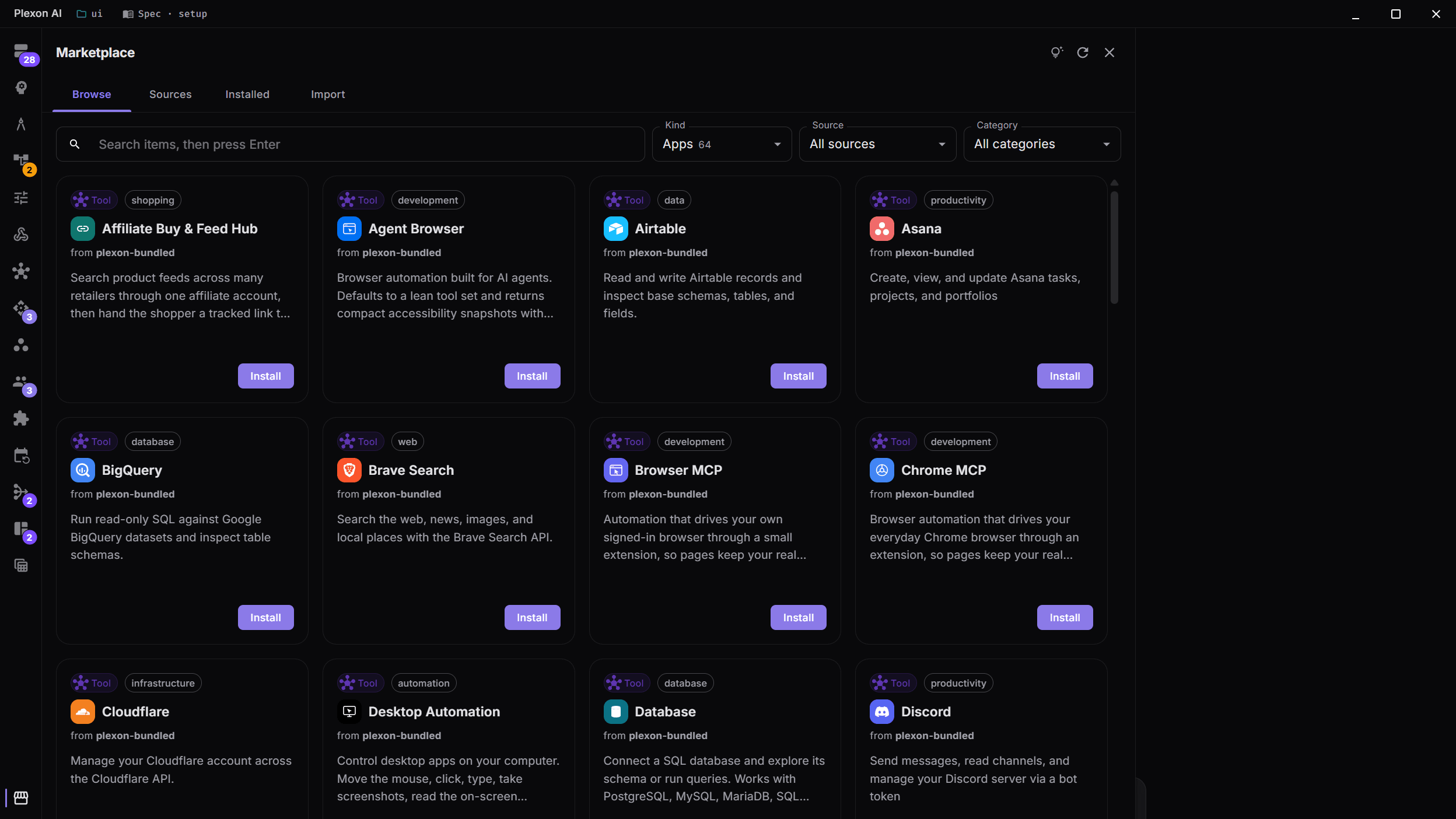
- Narrow it by kind, by source, or by category.
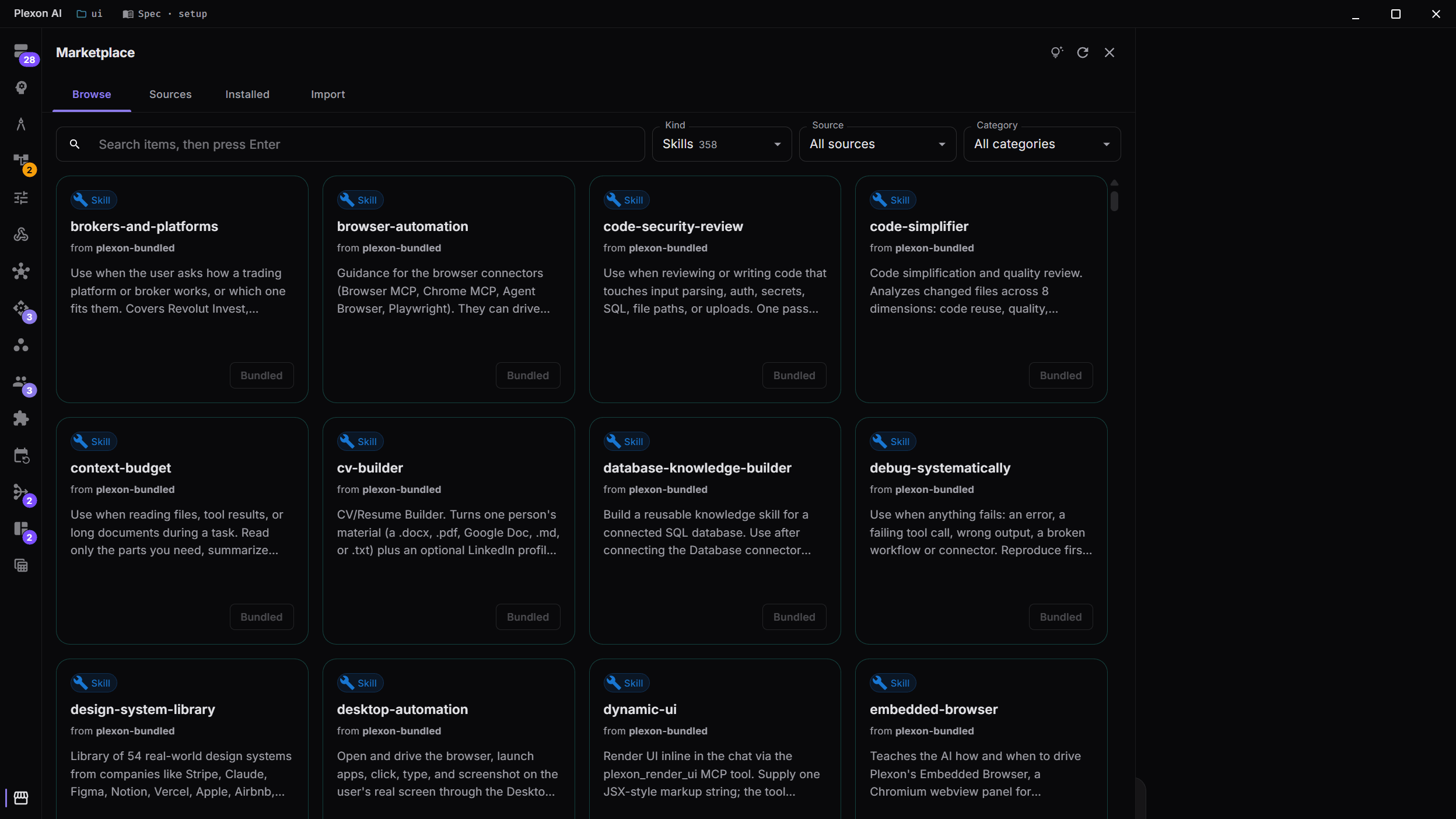
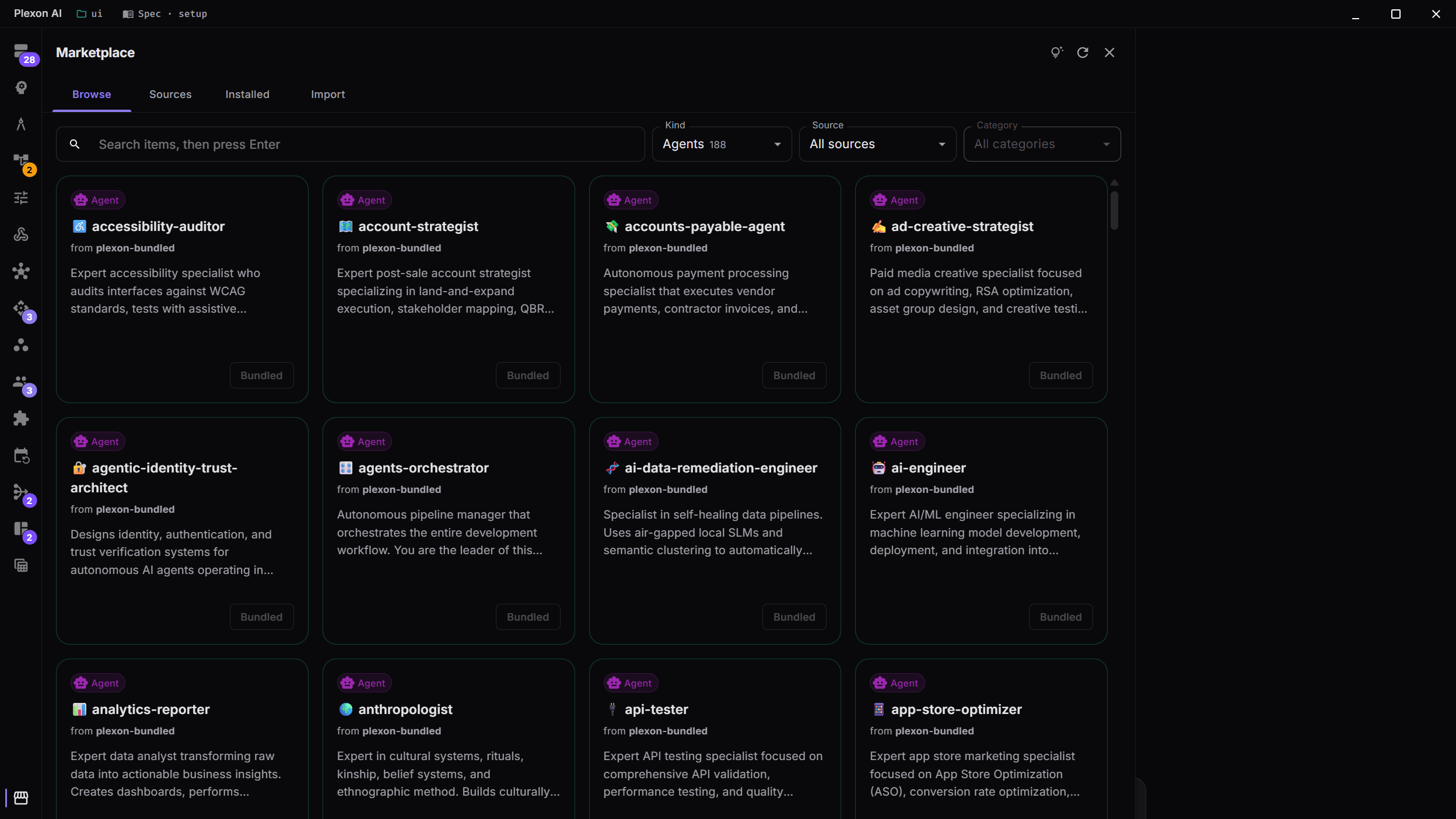
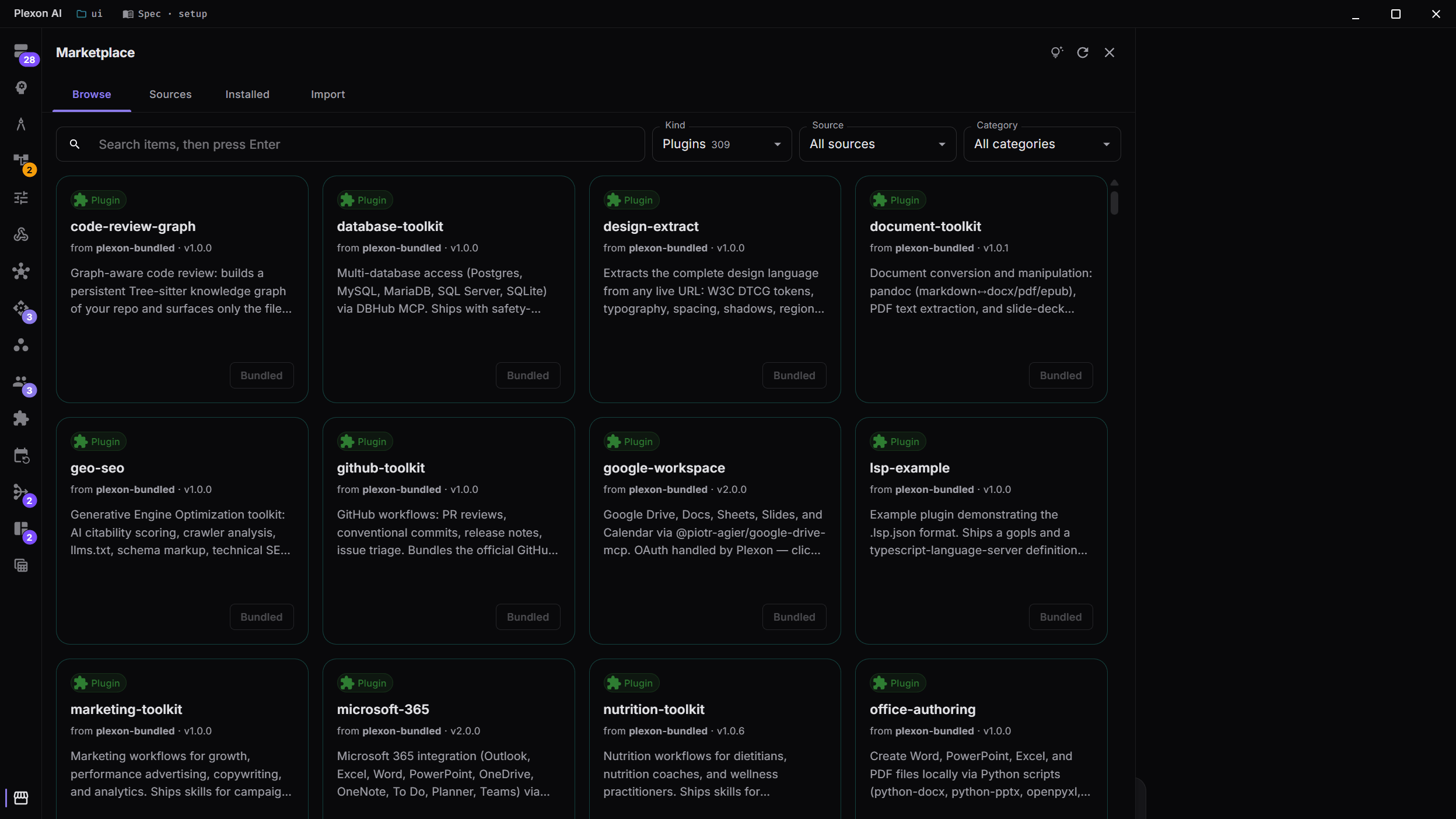
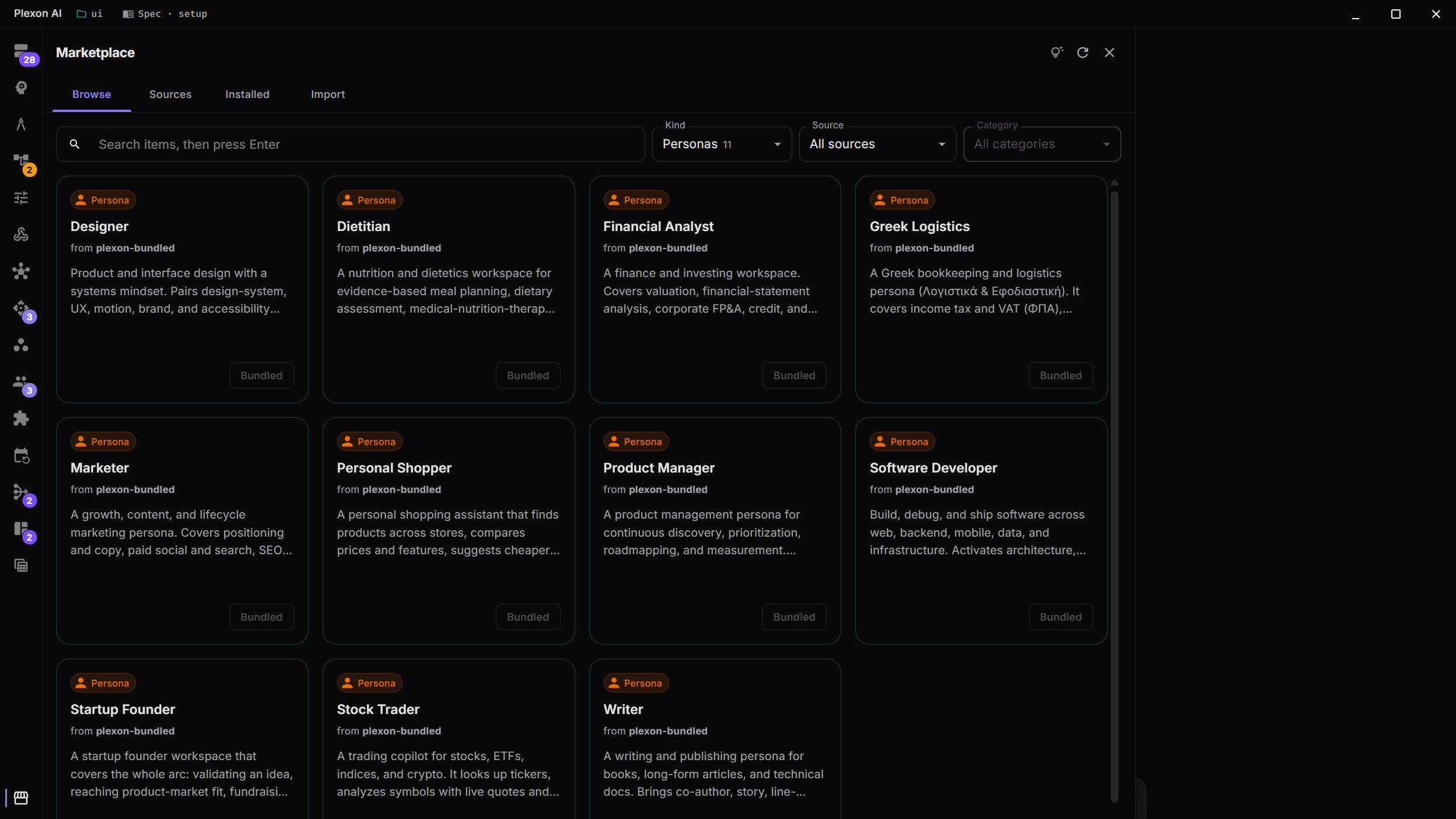
- Cards say where each item came from, and whether it is already installed.
Related features
One Marketplace, Everything Inside
One place to browse and install everything Plexon supports: skills, agents, plugins, personas, and tools. A single source can offer a mix of all of them; coloured tags tell you what each card is. The old separate dialogs are gone. There's just one place to look.
- Mixed bundles: one source can offer skills, agents, plugins, personas, and tools side by side
- Coloured tags on every card so you know what you're installing at a glance
- Filter by category and search as you type, ranked by relevance: name, keywords, the phrases a skill says it is for, then description
- An 'Already installed' badge means you never install the same thing twice
Browse, Sources, Installed, Import
Four tabs cover the lifecycle of getting something into Plexon. Browse aggregates items from every registered marketplace into one filterable grid. Sources lets you add, refresh, or remove the places Browse pulls from. Installed shows everything currently on your machine with one-click uninstall. Import accepts a zip drag-drop, a `.plxm` package, or a pasted git URL, and shows you a preview before anything is installed.
- Browse: every item from every source; filter it, or search as you type with the best match first
- Sources: paste a git URL or just `owner/repo` and Plexon downloads and lists it for you
- Installed: flat list across categories, one-click uninstall, see where each one came from
- Import: drop a zip or `.plxm`, or paste any git URL (including `tree/branch/subdir` for sub-folders)
Auto-Detection
Drop a folder full of mixed content and Plexon figures out what's inside. A bundle can mix skills, agents, plugins, personas, and tools. Plexon recognises each one and sends it to the right place. No manual step to say what's what; no per-bundle metadata required.
- Reads the bundle once and lists everything inside in plain language
- A skill can't be mistaken for an agent. The detector knows the difference
- Bundles can be flat or nested in sub-folders; both work
- Personas authored in any naming convention are recognised automatically
Drag-Drop Zip Imports
Got a zip from a teammate, downloaded one from a website, or exported your own? Drop it on the Import tab and Plexon opens it safely, lists what's inside with coloured tags, and only installs after you confirm. Malicious or accidentally-huge zips are rejected before they touch your disk.
- Safe extraction: sneaky paths trying to escape the import folder are refused
- Size cap protects you from zip-bomb attacks and oversized accidents
- Preview before install: coloured tags on every item, no surprises after click
- Anything Plexon couldn't read shows up in a warnings list before the install starts
Double-Click to Install
Share a Plexon Marketplace as a single `.plxm` file. Send it over email, drop it in Slack, host it on your team wiki. Anyone with Plexon installed double-clicks the file and lands on a preview screen showing exactly what is about to be installed. One click confirms; everything goes to the right place. No URL pasting, no command line, no instructions for the recipient to follow.
- Works on Windows, macOS, and Linux. Your computer recognises `.plxm` files as Plexon Marketplaces and opens them in Plexon
- Always preview before install: see every skill, agent, plugin, persona, and tool in the package before anything touches your disk
- Open several files in a row. Plexon queues them up in the same window instead of opening multiple copies of itself
- Plexon only reads files you opened on purpose. There is no way for a website to silently install something behind your back
Export What You Have, Share It Anywhere
Want to share your favourite skills + agents + a custom persona with a teammate? Open the Marketplace, go to the Installed tab, filter to what you want to send, and click Export as `.plxm`. Plexon bundles everything into one neat file you can email, attach to a Slack message, or drop in a shared folder. The recipient double-clicks it and gets exactly what you sent, set up the same way you have it.
- Pick what to share by filtering: search and the Kind dropdown double as your selection
- One file holds anything: skills, agents, plugins, personas, tools, or a mix of all of them
- Saves to your normal downloads folder: same flow as downloading anything else from the web
- Works across systems: a package made on Windows installs perfectly on a Mac or Linux laptop
- Round-trip clean: install your own `.plxm` on a fresh machine and your setup is back exactly the way it was
Sub-folder URL Imports
Paste a GitHub URL pointing at a sub-folder (`github.com/owner/repo/tree/branch/subdir`) and Plexon installs only that folder. Plain repo URLs and `owner/repo` shorthand work the same way. Pin to a specific commit when you want your install to always match exactly what the author published.
- Sub-folder URLs from GitHub work natively. Plexon installs just the folder you pointed at
- Plain `owner/repo` shorthand works too
- Pin to a specific commit so your install never drifts
- SSH URLs are supported. Plexon uses your system SSH agent
Private Repos, Securely
Installing from a private GitHub or GitLab repo? Click the lock icon, paste a Personal Access Token, and Plexon remembers it for that host. Tokens are encrypted on disk and never leave your machine. Plexon won't reuse a token across different hosts. Your GitHub token never gets sent to GitLab, even if you install from both in the same batch.
- Tokens encrypted on disk and never leave your machine
- One token per host: GitHub, GitLab, and self-hosted Git each get their own slot
- Auto-reused on every install from that host once you've saved it
- Mixed-host installs only auto-pull tokens that match. No accidental cross-host leaks
- Manage saved logins at Settings → Connected apps → More options → Git Credentials
Open and Yours
Sharing a marketplace is open and account-free: a marketplace is just a folder in a public Git repository, with no proprietary format, no signup, and no central registry. The same engine handles whatever you put in: a single skill, a complete role-specific kit, or a whole company's curated catalog. Want to publish your own? Developer Mode scaffolds it from inside the app.
- No proprietary format: your marketplace is a folder in a Git repo you control
- No signup, no Plexon account required to publish or consume
- Mixed bundles, single items, or hundreds of entries: same engine handles all sizes
- Want to publish? Developer Mode scaffolds a working marketplace from inside the app
Privacy and Trust
Plexon never modifies your shell PATH and never runs anything from a marketplace at install time. Marketplaces are just folders in Git repositories. Plexon downloads them but does not vet or curate what they contain. You can remove a marketplace any time without losing anything you already installed from it; uninstalling something is always an explicit choice.
- Nothing in a marketplace runs until you ask Plexon to use it
- Your shell PATH is never touched. Marketplace tools live inside Plexon
- Removing a marketplace stops trusting its source; your installed items stay until you uninstall them
- All marketplace content lives under your Plexon folder: easy to back up, easy to wipe
Sync Whole Teams from a Company GitHub Repo
Each department keeps its curated marketplace as a folder in a GitHub repo it controls. Marketing maintains a marketplace of marketer agents, brand-tone skills, and approved MCP integrations; Engineering keeps coding standards, CI agents, and internal tool plugins; Legal keeps compliance personas and document-review agents. A new hire pastes the department source URL into Sources once and gets the exact same setup as the rest of the team. Updates the team merges arrive on their own: every install checks the repo when Plexon starts and applies what changed. No per-engineer setup, no shadow IT, no version drift.
- Each company department publishes its curated marketplace as a folder in a GitHub repo it controls
- Onboard new hires in seconds. Paste the department's source URL into Sources and they get the team baseline with one click
- New hires get your welcome tour, not the general one. The first tour after they sign in walks the personas, boards, workflows, and connections your marketplace sent them. Write it in the manifest, or let Plexon build it from what the bundle ships
- Installs update themselves on launch, and Refresh pulls and applies on demand. Your install always matches the gold standard
- Private GitHub or GitLab repos are first-class. Per-host encrypted PATs keep proprietary tooling internal
- Sources stack: the company-wide marketplace, the department marketplace, the official registry, and your personal sandbox all coexist in one Browse view
- No central server, no per-seat licensing, no vendor in the middle. Your team's marketplace is just a Git repo you already know how to manage
Build Your Own Marketplace
Authoring a marketplace is a 16-step wizard, not a one-screen form. Sources to Create marketplace walks you through identity, metadata, and asset pickers over your installed Skills, Agents, Personas, Plugins, and Tools. Pick an artifact and the wizard auto-fills its display name, description, tagline, emoji, color, version, and author from the source. Decide per item whether to bundle it (copy the files), scaffold a placeholder, or just declare a Plexon-bundled one. Link local folder registers a clone you already own. Plexon symlinks items at the install locations instead of copying, so your edits go live every time you save. When teammates work on the same marketplace, one-click Sync publishes your edits, pulls theirs, and resolves conflicts per file without git. Full walkthrough on the Marketplace Developer Mode page.
- 16-step wizard: Identity, Metadata, Skills, Agents, Personas, Plugins, Workflows, Dashboards, Tools, API Connections, Hooks, Knowledge, Code graph, Company, Marketing, Review
- Three-tier sort in every picker: your custom artifacts first, then marketplace-installed, then Plexon-bundled
- Bundle, scaffold, or declare each item. Declared items keep the marketplace small for artifacts the consumer's binary already ships
- AI-rewrite buttons on the description and tagline fields, gated on subscription
- Live-reload watcher refreshes Plexon's catalogs the moment you save SKILL.md, AGENT.md, or persona YAML
- One-click Sync commits with a generated summary, pulls the team's changes, and publishes. Conflicts resolve per file: keep mine, take theirs, or AI merge
- Workflows, dashboards, and hooks write back into the marketplace folder on save, ready to sync
- Inspector pane shows manifest validation and per-item parse results before publish
- Patch / Minor / Major bump menu writes the version and stages it via git add
- Source Control sidebar treats every linked marketplace as its own group with status, stage, commit, push, and pull
Five artifact types, one grid
Flip the Kind filter and the same Browse grid narrows to skills, agents, plugins, personas, or tools. Every card carries a coloured tag, its source, and a one-click install.
Running a marketplace for a whole company?See Plexon for Business for white-label branding and secret items clients cannot copy.
Marketplace Capabilities
Your Code Graph, Not Your Code
A marketplace can ship a code graph of your private codebase: which function computes a value, which table and column it reads, what a product feature is called in code. The marketplace owner builds it from a checkout, a gate scans every byte for credentials and personal data, and only the graph is committed. Personas answer from it, and follow your production or development branch with the environment switch.
Every Kind in One Place
Skills, agents, plugins, personas, and MCP servers live in one Browse dialog. Filter by kind chip, search across every metadata field, install with one click. No more hunting through four different dialogs.
Mixed Bundles
A single bundle can mix all five (skills, agents, plugins, personas, tools) so the community can ship a complete role-specific kit in one click.
One-Click Install
Click a card; Plexon downloads it, figures out what's inside, and installs it in the right place. No URL pasting, no setup, no friction.
Drag-Drop Zip Imports
Drop a .zip on the Import tab. Plexon opens it safely, lists what's inside with coloured tags, and only installs after you confirm.
Sub-folder URL Imports
Paste a GitHub URL pointing at a sub-folder and Plexon installs only that folder. Same flow for plain repo URLs and `owner/repo` shorthand.
Private Repos, Securely
Tokens for private GitHub or GitLab repos are encrypted on disk and never leave your machine. Plexon won't reuse a token across hosts. Manage at Settings → Connected apps → More options → Git Credentials.
Auto-Detection
Plexon recognises a folder of mixed content and installs each piece in the right place. No manual step to say what's what.
Search and Filter
Search ranks as you type: a name or keyword hit first, then the phrases a skill lists as what it is for, then description text, with Plexon's own items ahead of community ones. The category filter narrows the grid to just skills, agents, plugins, personas, or tools as you browse.
See Where Each One Comes From
Every card shows its source, version, and category. Already-installed items get a green badge so you don't double-install. Sources that failed to load get an inline retry button.
Add Any Source
Not locked to one registry. Paste any GitHub URL of a Plexon marketplace and it shows up alongside the others: official, community, or your own.
Updates on Launch
Sources you added check their repo when Plexon starts and install what changed, limited to items you already have. Turn it off per source with the Auto-update chip, or click Refresh to pull and apply on demand.
Heads-Up Warnings
If a plugin contains a piece Plexon can't run yet, the card shows a warning chip. The rest of the plugin still installs cleanly so you're never blocked.
Always Preview First
Importing a zip, `.plxm`, or URL always shows a preview of what would be installed first, by category and name. Only commits after you confirm.
Installed Tab
One flat list of every skill, agent, plugin, persona, and tool on your machine, no matter how it got there. One-click uninstall per row.
Offline Browsing
Every registered marketplace is cached on disk on clone. Browse, filter, and search without a network connection. The install step runs only when you click.
No Vendor Lock-In
Sources are just folders in public Git repos: no proprietary format, no signup, no Plexon account required. Everything you install is yours.
Nothing Runs Without Your Say-So
Plexon never executes anything from a marketplace at install time. An item only runs when you ask Plexon to use it: same safety as installing from any Git repo by hand.
Consistent Behaviour
Marketplace installs and direct installs use the same code, so updates and uninstalls behave identically every time.
Connects to
Nothing here works alone. See the whole map for how the pieces fit together.
This one is taught in step 3 of 8: connect an app with your own account.
What feeds it
API Connections is distributed by this.
Share a connection through the marketplace.
Skills & Tools is distributed by this.
Skills install from any marketplace source, or from a dropped zip.
Dynamic Workflows is distributed by this.
Flows travel inside a linked, managed or protected marketplace bundle.
Dashboards is distributed by this.
Boards travel inside a marketplace bundle.
Personas is distributed by this.
Personas install from any marketplace source, including a company's own.
Plugins is distributed by this.
Install more plugins from GitHub through the same Browse dialog.
Marketplace Developer Mode authors this.
Build your own marketplace inside Plexon and publish it with one-click Sync.
Company Marketplaces is distributed by this.
A company's own catalog sits in the same Browse dialog as every other source.