New · April 2026
ParallelAgents Workspace
Fan out one prompt across N AI agents, each running concurrently in its own isolated git worktree off your current branch. Watch live progress per agent, then merge with fast-forward, squash, or cherry-pick (with a pre-flight check that refuses doomed merges before they destroy your scratch state), or discard the worktree entirely. Cancel the whole run with one click and keep every partial result. The same multi-agent pattern that Cursor 3, Zed, JetBrains Air, Conductor, and SuperSet shipped in Q1 2026, native to Plexon and built on real git worktrees.
What happens in this clip
- Write the task once and hand it to several specialists instead of one.
- Each gets its own copy of the project in its own git worktree, so they cannot tread on each other.
- You watch them work side by side in a grid.
- What they finish collects in the Diff Review Queue.
- Read the diffs there and take the one you want.
Related features
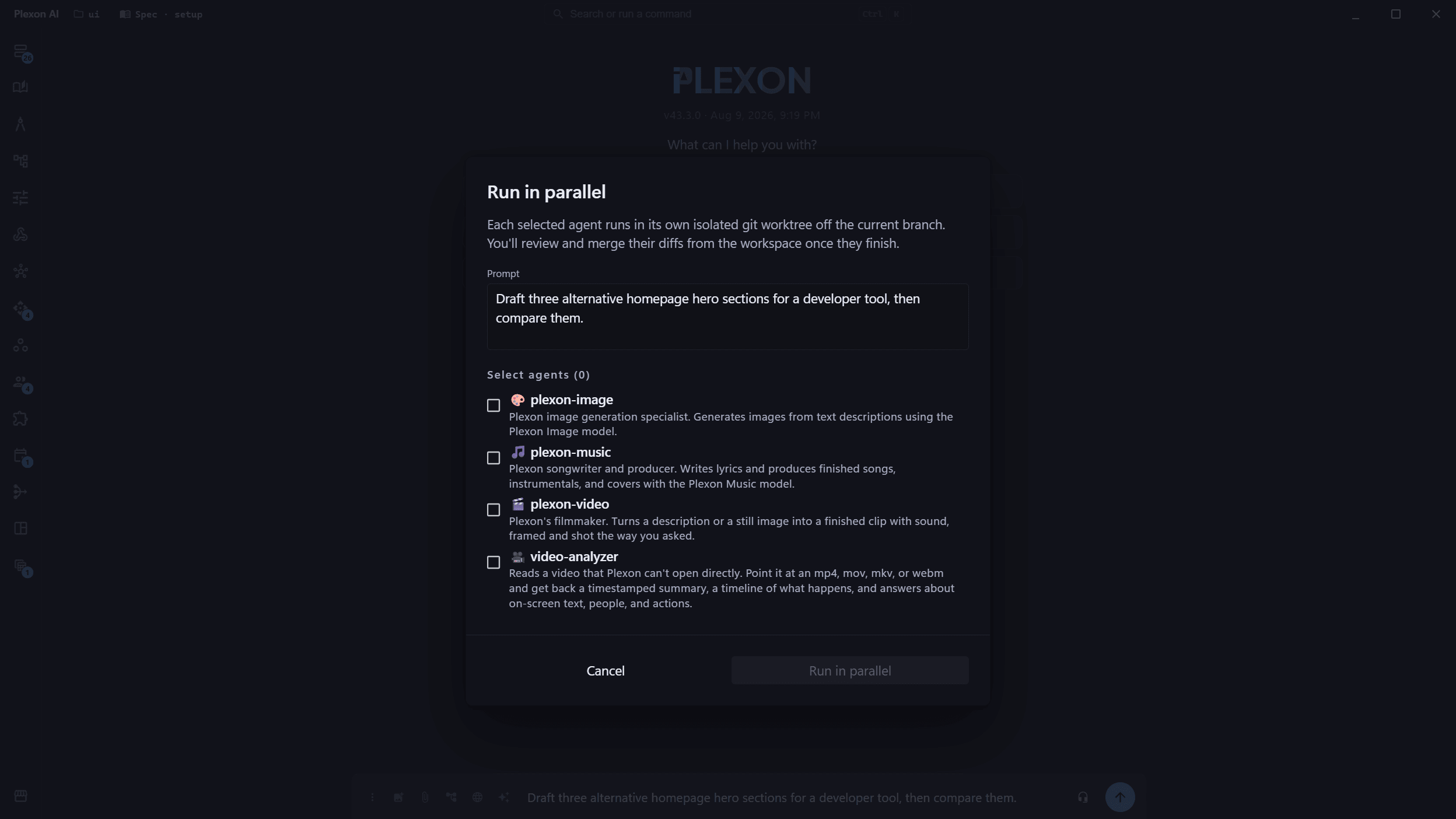
One Prompt, N Agents, N Worktrees
Pick a handful of agents from your roster, write a single prompt, and Plexon fans out the work in parallel: each agent runs in its own isolated git worktree off your current branch. No more sequential bottlenecks, no more conflicting edits stomping on each other.
- Up to N agents running concurrently from one prompt
- Each agent gets a fresh worktree on its own auto-named branch
- Picker reuses your existing user-defined agents: no separate config
Live Workspace with Per-Tile Progress
A dedicated Agents Workspace dialog renders one tile per agent: live status, branch label, streamed output, token + cost counters, and tool-call counts. As each agent finishes, its tile flips to a terminal state with merge / discard actions ready to go.
- Real-time streaming output per agent, expandable inline
- Per-tile cost, token, and tool-call counters
- Status icons for pending / running / succeeded / failed / cancelled
Three Merge Strategies, Picked Per Tile
Each successful agent gives you three ways to land its work, chosen from a dropdown next to the Merge button. Fast-forward keeps history linear, squash collapses the agent's commits into one, cherry-pick replays each commit individually onto a parent that has moved on. The right choice depends on the agent, and you decide tile-by-tile.
- Fast-forward: `git merge --ff-only`; the cleanest path when the parent hasn't moved
- Squash: one tidy parent commit; good for "give me the result, drop the history"
- Cherry-pick: replays each commit with its original authorship; rescues work when the parent has diverged
Pre-Flight Safety: Never Lose Work to a Failed Merge
Before destroying anything, Plexon checks `git merge-base --is-ancestor` to verify the merge will actually succeed. If the parent has diverged and a fast-forward is impossible, the merge aborts cleanly *before* removing the worktree: your scratch state stays intact, you pick squash or cherry-pick instead, and try again. No more orphan branches with the commits but no recovery path.
- Ancestor pre-check refuses the merge instead of leaving you in a broken state
- Worktree is only released after the merge is proven to be safe
- Failed merges surface a clear "try squash or cherry-pick" message in the UI
Cancel the Whole Run, Keep What You Have
A "Cancel all" button at the top of the workspace sends a single signal that every agent honors at its next checkpoint. Crucially, the worktrees stay around, so even after a wholesale cancel, you can still open each tile, review the partial diff, and merge or discard whatever the agent produced before the cancel landed.
- One click cancels every in-flight agent in the run
- Worktrees and partial output survive cancellation for review
- Per-tile actions still work after cancel: keep the wins, drop the rest
Ask Which Result to Merge
Once two or more agents have finished, Recommend sends their results to a separate reviewer with the agent names, branches and order hidden. It checks whether each result did the task and came back in the shape you asked for, then weighs fidelity, consistency and finish, and answers with a pick and a reason: "Recommended: B, because ...". You still do the merge. If no result delivered, or the reviewer does not give a valid answer, the workspace says so and recommends nothing. Results that changed no files are set aside first, and when none changed anything no AI call is made at all.
- Names, models and branches are hidden from the reviewer, and the order is shuffled
- A "Recommended" chip marks the tile it picked
- No delivered result means no recommendation, never a guess
- A second click can pick differently, so read the diff before you merge
Powered by Real Git Worktrees
Plexon uses real `git worktree` primitives, not a mock, not a copy. Every parallel agent is operating on a fully checked-out tree under `.plexon/worktrees/<sessionID>/<subtaskID>/`, with `git status`, `git diff`, and the rest of your tooling working exactly as you expect inside.
- Native `git worktree add / list / remove / prune` under the hood
- Auto-named branches like `plexon/agents/<session>/<subtask>-<hex>`
- Self-healing: a stale-worktree sweep at the start of every run cleans up after crashes or manual `rm -rf`s
Built on the Same Sub-Agent Infrastructure
Parallel runs reuse Plexon's existing sub-agent orchestrator, tool denylists, model overrides, persona inheritance, and progress streaming. The only thing that changes per run is the working directory each agent sees. Every other guarantee you already rely on still holds.
- Per-agent model + provider overrides honored
- Tool allowlists / denylists enforced inside each worktree
- Cost tracking and usage roll up into the same session metrics
What Parallel Agents Unlock
True Isolation
Real git worktrees, not mocked sandboxes. Each agent gets its own checkout, branch, and `git status` view: concurrent edits never collide.
Live Tile Grid
One workspace dialog renders every agent in a responsive grid with streamed output, status, cost, tokens, and tool-call counters in real time.
Three Merge Strategies
Fast-forward, squash, or cherry-pick: chosen per tile from a dropdown next to Merge. A pre-flight ancestor check refuses doomed merges before touching the worktree, so you never lose scratch state to a failed integration.
Cancel All, Keep Partials
A single Cancel All click stops every in-flight agent at its next checkpoint. Worktrees stay around. You can still merge or discard whatever each agent produced before the cancel landed.
Self-Healing
A stale-worktree sweep at the start of every run cleans up after crashed daemons or manual `rm -rf`s. The next run reuses the same paths cleanly: no manual `git worktree prune` required.
Same Guarantees
Model overrides, tool denylists, persona inheritance, cost tracking: every sub-agent guarantee you already rely on still holds inside parallel runs.
Connects to
Nothing here works alone. See the whole map for how the pieces fit together.
What feeds it
192 AI Agents runs inside this.
One prompt fans out across N agents in isolated git worktrees.
Work Across Folders feeds this.
A sub-agent can run in its own git worktree of any folder on the chat, and its work waits in the Parallel Agents review queue.
Cross-Chat Messaging feeds this.
Parallel work is where chats collide; messages and claims are how they stay out of each other’s way.
Where it goes
This feeds Diff Review Queue.
Every tile waiting on review lands in one cross-session panel.
Seen in these jobs