New · August 2026
GitHubAuto-Review
Leave Plexon open and it watches the repositories you cloned. Every new issue gets a drafted reply, every new pull request gets a review written against the code in that pull request, and both wait for you. Press Post, carry on with it in chat, or press Always and let it handle that one kind of thing on its own.
Related features
Point It at a Folder You Already Cloned
Pick the folder, not a URL. Plexon reads its git remote to find the repository on GitHub and uses the account you connected once. Because the code is on your disk, the reviewer reads the actual files the issue is about instead of guessing from the text.
- Pick a cloned folder; Plexon finds the repository from its remote
- Reuses the GitHub account you already connected
- The reviewer reads real code, not just the diff
- Works with GitHub Enterprise Server too
It Reviews the Code in the Pull Request, Not Whatever You Have Open
Before reviewing, Plexon fetches the pull request and checks it out read-only in a throwaway copy at that exact commit. Your own folder is never read, so the half-finished work sitting in it stays private and can never be quoted back onto a public thread. The review is pinned to the commit it actually read, so a push landing while you decide cannot move it.
- Fetches the pull request branch even when you never had it locally
- Your uncommitted work in progress is never read and never quoted
- The posted review is attached to the exact commit it was written against
- When the branch cannot be fetched, the review says it worked from the diff alone
Tell It What You Know
The reviewer reads your code, but it cannot know what is in your head. Drop a markdown note in your repository and it goes into every review it applies to. A note can cover everything, or only items opened in a stretch of time, which is what you want in the middle of a migration.
- Notes are markdown in your repository under .plexon/review-notes/, so the whole team gets them
- A note headed "applies_to: <2026-02-05" only reaches items opened before the cutover
- Ranges read the way you would write them: 2026-02-01-now, a single day, or nothing at all
- Say "read MIGRATION.md before answering" and it reads it, then answers from it
A Start Date, So Old Threads Stay Old
Every repository has a start date, applied to when something was last touched. A dormant thread is left alone, so a project with a thousand old issues stays quiet. One that gets a new comment today does count, because that is live work.
- Set the instant watching begins, stored in UTC
- Both issues and pull requests are bounded by their last activity
- A dormant thread stays dormant; a revived one is picked up
- The bound holds even when you press Check now
Everything Waits For You
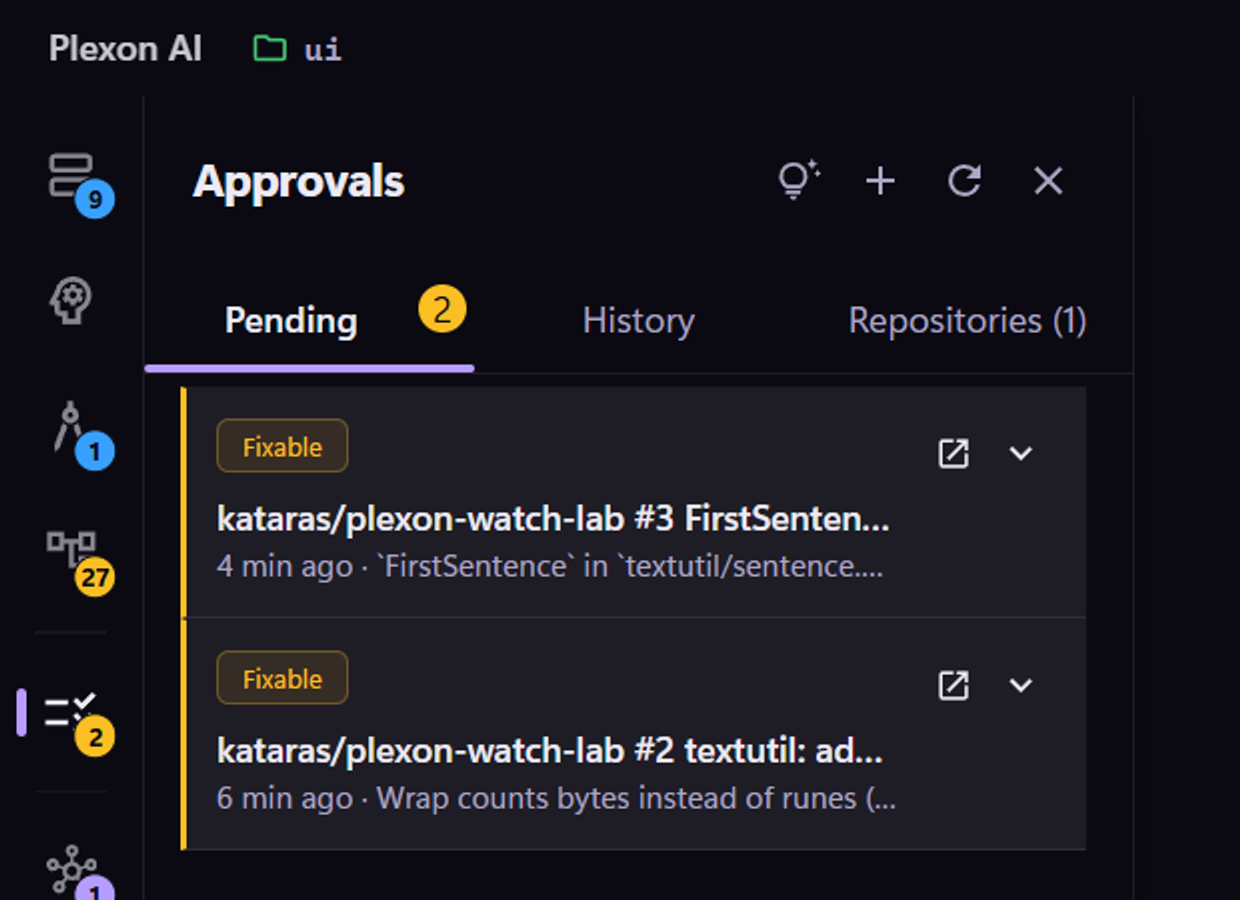
A drafted reply or review sits in the Approvals panel with its verdict on the front: green for an approval, amber for a request for changes. Read it, edit it, post it, or dismiss it. Nothing reaches GitHub until you decide.
- Drafts wait; a new repository can start in full draft-only mode
- Edit the text and change the verdict before it goes out
- A column of cards reads as green and amber at a glance
- The sidebar badge counts what is waiting, panel open or closed
Or Press Always, For One Kind of Thing
When you keep posting the same kind of reply, press Always instead of Post. That single kind of action on that single repository becomes automatic. Approving pull requests and replying to issues are separate permissions, and one never implies the other.
- Granted per action kind, per repository
- Turning it on for a public repository asks you to type a word first
- A daily cap means a loop degrades to drafting, not spamming
- Shows as a chip on the repository; one click withdraws it
It Can Write the Fix
When the reviewer finds a clear, fixable bug, Plexon copies your repository into a throwaway folder, writes the fix there, and runs your own build and test command against it. Your checkout is never touched. You get the diff and the test output.
- Works in a separate copy; your working tree stays clean
- Runs the verify command you configured and shows what it printed
- Pushing and opening a pull request is a separate, explicit click
- No verify command means no push button: an unverified patch is a suggestion
Carry On With It in Chat
Any card can open a chat session inside the repository, seeded with the draft. Rework the wording together, read the code with it, or take a fix further. The chat cannot post to GitHub, so nothing escapes while you are working. When it reads right, you go back to the card and press Post.
- Opens in the repository, or in the fix working copy for a fix card
- The draft is already in the conversation, so you start by editing, not explaining
- Press it again and you return to the same conversation
- Posting stays a decision you make on the card
Find Out Whether the Drafts Are Any Good
Each watched repository keeps score of what actually happened to its drafts: how many you posted as written, how many you edited first, and how many you threw away. That line is the honest answer to whether this is working for you, and it is the number to watch before you turn anything automatic.
- Counted per repository, on the Repos tab
- History rows mark items that you edited
- Counters survive the history being trimmed or cleared
- Clear history when you want a fresh baseline; pending decisions stay
Under the Hood
It Never Answers Itself
Items opened by your own account and by bots such as dependabot are skipped, and a live check against GitHub stops a second reply landing on a thread you already answered.
A Push Is Not a Re-Review
A pull request is re-reviewed when the code changes, not when someone adds a label. A rebase storm collapses into one review instead of one per push.
The Same Watcher Starts Your Workflows
A watched repository doubles as a workflow trigger: a new issue, a new pull request, a new comment, or a submitted review can start a Dynamic Workflow, filtered by repository and event. One watcher feeds both, so nothing extra polls GitHub, and a workflow that posts a comment never re-triggers itself.
A Daily Budget Per Repository
Reviews stop for the day once the budget is spent, so leaving Plexon running overnight cannot run up a bill you did not agree to.
Rate Limits Are Not Failures
GitHub asking you to wait is temporary, so it parks the repository and resumes. Three real failures in a row pause it and say why. It also stops early while some of your quota is left, so its polling never takes the last of it from you.
It Can Run Your Tests Before Reviewing
Turn it on for a repository and the review is written after your own build and test command has run against the pull request head, so it cites a real result instead of guessing from the diff.
It Will Not Push Work You Have Not Committed
If you refined a fix in chat and left the changes uncommitted, pushing would publish the old version and quietly drop yours. It refuses and says so. It also refuses when the branch moved on after the tests ran, because the green result no longer describes it.
It Writes Like a Person
What gets posted is the reply alone, in plain language, with none of the assistant thinking out loud about what it read. No em dashes, no "great catch", nothing that reads as machine-written on a public thread.
Connects to
Nothing here works alone. See the whole map for how the pieces fit together.
What feeds it
App Connectors requires this.
It needs GitHub signed in to read issues and pull requests, and to post once you approve.
Seen in these jobs