Animated and 3D videos
Animations built from code,not guessed by a clip model
Say "make a 3D animation about this workflow" and Plexon does not call a video generator. It writes the animation as a page on the design canvas, a Three.js scene or a GSAP timeline behind a small seek hook, plays it beside the chat, and records it one frame at a time on your computer. Every frame is exact, every label is spelled right, and the file is yours to edit.
Related features
A 3D scene of your own workflow, frame by frame
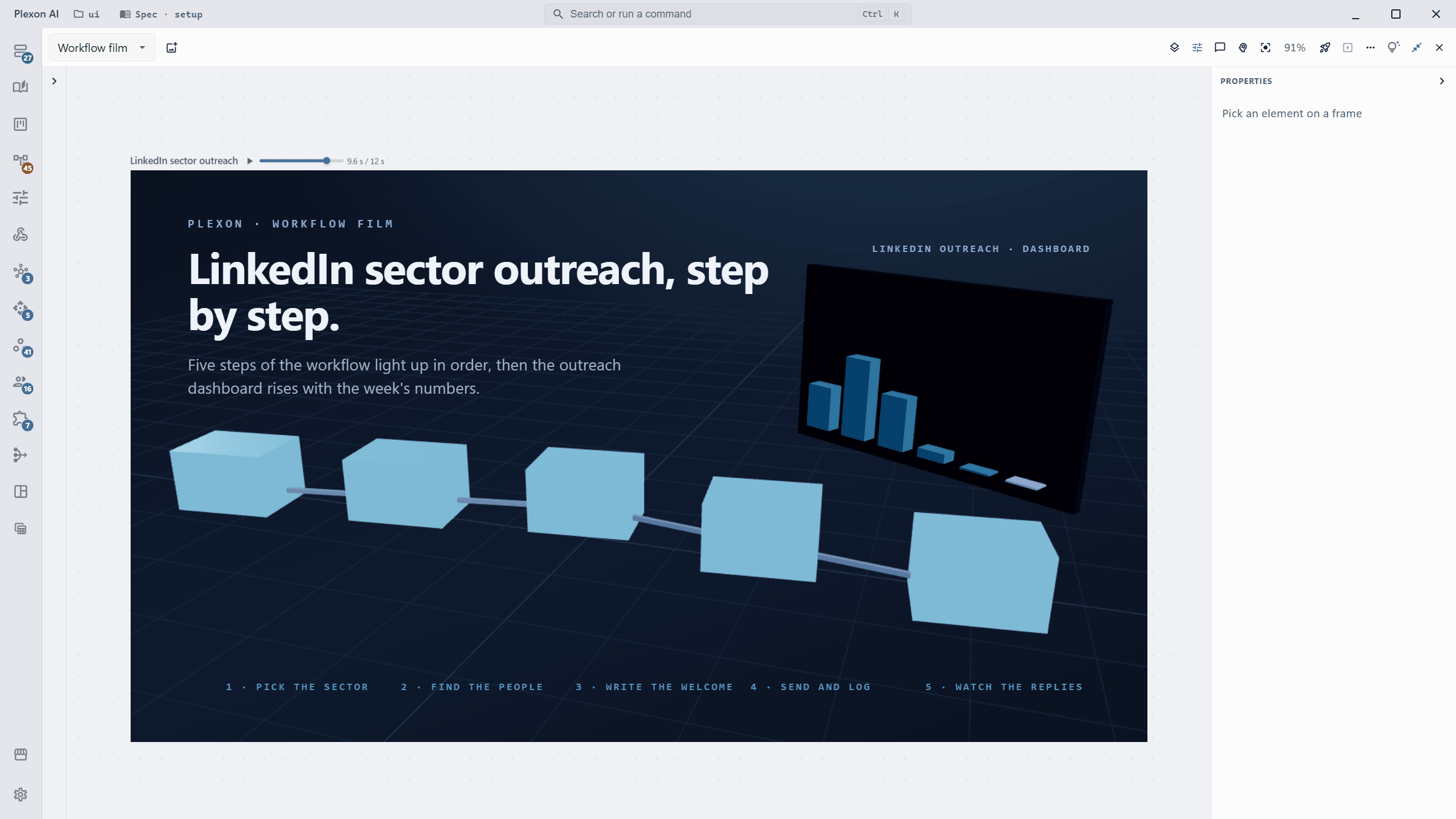
This is a real frame on the canvas: five workflow steps light up in order on a 3D floor, then the outreach dashboard rises with its bars. The scene is Three.js, driven by the time the canvas asks for, so the same instant always looks the same. Pause it, drag the scrubber, and the picture holds while you look.
- Ask for an animation about a workflow, a dashboard, a feature or a screen and this is where it lands
- The scene reads its state from the clock, never from a timer, so the export matches what you saw
- Labels, numbers and brand colours are written into the page, not guessed by a model
Say it in chat, get a video back
The request can be as loose as "a 3D animation about my outreach workflow" or as exact as a beat sheet. Plexon reads the workflow or project it is about, picks an angle and a tone, storyboards it, writes the frame, reviews it at chosen instants and exports the mp4 with a poster frame and a share caption.
- Launch videos, explainers, motion graphics and 3D walkthroughs all take the same path
- Seven tones from polished to deadpan, or direction in your own words
- Landscape, vertical or square; 15 to 25 seconds is the default length
- Music from Plexon or a track of yours, narration in your voice only when asked
Stop it, scrub it, fix the instant
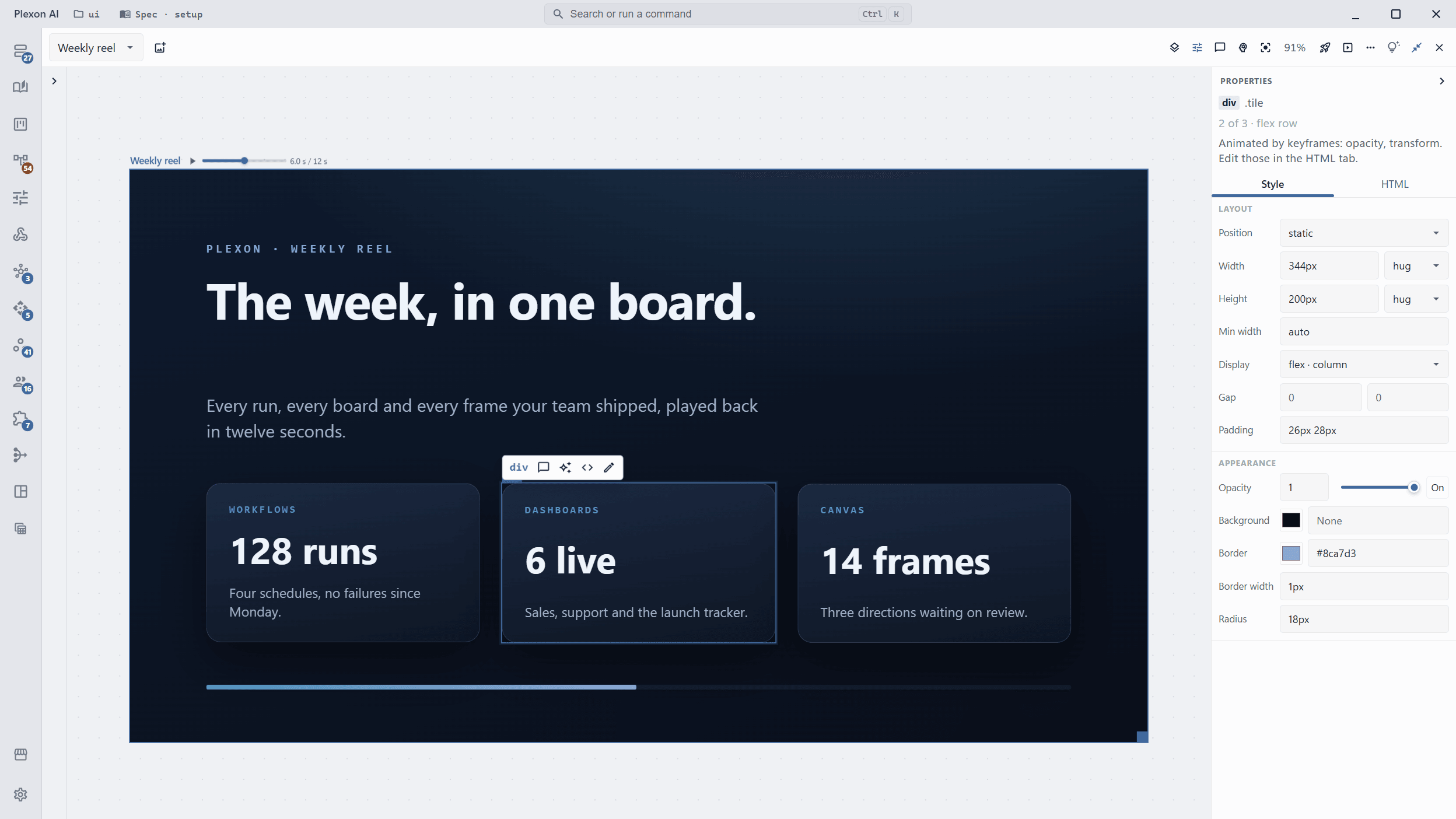
An animated frame carries Play, a scrubber and a clock on its title bar. Pause at 6.0 s, pick the element that is wrong, and edit it there: the frame stays on that instant through every change. The arrow keys step one frame at a time.
- Ask the AI to change a scene and the frame repaints in place, at the second you were on, playing or held
- Screenshots and measurements at any millisecond are how the AI reviews its own work
- Replay from the top when you want to see the whole thing again
CSS, GSAP timelines and Three.js scenes
Simple pieces are CSS animations and Web Animations with absolute delays. When the storyboard wants a 3D scene, a particle field or a long choreographed sequence, the frame uses a GSAP timeline or a Three.js scene behind a one-function hook: the canvas asks for an instant, the frame draws it. The host owns the clock, so pause, scrub and export all agree.
- GSAP timelines are created paused and seeked, never played on their own ticker
- Three.js renders synchronously for the instant asked, so WebGL frames export like CSS ones
- Libraries are copied into the frame folder; nothing on a frame points at the web
- The official GSAP skills ship with the Software Developer role, with the hook contract
- Ask for an animation and the GSAP and React Bits skills load with it. A React Bits background or text effect is rebuilt to play frame by frame.
Why this is not a generated clip
A clip model films an imagined shot of a few seconds and cannot draw your interface, your diagram or your numbers faithfully. Plexon keeps the generator for live-action shots and sends every animation request to the canvas, where the picture comes from code and a wrong label is a one-line edit, not a re-roll.
- Up to two minutes as a single film on the canvas, at any frame rate up to 60 a second
- One-step delivery to spec: an exact length, even loudness (around -14 LUFS), and upload, master and ProRes files with a quality-control report
- Renders with ffmpeg on your computer, or on your Plexon Nous when the app is connected there, with the file brought to your laptop; no daily limit, on every plan
- Sound mixed in from the frame: one music bed, effects and narration with start times
- The frame stays on its board as an HTML file in your project, and you can keep editing it
Or just ask
Say it, watch it render
Four requests and what comes back. Each one is a frame on the canvas you can open, pause and change.
Say this
Create me a 3D animation about the LinkedIn sector outreach workflow and its LinkedIn outreach dashboard.
You get back
A 12 second Three.js scene on the canvas: the five steps light up in order, the dashboard rises with the week’s numbers, exported as mp4 with a poster frame.
Say this
Make an animated explainer of how the invoice workflow moves a file from inbox to paid, chaotic tone, vertical.
You get back
A 1080x1920 motion frame with a GSAP timeline, seven beats, music under it, and a share caption for Reels.
Say this
Brag about this project.
You get back
A 15 to 25 second launch video built from the project’s own copy, colours and screens, with a poster and a caption in brag-output.
Say this
Pause the film at 9 seconds and make the dashboard title larger.
You get back
The frame holds at 9.0 s, the title is edited in Properties at that instant, and the next export carries it.
Every draft opens for you to read before it does anything. Nothing runs, sends, or refreshes until you have looked at video and said so.
Pairs with
- Design Canvas: the board the frame lives on, with its transport, history and comments.
- Video Composition: cut the exported mp4 together with recordings, stills and narration.
- Video Generation: the clip model, for the live-action shot an animation cannot draw.
- 3D Simulators: a real machine built as a working simulator you can take apart, with its own 60 fps film.
How it holds together
3D on the canvas
Three.js scenes run behind a seek hook, so a 3D animation pauses, scrubs and exports like any other frame.
One clock
The canvas and the recorder own the time; the frame only answers "what does 9.6 seconds look like".
Storyboard first
An angle, a tone and a beat sheet before a line of code, so the film says one thing well.
Edit the instant
Hold the frame, pick an element, change it in place; the frame stays where you were.
A file you keep
Every video is an HTML frame in your project, in git, open to the next edit.
Sound included
A music bed, effects and narration are cues on the frame, mixed into the export on this computer.
Frame-exact export
ffmpeg records one instant at a time; a slow machine makes the same file as a fast one.
Nothing leaves
No upload, no daily limit, no video runtime to install; the server never sees a frame.
Connects to
Nothing here works alone. See the whole map for how the pieces fit together.
What feeds it
Design Canvas feeds this.
An animation is a motion frame on the board: CSS, a GSAP timeline or a Three.js scene behind the frame's seek hook, paused and scrubbed from the title bar.
Where it goes
This feeds Video Composition.
The exported mp4 becomes a scene in a longer composed video, cut with recordings and narration.