Built-in Document Reader
Read Any DocumentStraight From Chat
Point Plexon at a Word doc, spreadsheet, slide deck, PDF, EPUB, OpenDocument file, RTF, email, or a LaTeX or reStructuredText file and it reads the contents as Markdown you can ask about. No exporting, no converting, no setup. The reader installs itself the first time you use it.
Related features
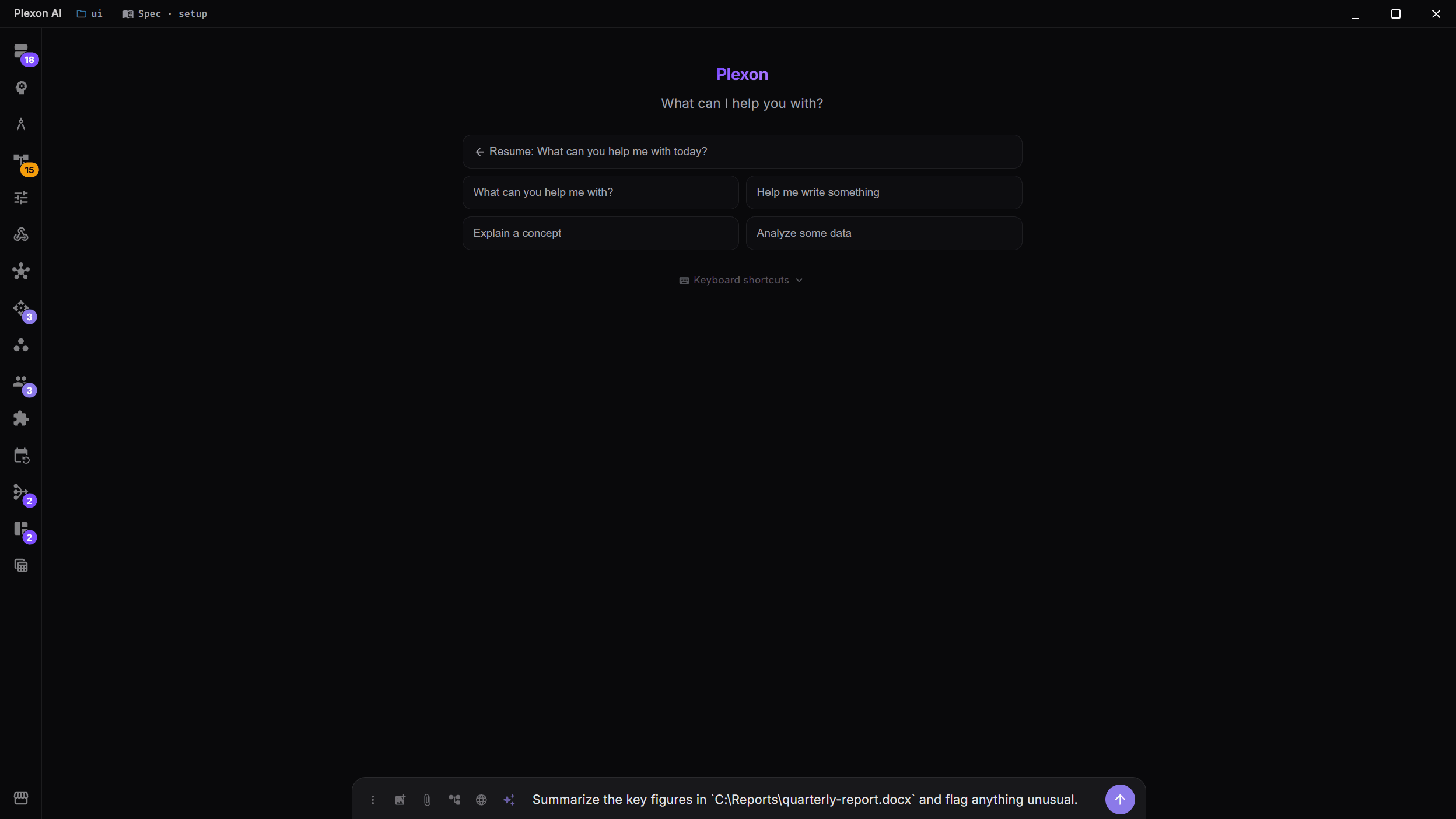
Ask About a File, Get an Answer
Point Plexon at a document and ask a question in plain language. It reads the file into clean Markdown behind the scenes, then summarises a report, pulls the numbers out of a spreadsheet, or answers a question about a slide deck. Nothing to export, nothing to paste.
- "Summarise this PDF and list the action items"
- "What were the Q3 totals in this spreadsheet?"
- "Give me the key points from this slide deck"
- "What does this contract say about termination?"
Every Common Document Type
One reader covers the files people actually send. Word, Excel, and PowerPoint, plus PDF, EPUB, CSV, HTML, and email. It also opens OpenDocument files, RTF, and markup like LaTeX and reStructuredText. Each one comes back as structured Markdown the AI can read, search, and reason over, with tables kept as tables.
- Word (.docx), Excel (.xlsx and .xls), PowerPoint (.pptx)
- OpenDocument (.odt, .ods, .odp), RTF, and FictionBook
- PDF text, EPUB e-books, CSV data files, HTML pages
- Email (.msg and .eml), plus LaTeX, reStructuredText, Org, and more
Nothing to Install, Nothing to Configure
The reader is built in. The first time you hand it a file, it sets up its own converter in the background and gets to work. There are no API keys to paste, no accounts to create, and no settings to open. It works the same on Windows, macOS, and Linux, and the files stay on your machine.
- Sets itself up on first use
- No keys, no accounts, no configuration
- Cross-platform by default
- Files never leave your machine
Pairs With Word and Excel Editing
Reading a file is the first half. When you want to write back, the bundled Office tools create and edit Word and Excel documents from the same chat. Read a PDF, drop its figures into a spreadsheet, and draft a memo in one conversation, or feed a document into a workflow and let it run.
- Read here, then create or edit with the Office tools
- Feed a file into a workflow step or a dashboard
- Available to every persona and every chat mode
- Works inside the Orchestrator for parallel subtasks
Print a Draft or a Styled Page to a Real PDF
Going the other way is built in too. Ask for a PDF of a Markdown draft or a local HTML file and Plexon prints it with its own browser engine. The letter, report, or meeting notes the AI just wrote come out as real typography on an A4 page, headings, bold, lists, and tables included. A styled HTML page keeps its backgrounds, fonts, and charts exactly as they look on screen, with no date or file-path stamped on every page.
- "Write the follow-up and give me a PDF I can send"
- "Turn report.html into a PDF"
- Full-bleed color, web fonts, and chart scripts survive
- A4, Letter, or Legal, portrait or landscape
- No headless browser to install, no pandoc, no LaTeX
Or Send It Straight to Your Printer
When you want paper rather than a file, say so and it prints. The same engine renders the page, so what comes out matches the PDF. Name a printer and it uses that one, or set a default in Settings and stop naming it. Ask for a printer that is not there and Plexon answers with the ones your machine has.
- "Print the follow-up letter"
- "Two copies of the invoice on the front desk printer"
- Copies, two-sided printing, paper size, and margins
- Warns when a page runs past the sheet before you spend it
- Only ever when you ask: no board or schedule can print by itself
What It Reads
Word (.docx)
Reads reports, letters, and contracts into Markdown, with headings and tables preserved for accurate quoting and summarising.
Excel (.xlsx, .xls)
Turns a workbook into readable tables. Ask for totals, trends, or a plain-language summary of what a sheet contains.
PowerPoint (.pptx)
Pulls the text and structure out of a deck, slide by slide. Ask what it argues without clicking through it.
Extracts the text of a PDF for summarising, searching, or question-answering, including long reports and exports with a text layer.
EPUB
Reads a whole e-book as structured Markdown. Find a passage or summarise a chapter without leaving the chat.
HTML and CSV
Converts a saved web page or a raw data file into clean text and tables the AI can work with directly.
Email (.msg, .eml)
Reads a saved email, sender and subject and body, from Outlook .msg or a standard .eml file, without opening a mail app. Handy for triaging a forwarded thread.
OpenDocument (.odt, .ods, .odp)
Reads LibreOffice and OpenOffice text documents, spreadsheets, and presentations into Markdown, the same way it handles the Microsoft formats.
RTF and markup
Opens RTF, FictionBook, LaTeX, reStructuredText, Org, Textile, MediaWiki, DocBook, man pages, OPML, and Typst, so notes and papers read as cleanly as Office files.
Auto-Install
The converter installs itself the first time you use it. No keys, no accounts, no setup screen, and it runs the same on every platform.
Composes With Everything
Reading is a built-in tool. It works in every chat mode, inside workflows and dashboards, and alongside the Office, browser, and connector tools.
Connects to
Nothing here works alone. See the whole map for how the pieces fit together.
This one is taught in step 4 of 8: let it act on real files.
Where it goes
This feeds AI Chat & Modes.
A Word doc, spreadsheet, deck, PDF, EPUB or Outlook email arrives as Markdown you can ask about.