v1 · July 2026
Move Your Setupto Another Machine
Everything you built in Plexon lives on one computer. Settings, This computer, "Move to another machine" turns it into a single encrypted file: personas, skills, agents, connectors and the credentials they use, plugins, workflows, dashboards, memory, journal, cloned voice, and chats. Install Plexon on the new computer, click "Bring my setup from another machine" on the sign-in screen, and carry on where you left off. Nothing goes through a Plexon server at any point, and the same file works as a snapshot you can restore later.
What happens in this clip
- Turn on the app lock and type a four digit PIN.
- Unlock with the PIN, Windows Hello or Touch ID.
- Set it to lock after a few idle minutes.
- Cap the wrong PIN attempts, after which the local data is wiped.
- A single chat can lock separately, and Settings, This computer turns on continuous backup to your own Google Drive.
Related features
Everything Comes Across, Credentials Included
Not just settings. Your personas, the skills and agents you wrote, the edits you made to the built-in ones, your plugins and marketplace subscriptions, workflows, dashboards, hooks, scheduled jobs, data sources, templates, memory, your journal, your cloned voice, and your chats. API connections travel with their keys and OAuth tokens, so the connectors that worked yesterday work on the new computer without you hunting down every key again.
- Personas, skills, agents, plugins, and marketplace subscriptions
- Workflows, dashboards, hooks, scheduled jobs, routines, and data sources
- API connections with their credentials, OAuth tokens, and middlewares
- Memory, per-project memory and plans, notes, pinned messages, and your journal
- Avatar portrait, cloned voice, git credentials, and your sign-ins to AI providers
- Chats, including locked ones, and your per-project settings
- An edit you made to a built-in skill arrives as an edit, re-applied over whatever version the new machine ships
- Nine rows are offered but left unticked, because each one is large, short-lived, or unusually sensitive: the .env file, connection cookies, browser profiles, workflow history, job notifications, routine history, the avatar recording, the app PIN, and saved agent results
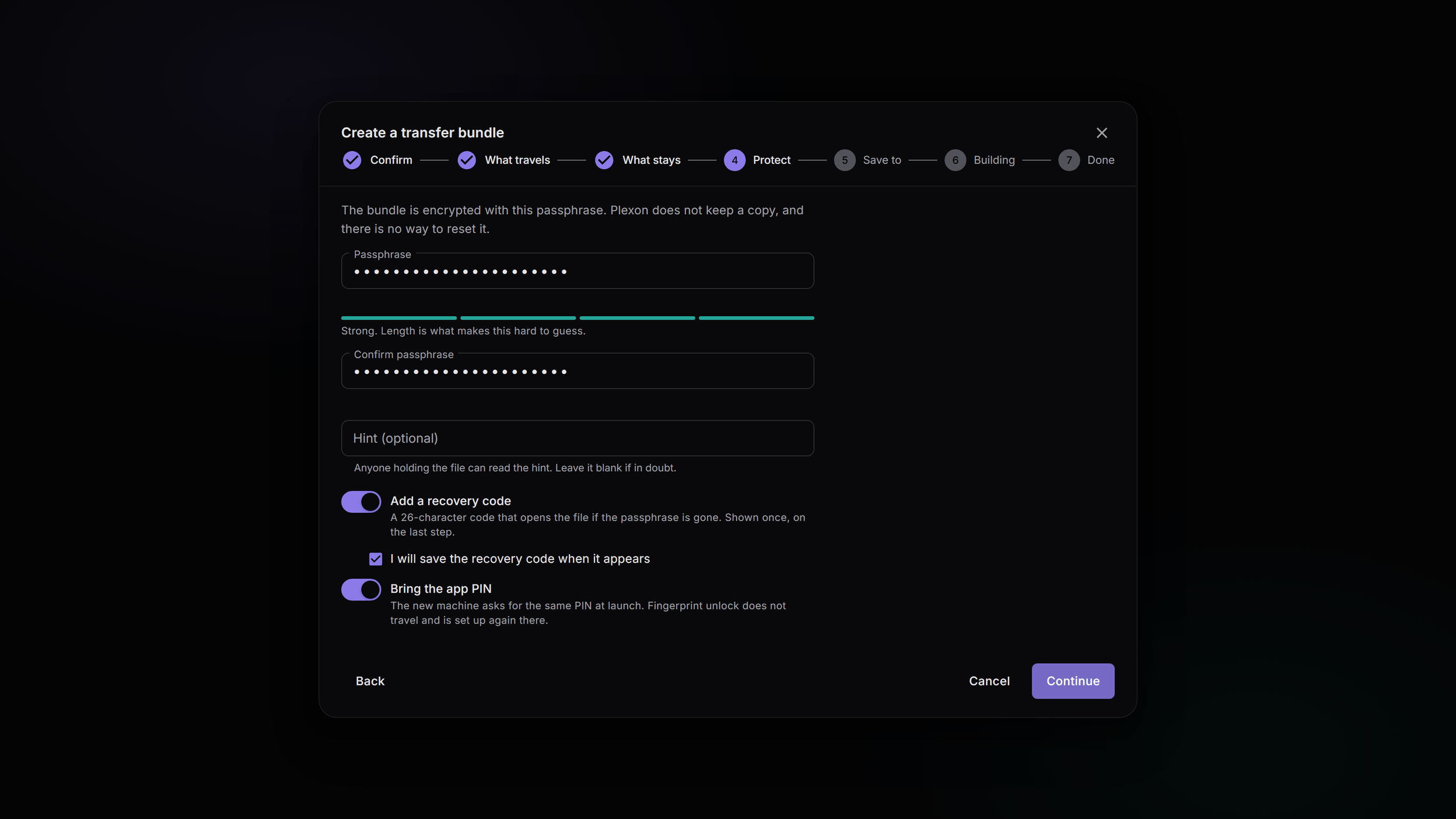
One File, Sealed With a Passphrase You Choose
The export writes a single file. Its contents are encrypted under a passphrase you pick at the time, and Plexon keeps that passphrase nowhere: not on disk, not in the file, not on a server. A bundle is usually built weeks before it is opened, often on a computer that is about to be wiped, so Plexon offers a recovery code beside the passphrase and turns it on by default. Those two are the only ways in.
- At least 12 characters. A four-digit passphrase is refused outright
- Your app PIN is never accepted as the passphrase, and Plexon never offers to reuse it
- The recovery code defaults on. Keep it somewhere other than the bundle
- Building a bundle re-asks for your app PIN when you have one set
- Your app PIN can travel too, decided on the computer that still knows it. It arrives with biometric unlock off, because that secret lives in the keystore of the machine you are leaving
- Lose the passphrase and the recovery code and the bundle is gone. There is nothing on a server to fall back on
No Cloud, No Account Sync
The file goes wherever you put it: a USB stick, a network share, an external disk, a folder you already back up. Plexon servers are not involved in building it, moving it, or opening it, and there is no account-level sync doing this quietly in the background. Moving your setup is something you do on purpose, with a file you can see.
- Nothing about the bundle reaches a Plexon server at any point
- No sync service, and no copy of your setup held against your account
- The file is yours to store, move, copy, and delete
Save a Snapshot, Restore It Later
The same export, framed as a backup. "Save a snapshot" opens the same wizard under that name, ticks every row instead of leaving the nine large or sensitive ones off, and skips the "What stays" step, since nothing is being left behind. Restoring it later runs the same import, on this computer or another one.
- "Save a snapshot" is one of three cards inside the "Move to another machine" section of Settings, under This computer, next to "Create a transfer bundle" and "Restore from a bundle"
- Restoring a snapshot is the same import, with the same confirmation in front of it
- A setup bundle dropped on Plexon never runs on its own. It describes itself and waits
- A shared chat and a whole setup use the same file type but never the same door: the chat importer refuses a setup bundle rather than quietly switching modes, and the two deeplinks are separate URLs
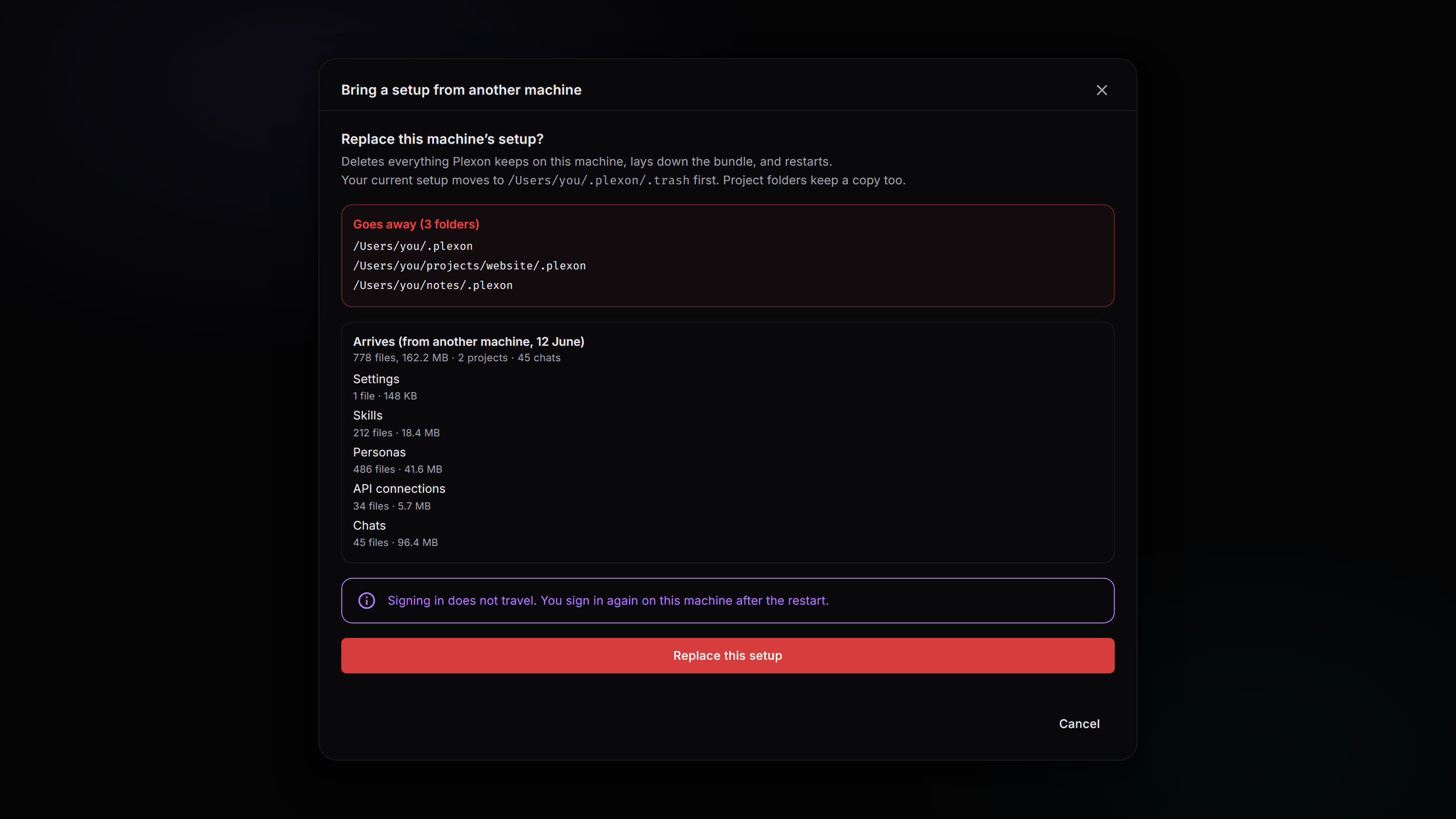
Import Replaces the Machine, and Names What It Removes
There is no merge mode. An import lays the bundle down in place of what is there. So before anything moves, Plexon reads the file, works out what will arrive, and shows you the exact paths that go away and the exact categories that land. Nothing moves until you press "Replace this setup" and then type the word replace on the dialog that opens. Cancel at either point and nothing has moved. The setup being replaced is renamed into a restore point that sits in the Plexon trash folder for a week.
- The list of what goes away is headed by a folder count and then names every path in full
- The word you type is "replace", and that dialog's confirm button stays disabled until it matches
- A machine with nothing of yours yet (no chats, no sign-in, no connections) gets a calm confirmation instead and skips the typed word; the restore point is still taken
- Refusals come first: a file from a newer Plexon, not enough disk space, a failed header check
- The restore point is made before anything is laid down. If it cannot be made, the import stops there
- A failure while wiping, laying down, or remapping paths rolls back on its own
- Once marketplaces have been re-cloned there is no clean rollback left, so Plexon says what happened and offers a manual undo instead of half-undoing
- The restore point is collected a week later by the same sweep that clears everything else in the trash
A Few Things Stay Behind, and You Read the List First
Some things cannot travel, and each one says why. Plexon shows the same list twice: at export as what will not come with you, and at import as what to redo. The group that needs you to sign in or authorise something again sits at the top and does not fold away, because that is the part someone has to read before wiping the computer they are leaving.
- Signing in: one credential is one seat, so carrying a live session would evict the machine you are leaving
- The WhatsApp pairing: those keys belong to the device. Scan the QR again on the new one
- Downloaded tools, speech engines, and the avatar engine: operating-system specific, and several gigabytes. They come back on their own
- Marketplace installs are re-cloned from their source on first launch, so you land on the current version
- Marketplace keys are fetched again after you sign in. They belong to the account, not the machine
- Caches, logs, and temporary files stay where they are
Windows, macOS, and Linux, With Paths Remapped on Arrival
A bundle built on Windows imports on macOS or Linux. Absolute paths are the hard part of moving an install, and Plexon handles them two ways: command lines get their paths turned back into the placeholders Plexon already resolves when it runs them, and typed fields, map keys, and folder names are remapped against the project folders you pick on arrival. The import shows one row per project folder from the old computer, with its chat count and its size, defaulting to the same path when that path is already there.
- One mapping row per project folder, defaulting to the same absolute path when it exists
- A path still absolute after both passes is kept and reported, never quietly aimed somewhere else
- A scheduled job whose project folder did not travel arrives switched off rather than pointed at a different folder
- Two folders that are separate on Linux but collide on Windows are handed to you rather than merged
- The new computer writes its own build record at the end, so the next launch does not mistake the import for an upgrade and undo it
What a Sealed Bundle Still Says About Itself
The import screen has to describe a file before it can ask you for a passphrase, so a few things are readable without one: which categories are inside, how many items each holds, the total size, the name of the computer that built it, and the date. Content is not, and neither is anything that would identify it.
- Readable without the passphrase: category names, item counts, total size, source hostname, creation date
- Not readable: paths, filenames, connector names, project folders, and every byte of content
- Reading that much takes about two kilobytes, which is why a file dropped on Plexon can describe itself before you decide anything
What Travels With You
Your Work, Not Just Your Settings
Personas, skills, agents, workflows, dashboards, memory, journal, cloned voice, and chats. Connectors keep working because the credentials they use travel with them.
One Encrypted File
Sealed under a passphrase you choose and Plexon stores nowhere. A recovery code is offered beside it, because a bundle is often built weeks before it is opened.
No Cloud, No Sync
The file goes wherever you put it. Plexon servers are not involved in building it, moving it, or opening it, and no account holds a copy.
A Restore Point, Kept a Week
An import replaces what is on the machine, after showing you the exact paths that go away. The old setup is renamed into the trash and swept a week later.
Connects to
Nothing here works alone. See the whole map for how the pieces fit together.
This one is taught in step 1 of 8: install it and sign in.
What feeds it
App Connectors is packaged by this.
Connectors travel to a new machine with the credentials they use.
Dynamic Workflows is packaged by this.
Workflows and dashboards travel with your setup.
Personas is packaged by this.
One encrypted file carries your personas to a new computer.
Cloud Backup (Google Drive) extends this.
A transfer bundle is the move you planned; Cloud Backup builds the same bundles continuously into your own Google Drive and restores them through the same rails.