3D simulators
Ask how a machine works,get one you can take apart
Say "how does a four-stroke engine work, show me" and Plexon does not fetch a diagram. It builds the engine as a working 3D simulator on the design canvas, from a reference picture and real dimensions, with one input turning every part. The readouts around it come from the same function that moves the parts, so a number on screen cannot disagree with the motion. Orbit it, take it apart, leave it to tour itself, and record a film of it on your computer.
Related features
A V8 on the board, live and on film
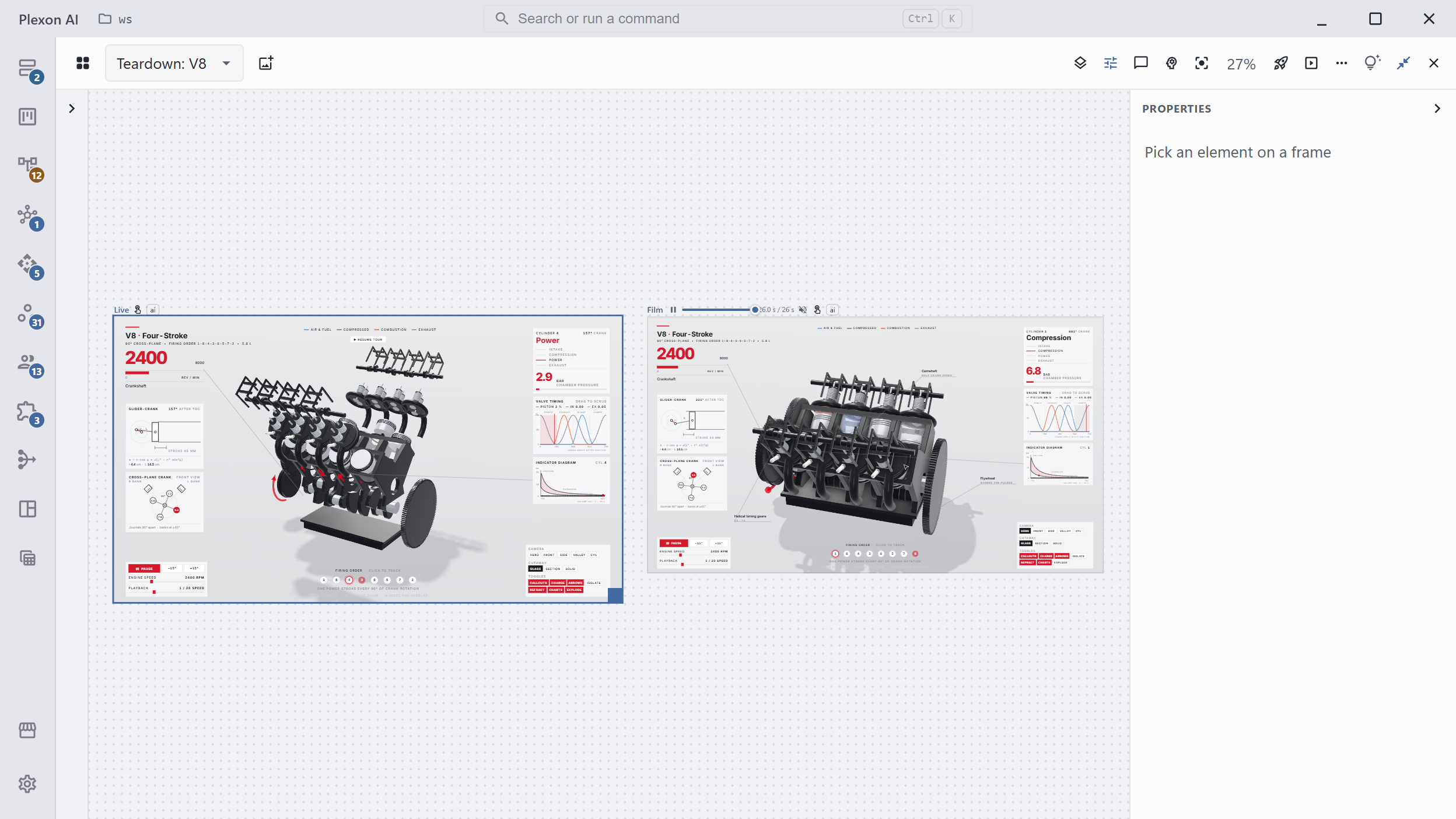
This is the real board for a V8. The Live frame on the left is the engine you drive: 2,400 rpm, cylinder 4 on its power stroke at 2.9 bar, the valve timing and the pressure curve drawn beside it. The Film frame on the right is the same engine at the end of its 26 second film, cylinder 1 tracked in a section cutaway on its compression stroke at 6.8 bar. Both read every number from the function that turns the crank.
- One input drives it all: a crank angle, a stroke or a wind speed poses every part and fills every panel
- Dimensions come from a reference picture, a manual or a datasheet, with the source written down. A number with no source is marked unknown, never guessed
- Camera presets, a slider for the input, playback speed and the firing order are buttons on the page
Isolate, cut away, x-ray, explode
A button on the page opens the part doing the work. On the V8, Isolate hides everything else, Section cuts the block in half, Glass turns the metal see-through, and Explode spreads the parts along their axes to show how they stack. The readouts keep running through every view, and callouts name the part and what it is doing at that instant.
- Turn on Interact on the frame and the page is yours: drag to orbit, scroll to zoom, press its keys and buttons
- Left alone, the page tours itself with a cursor. The first click hands it back to you
- Charts draw the valve timing and the pressure curve as the machine runs
A 60 fps film with its own score, recorded here
The same code that runs the live page records the film. An operator's cursor presses the buttons on screen, the panels read real numbers, and the recorder steps through it one frame at a time into an mp4 on your computer, with a score composed on the same timeline and mixed in. There is no cloud render and no upload. Recording takes minutes: a 26 second film at 60 frames a second takes about three minutes on a laptop (2.4 to 2.7 measured), longer on a Plexon Nous.
- The film is the frame's size, up to what your display allows
- Before anything is recorded, a contact sheet tiles up to twelve instants in one picture for review
- A poster frame is saved beside the mp4, and the film can be finished to an exact length and loudness
One page, offline, at its own address
The live simulator folds into one HTML file of about 800 KB that opens in any browser with no connection. Keep it on the board, send the file, or publish it at its own address with the same tools that put a Plexon site online. Publishing waits for your yes. The tools it needs download once, about 13 MB, and every simulator you build after shares them.
- Nothing on the page points at the web, so it opens the same with no connection
- The page and the film stay in your project folder, open to the next edit
- The board keeps both frames: replay the film, or drive the live one again
Who builds it, and from what
The Designer, Marketer and Software Developer roles carry the teardown skill and its agent, mechanism-engineer. The agent writes the brief a machine is built from: the one input, every dimension with where it came from, one number checked by hand against a second source, and the chain from the input to every moving part. The skill builds from that brief in four steps, each checked before the next: the brief, the machine, the film and its review, the delivery.
- A machine with one moving input and a reference picture is the right place to start
- Readouts, callouts and camera moves are planned in the brief, not improvised in code
- A launch video about something you built is a different request: that is the brag skill
Or just ask
Say it, take it apart
Three requests and what comes back. Each one is a board with a frame you drive and a film you can send.
Say this
Build a simulator of a 4-stroke engine I can take apart.
You get back
A V8 on the board: a Live frame you drive at any engine speed, with cutaway and exploded views and the cylinder pressure read live, and a 26 second film with its own score recorded on your computer.
Say this
How does a Strandbeest walk? Show me.
You get back
Theo Jansen's walking linkage, twenty legs on one crankshaft with the wind as its one input: a slider for the wind, one leg isolated with its eleven bars lettered, and a chart of which of the twenty feet are on the sand.
Say this
Show me the Cessna 337 landing gear retracting, working.
You get back
The gear built from the airframe's dimensions with the stroke as its one input, a slider to drive it, callouts naming the part doing the work, and a film of one full cycle.
Every draft opens for you to read before it does anything. Nothing runs, sends, or refreshes until you have looked at simulator and said so.
Pairs with
- Design Canvas: the board both frames live on, with Interact, the transport and the contact sheets.
- Animated and 3D Videos: the film side of the same canvas, for a piece that plays rather than one you drive.
- Publish Sites: the hosting that gives the offline page its own address.
How it holds together
One input
A crank angle, a stroke or a wind speed poses every part. Nothing on the page animates on its own.
Readouts from the motion
Every number on screen comes from the same function that moves the parts.
Four ways in
Isolate, cutaway, x-ray and exploded views, each a button on the page.
Drive it
Orbit, zoom, a slider for the input, keys and buttons. Left alone, it tours itself.
A film with a score
60 frames a second, a score on the same timeline, recorded on your computer in minutes.
Contact sheets
Up to twelve instants tiled in one picture, which is how the AI checks its own work before recording.
One offline page
About 800 KB, opens with no connection, publishes at its own address.
Rendered here
No cloud render and no upload. The 3D library downloads once; the rest happens on your computer.
Connects to
Nothing here works alone. See the whole map for how the pieces fit together.
What feeds it
Design Canvas feeds this.
A simulator is two frames on the board: a Live frame driven with Interact on, and a Film frame the recorder plays through at 60 fps.
Where it goes
This feeds Video Composition.
The recorded film is an mp4 with its score mixed in, and becomes a scene in a longer composed video.