Reusable instructions
Keep what worked.Use it next time.
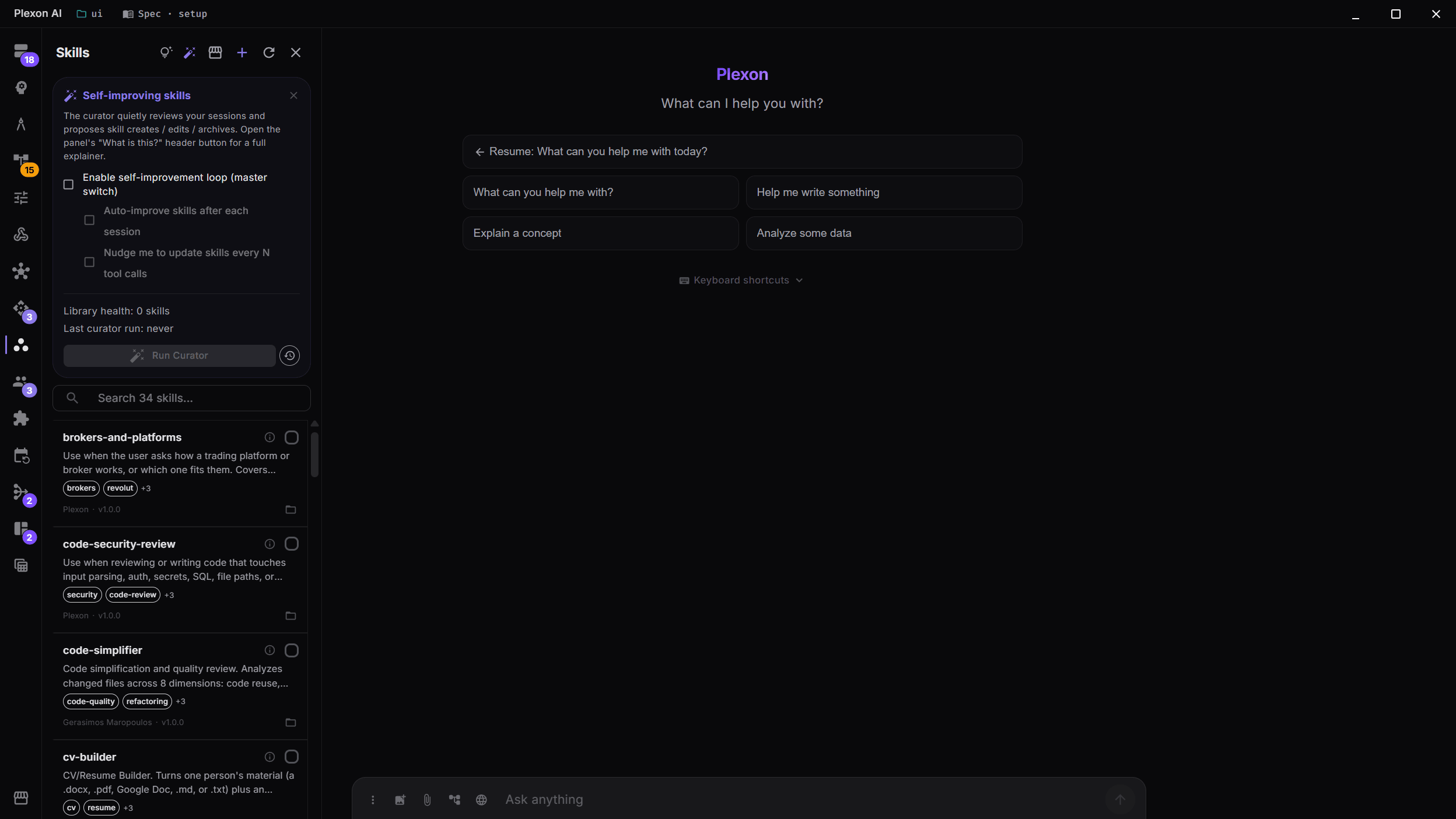
Turn a repeated correction into instructions Plexon can reuse. Open the Skills panel to enable session review or start a review of your own skill library. Self-improvement is off until you turn it on.
What happens in this clip
- The Skills panel lists your library with its usage.
- Open the self-improving panel from the header.
- One master switch turns the improvement loop on.
- Under it, choose automatic improvement after each session, a nudge every so many calls, or a schedule.
- A correction goes back into the skill file, so the next run already knows. You decide whether that needs your approval.
Related features
Keep instructions you will use again
A skill is a set of reusable instructions. If you repeatedly correct the layout of a report, Plexon can save that preference as a skill for future reports. Turn on self-improvement in the Skills panel and enable session review to let it look for useful additions and updates.
- Self-improvement is off until you enable it
- Session review can propose new skills and changes
- Review the resulting instructions before relying on them
Review the skills you created
The curator is a helper that reviews your own skill library. Start it with Run Curator in the Skills panel. It uses the library and its usage history to find instructions worth updating or archiving.
- Start a library review when you need one
- See when a review is running or finished
- Bundled skills and skills installed by plugins are excluded
Protect instructions you want to keep
Pin a skill to protect its instructions and supporting files from AI edits and deletion. Both session review and library review respect the pin. You can keep using the skill and edit it yourself in the Skills panel.
- Pin a skill from its Usage dialog
- Unpin it to allow AI changes again
- Pinned skills stay out of inactivity archiving
See the results of a review
Open Curator history from the Skills panel to see when each library review ran, its result and the change in the number of skills. Return to the Skills panel to inspect the instructions themselves.
- Open past curator runs
- Review their status, duration and skill counts
- Inspect individual skills in the Skills panel
Approve changes and keep a record
Skill changes and persona proposals wait in the Proposals list until you approve them. Each approved change is recorded with what changed, when, and which skill or persona it touched, and the list keeps them under History. Turn on Tune personas after sessions on the same card and Plexon reviews a persona by itself after a session, at most once a day for each persona and only when something went wrong since its last review.
- Approved proposals stay listed under History
- Tune personas after sessions is off until you turn it on
- At most one automatic review per persona a day
- No new problems since the last review means no review
Your review settings
Choose what runs
Enable self-improvement and session review separately. Library curator reviews start from Run Curator; automatic interval scheduling is not available yet.
Keep your instructions intact
Pin a skill to protect it from AI changes and inactivity archiving. You can still use it and edit it yourself in Skills.
Check past reviews
Curator history records previous runs and their results. Use it to review what changed in your library.
Understand the access
Reviews use your instructions and relevant work history. When an online AI service handles a review, that content is sent to the service and the run uses AI allowance.
Repeat the work with a workflow
A skill holds the instructions. A workflow is a routine Plexon follows, such as preparing a weekly report. Choose when the routine starts and which steps it runs.
Explore WorkflowsConnects to
Nothing here works alone. See the whole map for how the pieces fit together.
Where it goes
This extends Skills & Tools.
A curator agent saves new entries, refines existing ones and retires the stale, in that same library.
Seen in these jobs