Flows
Repeating Work,With a Pause Button
Ask Plexon to reply to every unread message, file a folder of invoices, or check something every few minutes, and it puts a card in the chat. The card counts what went through and what did not, with the reason for each, and gives that job its own pause and stop. You can hold one job, let the rest carry on, and get the summary anyway.
What happens in this clip
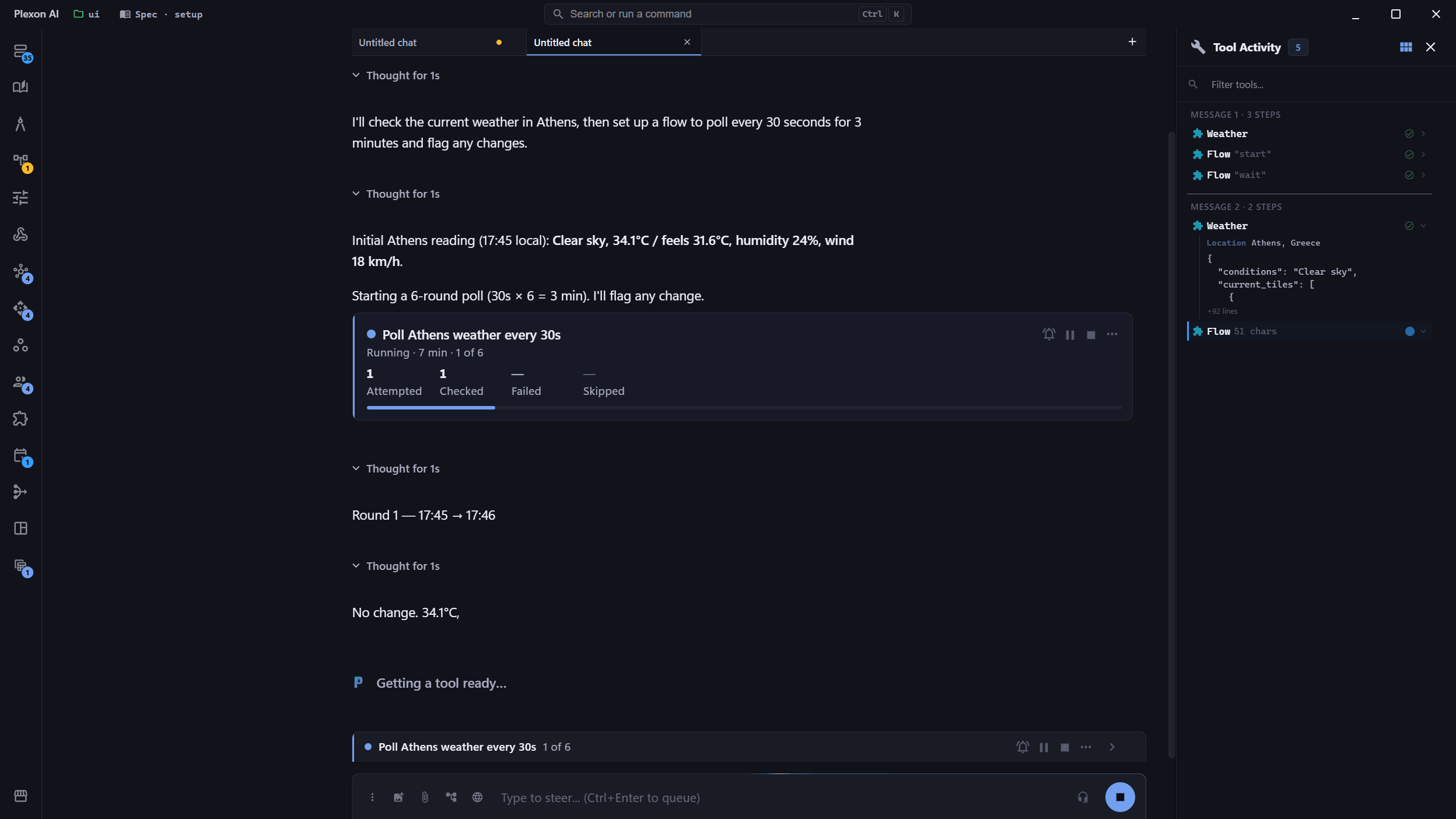
- Ask for something to be checked again and again, in this case Athens weather every thirty seconds.
- The repeating job gets a card in the chat.
- The card counts attempts, checks, failures and skips as they happen.
- It carries its own pause and stop, and stays reachable an hour later.
- Ending the job leaves the conversation open.
Related features
Ask for something repetitive
Anything that repeats an action across a list, or checks something on a timer, gets a card. It names the job, counts each attempt as it happens, and shows what it is working on right now. You keep reading the conversation; the card keeps the tally.
- "Reply to everyone who messaged me on WhatsApp today"
- "Check the weather in Athens every 30 seconds and tell me if it changes"
- "Message all 40 people on this list and tell me who bounced"
- "Watch my inbox and tell me when the signed contract comes back"
Pause it without stopping the conversation
Pause holds the next action until you resume. Anything already in flight finishes first, so pausing mid-send never leaves half a message somewhere. Stop refuses everything after it and asks Plexon to write up where things got to. The Stop button in the composer ends the whole turn instead. The finished steps stay in the chat.
- Pause and resume, without ending the turn
- Stop lets the current item finish, then stops. Press it again to stop now
- The composer Stop ends everything at once and keeps the finished steps in the chat
- Stopping is enforced, not a request: the next action cannot run
Still reachable an hour later
A job can run long after its card has scrolled out of sight. Every live one keeps a row in a strip above the message box, so pause and stop are always one click away, and the arrow jumps you back to the card.
- One row per running job, in the order they started
- Counters and countdowns update in place
- Jump back to any card
- A job that finishes cleanly clears itself off
See what failed, and why
Failures are grouped by reason rather than listed one by one, so seventeen of them usually read as two lines. Retry asks Plexon to have another go at only the ones that did not work, leaving everything already done alone.
- Grouped by cause: "Not on WhatsApp", "Media upload failed"
- The item that failed is named, not just counted
- Retry covers only the failures
- The card keeps its numbers after the job ends
Waiting, out loud
A job that polls shows the time to the next check and counts down. Check now skips the wait. A quiet tick marks each completed check, even with the job running in another window. The sound is on by default and can be muted per job.
- A live countdown to the next check
- Check now, instead of waiting it out
- A sound on each check, off with one click
- Ask to keep it running and Plexon offers to put it on a schedule
What the Card Gives You
Its Own Pause
Per job, not per conversation. Hold one thing while Plexon carries on with everything else.
Counted As It Goes
Attempted, succeeded, failed, skipped. Live, with a progress bar whenever the size of the job is known.
Reasons, Not Just Counts
Every failure carries the reason it failed and the item it failed on, grouped so a long list stays readable.
Visible Waiting
A countdown to the next check, and a button to skip it. No more guessing whether anything is still happening.
Several At Once
Run more than one job in the same conversation. Each keeps its own card, its own counters, and its own controls.
A Quiet Tick
A sound on each completed check, on by default. It ticks per round, never per item, so a long send stays silent.
Retry Only the Failures
Have another go at what did not work without redoing what did. Plexon already knows which was which.
Stop Means Stop
The refusal happens where the action would have run, so a stopped job cannot send one more message on its way out.
Connects to
Nothing here works alone. See the whole map for how the pieces fit together.
This one is taught in step 4 of 8: let it act on real files.
What feeds it
Dynamic Workflows renders into this.
Repeating an action across many things shows as a counted card you can pause.