Local Memory
Knowledge GraphOver Your Notes
Plexon keeps what it learns about you as plain markdown notes. The knowledge graph reads those notes and connects them, so a question about a client is one question rather than six file opens. Every fact comes back with the note and line it was read from. Nothing is merged, hidden, or sent anywhere without you.
What happens in this clip
- The memory graph opens on what Plexon knows about your work.
- Thirty-three things and a hundred and two connections, none of them drawn by hand.
- Click a person and the graph centres on them.
- Everything further away folds behind a breadcrumb you can step back through.
- Every node is a note you can open and correct.
Related features
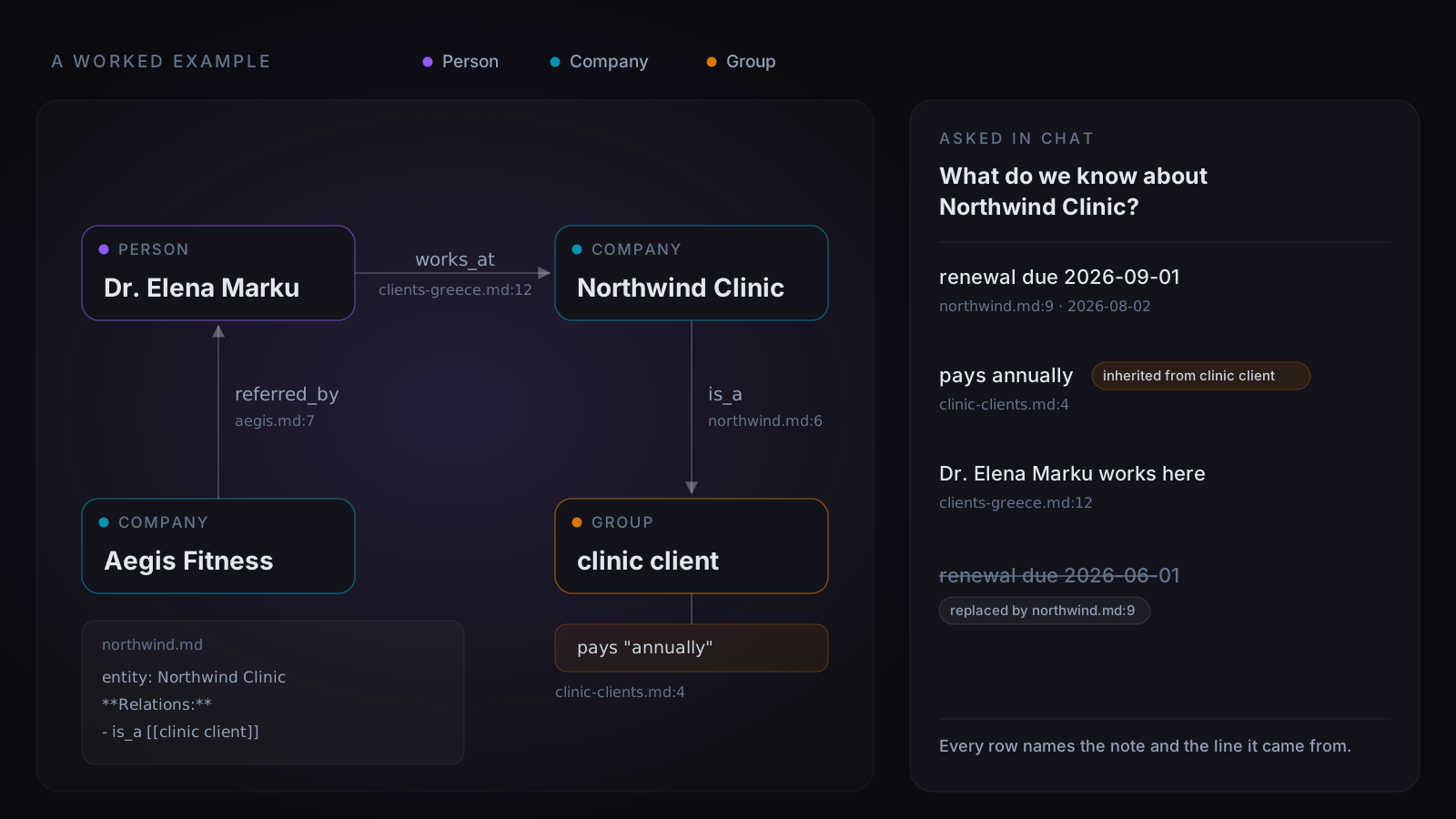
Four Notes, and What the Graph Makes of Them
Northwind Clinic and everyone around it are invented. The mechanism is not. Four notes mention each other, a Relations line in one of them states a membership outright, and the graph turns both into edges. Ask about the clinic and the answer arrives as sourced rows rather than five files to open. Paying annually is true of every clinic client rather than of this one, so the row says which. The June renewal date lost to a newer note and stays on screen struck through, because the newer note is not always the right one.
- A Relations block in markdown becomes an edge, one line per relation
- Every fact names its note, its line, and the date the note carries
- A fact that belongs to a group arrives marked with the group
- A replaced fact stays visible alongside what replaced it
- Every name in the picture is invented; the shape is what the app builds
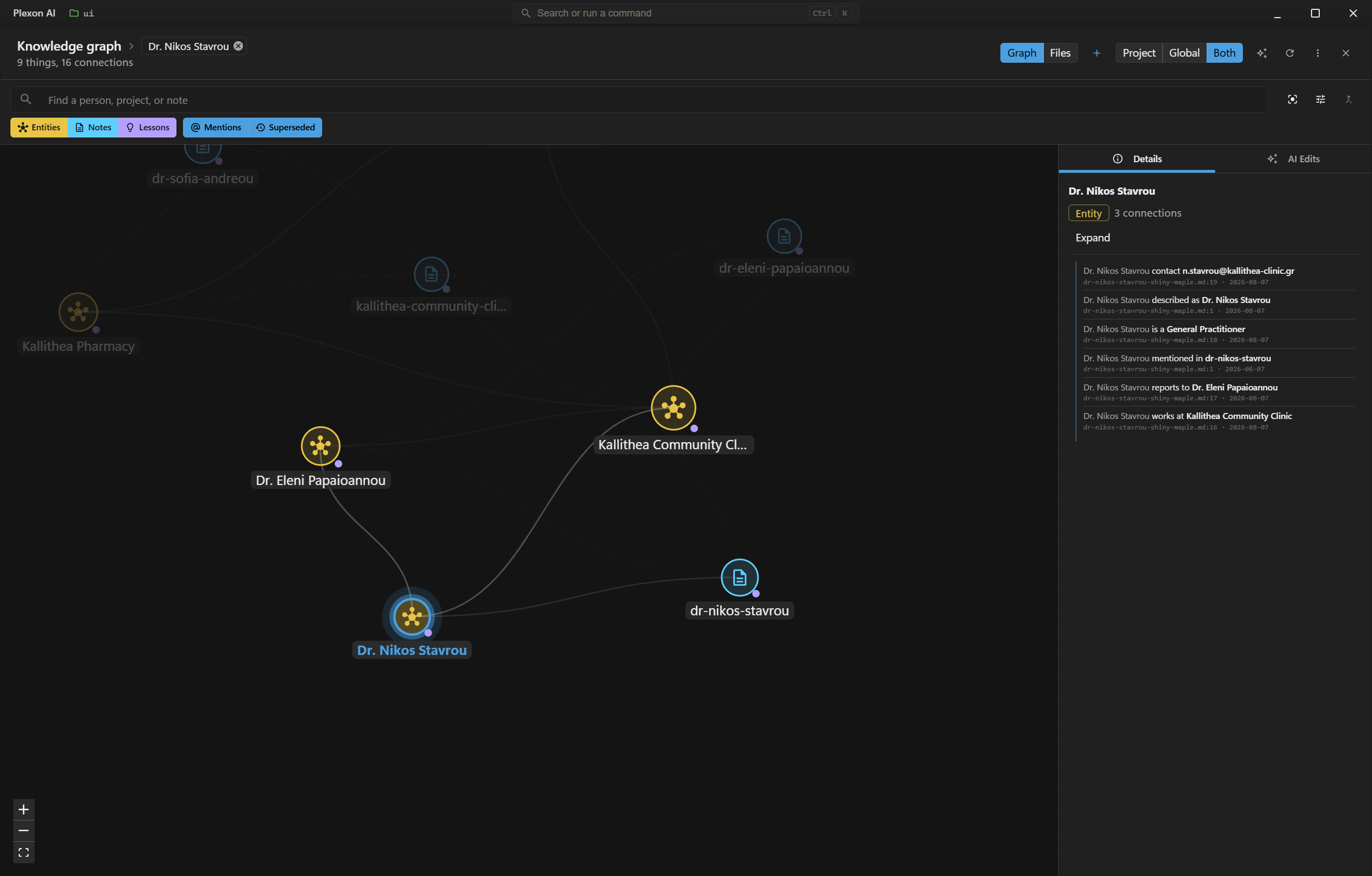
See the Shape of What You Know
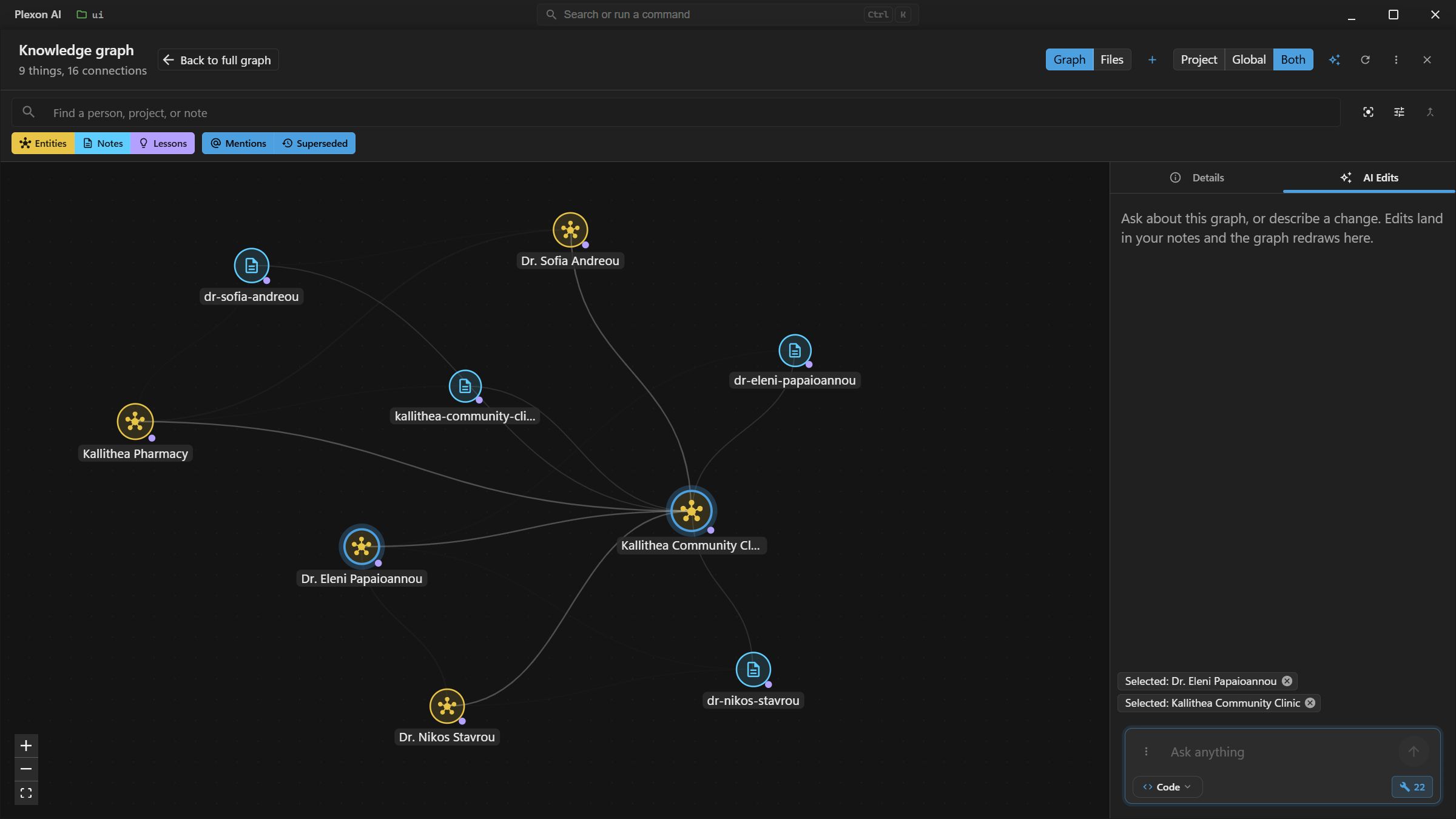
The graph is also something to look at, not only ask. Open it from the memory pill under the message box, or ask Plexon to show it and the same view opens, filtered to whatever was asked for. Every entity, note, and lesson lands as a node, connected by the relations the notes state. Pick a person from the search box or from Ctrl+K and the map re-centres on them: their node is ringed, what they touch stays lit, the rest of the picture fades back, and their facts fill the panel on the right. The crumb beside the title says who you are looking at, and clearing it brings the whole map back.
- Open it from the message box, the command palette, or a link in a reply
- Searching a name lands on that person, not just a highlight in a crowd
- Entities, notes, and lessons each draw as their own kind of node
- The filter chips carry each kind’s colour, so they double as the key
- A faint line means mentioned in; a solid one means a stated relation
- AI Edits is a docked tab: it changes the notes, and the map redraws on its own
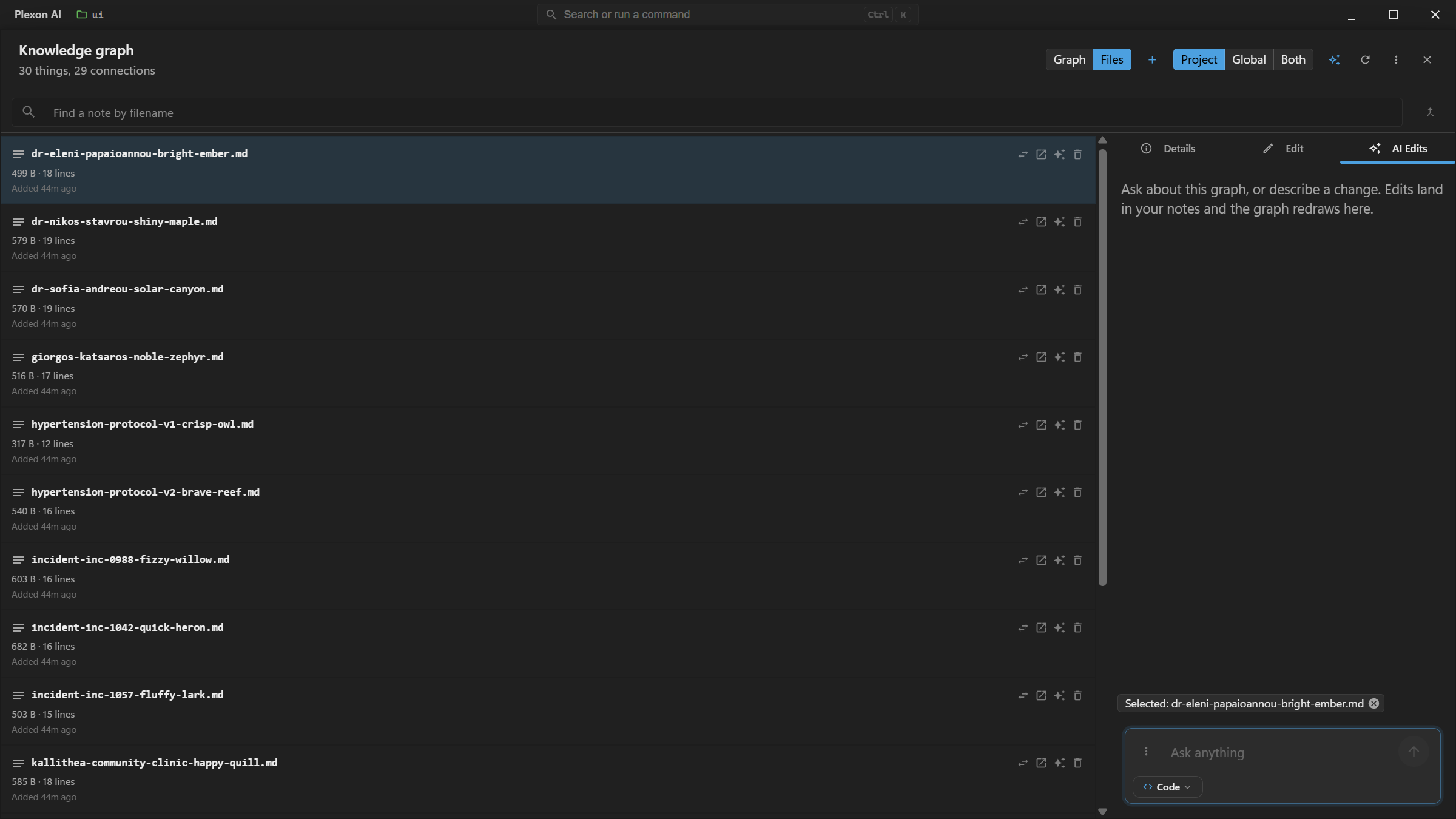
Every Note, Not Only the Connected Ones
The map draws what connects, and caps itself on a large collection so the picture stays readable. The Files view is the complete list: every note by filename, with its size, line count, and when it was added or changed. Pick one and the same side panel fills in, with an Edit tab holding the raw markdown. Select several to delete them together, or move a note between this project and your account without leaving the window.
- The complete listing, with no cap and no ranking
- Move a note between project and global, one note or the whole scope
- Select several and delete them in one action
- A note picked here stays picked when you switch back to the map
- Ctrl+K searches both: notes by filename, people and facts by name
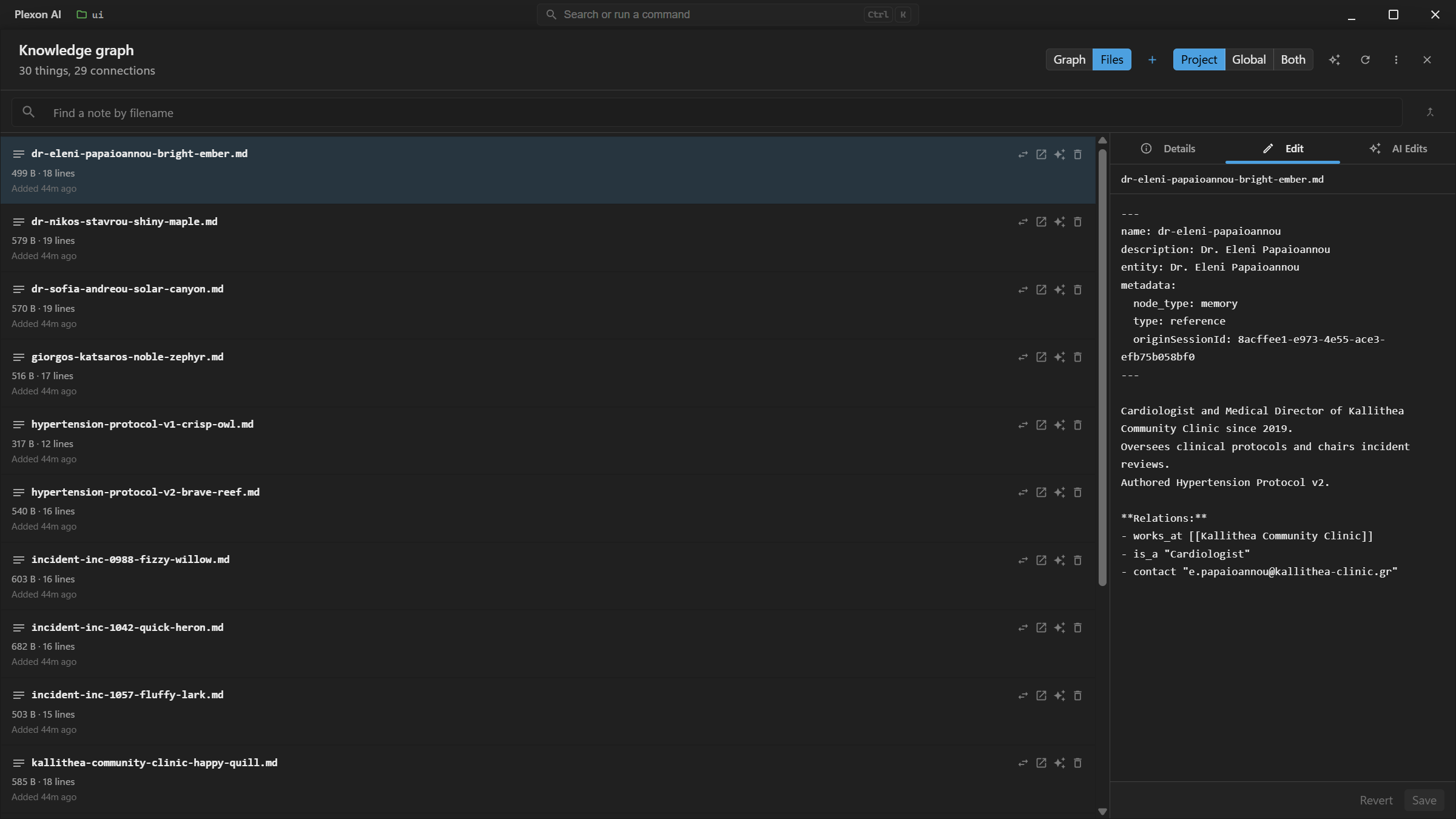
It Is Just Markdown, and You Can Say So
Open any note and the raw file is right there: frontmatter at the top, your prose in the middle, and a Relations block where the structure lives. Nothing is hidden in a database. If something else writes to the same note while you have it open, saving shows you both versions and lets you pick, rather than quietly winning.
- Frontmatter, prose, and relations in one plain file
- The description line is what the AI reads to decide whether to open the note
- A conflict shows both versions instead of overwriting one
- Edit here, in your own editor, or by asking. All three write the same format.
Three Sentences and You Have a Map
Nothing has to be set up. Say something worth keeping and Plexon writes the note; the map draws itself from what the notes say. The fastest way to see it working is to give it a few related facts and then ask a question that spans them. Below are prompts that produce a connected graph rather than three loose dots, because each one mentions something the last one already introduced.
- “Remember that Elena Vasquez is a cardiologist at Meridian Family Clinic.”
- “Remember that Meridian Family Clinic runs a Saturday vaccination clinic, and James Okafor is the pediatrician there.”
- “Remember that James Okafor worked at Gennimatas General Hospital before 2025.”
- Then ask: “What do you know about Meridian Family Clinic?”
- Then open the map from the icon under the message box, and the three of them are joined up
Ask Once Instead of Opening Six Notes
Notes accumulate faster than anyone re-reads them, and the thing you need is usually spread across four files with slightly different spellings of the same name. The graph reads every note in the scope, connects what they mention, and answers the question in one pass. The answer is a walk over text already on your disk, so it costs no tokens and touches no network.
- One question in place of several file opens and a guess about the filenames
- Project memory, global memory, or both merged into one answer
- Relations followed one hop by default, three at the most
- Facts come back ranked by how well the notes back them, and one reached through something else names the step it came through
- Answers in chat, in a dashboard widget, or as a workflow step
- When the question could mean several people it asks which one instead of picking
Every Fact Names the Note and the Line
A fact with no source is a rumour. Each row carries the file it was read from, the line number in that file, the date on the note, and whether the note stated it outright or Plexon derived it from a link or a phrase. A fact whose provenance is incomplete is refused when the graph is written, and a graph file holding one is rebuilt instead of served.
- Sources read like clients-greece.md:12 · 2026-08-05
- Stated means the note says it in as many words
- Derived facts are labelled, and worth less weight than stated ones
- Dates come from the note, never from a clock
- Click through to the note in the Files tab and read the line yourself
Your Markdown Stays the Only Copy
The graph holds nothing your notes do not already say. It is an index, and it is disposable: Forget the graph and the next question rebuilds it from the same files. Two rebuilds of an unchanged set of notes produce byte-identical output, which is what lets the markdown stay authoritative rather than merely being called authoritative.
- Forget the graph in one action; nothing is lost
- Rebuilds are byte-identical, and a test in the repo proves it
- No code path can write a fact your notes do not state
- Edit a note in any editor and the graph follows on the next read
- Notes stay plain markdown you can read, diff, and move elsewhere
Or Start Over Completely
Forget throws away the index and keeps the notes. The action under it throws away the notes as well, for one scope at a time: every note in this project, or everything your account remembers, with the index, the connections and the merges you confirmed. You type the word delete to confirm it, the other scope is untouched, and there is no undo.
- One scope per run, named in the confirmation before you commit
- A project clear never reaches what your account remembers, or the reverse
- The derived files go with the notes, so nothing is left to answer from
- Anything else in the folder that Plexon did not write is left alone
It Proposes a Merge. It Never Merges.
Δρ. Ελένη Παπαδάκη and Ελένη Παπαδάκη are probably one person. Plexon says so and waits. A wrong merge is silent and close to impossible to spot months later, so the proposal shows both sides with their evidence and you press Same person or Different. Names are compared with honorifics set aside; facts are never compared, because two people at one clinic are still two people.
- Each side shows the name, the fact count, and the note it came from
- Same person or Different, and a rejection sticks
- A short name that sits inside more than one longer name is flagged ambiguous
- Accepting folds the smaller entity into the one more of your notes agree on
- The decisions you make survive both a rebuild and a Forget
Greek Names Fold. Two People Do Not.
Ιωάννης and Ιωαννης are one person, and final sigma does not fork Νίκος from Νίκοσ. Identity is a folded form that decomposes the text and drops combining marks, so an accent typed one day and skipped the next never splits a client in half. Two different people who happen to share a first name keep two entries, which is the half that a looser rule gets wrong.
- Accents and final sigma fold to one identity
- Names are never slugified, which would collapse every Greek name to the same id
- Two people sharing a first name keep separate entries
- The longest matching name wins, so a full name is never shadowed by a partial
- Titles such as Δρ. and κ. are set aside for the comparison only
A Contradiction Stays on Screen
When a newer note claims to replace an older fact, the older one is struck through and labelled with what replaced it. It is still there, still readable, still sourced. Hiding it would settle the question on your behalf, and the newer note is not always the right one. Facts that belong to a class arrive marked with the class name, because "clients pay annually" and "this client pays annually" are different claims.
- A replaced fact is struck through and labelled, not removed
- Class facts arrive marked inherited from, with the class named
- A fact the entity states about itself beats the class version outright
- Both readings stay visible and you decide which one is current
- Inheritance walks up three levels and stops
You Say It in a Sentence. Plexon Writes the Structure.
"Remember that Dr. Jay is CMO at XCompany and signs the renewals" is the whole interface. Plexon works out who the note is about and what relates to what, then writes that into the file as ordinary markdown you can open, diff, and edit anywhere. You never type brackets or frontmatter. The format is documented if you want to write one by hand, and a note you wrote yourself is read exactly the same way, which is most of the reason the storage is kept boring.
- Plain English in, structured markdown on disk
- Facts attach to the person the note is about, not to the file
- Ordinary bullet lists stay prose, so one note does not become a hundred facts
- A link from one note to another is already an edge
- AutoDream adds the same structure while consolidating, so writing nothing also works
It Reads the Draft You Are Already Typing
Start writing a message and Plexon names the two things it can resolve for you: who you mean, and which stretch of time. A name comes back in the spelling your notes use, carrying the note behind it, and clicking it drops that spelling into the box. "last month" comes back as two dates. Anything you already typed in full gets no chip at all, because reading your own sentence back to you is not help. The pass is deterministic and makes no model call.
- A person or company your notes know, and a period like last month
- Click a resolved name to put your own spelling of it in the draft
- last month and τον περασμένο μήνα both become a date range
- The same draft on the same day always resolves the same way
- Pre-fill only. Nothing runs until you press send
It Shows Its Work
Pick anything on the map and its facts open beside it, each one carrying the note and the line it was read from. Switch between this project and your account, or view both at once. Merge proposals sit apart from the rest, because they are the only thing in there waiting on a decision from you.
- Entities with their kind, their fact count, and the notes behind them
- Search by name, and switch between project and global memory
- Open an entity and every fact shows its note, its line, and its date
- Rebuild re-reads the notes; Forget the graph clears it and keeps your merges
- Reachable from the message box, from the command palette, or from a link in a reply
Nothing Leaves the Machine, and Off Is One Switch
The graph gathers personal detail that used to be scattered across separate files, so it is never attached to a request and never sent anywhere. It is on by default. Settings, Chats and memory, Memory turns it off, which drops the tool from the AI entirely and quiets the panel. Your notes are untouched either way, and turning it back on rebuilds from the same files.
- The graph never rides a request to a server
- Connect my notes, in Settings, Chats and memory, Memory, is the off switch
- Off removes the tool from the AI and stops the draft suggestions
- Forget clears the graph and keeps the merges you confirmed
- Deleting the memory folder takes the graph with it
Under the Hood
Provenance on Every Row
File, line, date, and whether the note stated it or something derived it. A triple with incomplete provenance is refused on write, and a graph file containing one is treated as tampered and rebuilt rather than served as if it were whole.
Rebuild Is Free
Extraction is a pure function of the files and the alias table, so two rebuilds of an unchanged corpus produce identical bytes. There is no migration path for a fact: anything that needs remembering writes markdown.
Triples, Not Tables
A relation, an attribute, and a class membership are the same shape: subject, predicate, object. One type runs through the store, the query engine, and the tool, so a new kind of fact needs no schema and no upgrade step.
A Merge Needs a Person
Suggestions compare display names with honorifics set aside, never facts. Accepting one folds the smaller entity into the larger. The decisions live in their own file beside the graph, so neither a rebuild nor a delete can lose them.
Greek Folds Correctly
Canonical ids decompose the text and drop combining marks, so accents and final sigma never fork one person into two. Slugifying would strip every non-Latin character and collapse every Greek name into the same empty id.
Local, and Deletable
Two files inside the memory folder they derive from: the graph, which is disposable, and the identity decisions you made, which are not. Nothing is attached to a request. Deleting the folder takes both with it.
Bounded, and Honest About It
20,000 facts, 4,000 entities, 400 facts per source file. A build that hits a cap records what it dropped, and an answer from a capped graph says so instead of reading as complete.
Bindable in Boards and Workflows
The answer is a pure read of markdown already on disk, with no network, no mutation, and no state of its own. A board can show what is known about a client, and a workflow can look someone up before drafting to them.
Drawn, Not Just Answered
The same read-only view a person opens is what Plexon calls to reason over structure too: entities, notes, and lessons as nodes, stated relations as edges, literals and inherited facts left out entirely. Every picture says how much it capped, on both axes.
Connects to
Nothing here works alone. See the whole map for how the pieces fit together.
What feeds it
AutoDream Memory Consolidation feeds this.
The consolidation pass records how your notes connect, and those connections are the graph.
Where it goes
This feeds AI Chat & Modes.
Ask about a client and every fact comes back with the note and the line it was read from.
This feeds Command Palette.
The people and facts in your knowledge map are searchable from the palette.