Workflow Acceleration
PromptSuggestions
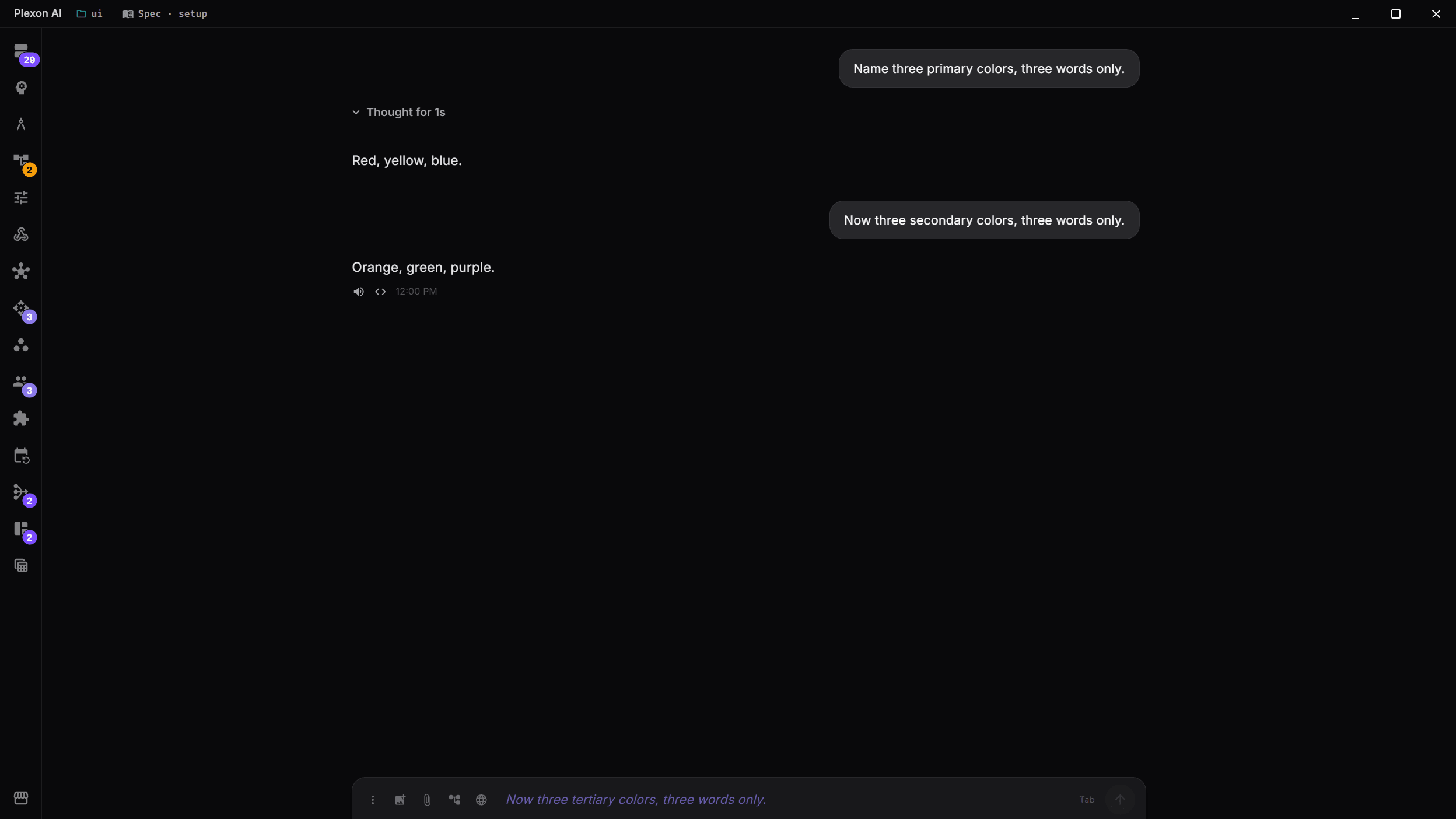
After every AI response, Plexon predicts your next message and shows it as placeholder text. Press Tab to accept or just start typing to dismiss. Common workflows like "run the tests", "commit this", or "push it" become single-keystroke actions.
What happens in this clip
- Ask a question and read the answer.
- Ask a second question and read that answer too.
- After the second answer, the question you were about to type is already in the box, greyed out.
- There is nothing to click and nothing in the way. Ignore it freely.
- Press Tab once and it becomes your message, still yours to edit before it goes anywhere.
Related features
Predictive Follow-Up Suggestions
After the AI finishes responding, Plexon predicts what you'd naturally type next and shows it as placeholder text in the input field. Press Tab to accept, or just start typing to dismiss. It feels like the AI is reading your mind.
- Appears as styled placeholder text after each AI response
- Press Tab to fill the input, then Enter to send
- Start typing anything to dismiss instantly
- Automatically cleared when a new AI response begins
Async & Non-Blocking
Suggestion generation runs in a background goroutine after the completion event is sent to the UI. It never delays the AI's response or blocks the input. If the suggestion takes too long or fails, nothing happens. Silence is better than a bad suggestion.
- Fires asynchronously after each successful completion
- Uses the same provider and model for maximum prompt cache hits
- Two-minute timeout with graceful failure (no error shown)
- Reuses conversation context so cached input tokens are ~90% cheaper
Aggressive Filtering
Every suggestion passes through a strict filter before reaching the UI. The goal is high precision: only suggestions that make you think "I was just about to type that" get through. Bad suggestions are silently discarded.
- Rejects evaluative phrases ("looks good", "thanks", "great")
- Rejects AI-voice patterns ("Let me", "I'll", "Sure")
- Rejects questions, multi-sentence responses, and formatting
- Allows single words only from a curated set: yes, no, continue, commit, push, deploy, done
- Maximum 12 words / 100 characters per suggestion
Smart Suppression
Suggestions aren't generated when they wouldn't be useful. Early in a conversation, during sub-agent orchestration, in Plan mode (where you're planning, not executing), or after errors, the feature stays silent.
- Waits until at least 2 assistant turns before suggesting
- Suppressed during sub-agent orchestration runs
- Suppressed in Plan mode (planning, not executing)
- Suppressed after error responses
Tab-to-Accept Workflow
When a suggestion appears, a small "Tab" hint shows at the right edge of the input field. Press Tab to fill the input with the suggestion text, but it doesn't auto-send. You review it, optionally edit, and press Enter when ready. This matches the safety-first design: you're always in control.
- Tab fills the input without sending
- Edit the suggestion before sending if needed
- Works alongside prompt history (Arrow Up/Down) and @agent mentions
- Suggestion highlighted with primary color italic styling
One-Click Toggle
Don't want suggestions? Toggle them off from the behavior settings menu (right-click the send button). The setting persists in your client.yaml and applies immediately. No restart needed.
- Toggle in behavior settings menu alongside other options
- Persists across sessions via client.yaml
- Enabled by default, disabled with one click
- Per-profile: different profiles can have different settings
Under the Hood
Cache-Optimized
Reuses the same provider and model as the main request. Cached input tokens are ~90% cheaper, making each suggestion cost fractions of a cent.
High-Precision Filter
Multi-layer validation rejects AI-voice, evaluative language, questions, formatting, and meta-labels. Only natural user-style phrases survive.
Keyboard-First
Tab to accept, type to dismiss, Enter to send. No mouse needed. Works alongside prompt history navigation and @agent mentions.
Configurable
Toggle on or off from the behavior settings menu. The setting persists per-profile and applies immediately without restart.
Connects to
Nothing here works alone. See the whole map for how the pieces fit together.
This one is taught in step 2 of 8: have a real conversation.
What feeds it
Adaptive Routing feeds this.
Which suggestions you take reorders the ones you are offered next.
Seen in these jobs