Remote Control
TelegramBot
A Telegram bot that connects to your running Plexon instance. Send text, photos, documents, and voice notes; get formatted answers, images, and files back; manage sessions; and let your workflows ping you. All from your phone.
What happens in this clip
- Open Integrations in Settings and find the Telegram section.
- Connect the bot with the token it asks for.
- Every session becomes reachable from your phone.
- Chat, manage sessions and send images from Telegram itself.
Related features
Refactor the auth middleware to use JWT tokens
✓readFilemiddleware/auth.go
✓editFilemiddleware/auth.go
I've refactored the auth middleware to use JWT. The changes include a new validateJWT() function and updated all route guards.
What's wrong with this UI?
I can see two issues: the button spacing is inconsistent (12px vs 8px), and the text color has low contrast on the light background...
Your AI, in Your Pocket
The Telegram bot connects directly to your running Plexon AI instance. Every message you send through Telegram is processed by the same AI with full access to your codebase, tools, and active session. Responses stream in real time, under one progress message that shows what the AI is doing and collapses to a summary when the reply lands.
- Send text messages and images for AI analysis
- Real-time streaming: responses appear as they generate
- Bidirectional sync: messages show in both Telegram and desktop
- Message queue: messages queue when busy, auto-processed in order
- Authorization by chat ID or Telegram username
Bot Commands
/newCreate a new AI session/switchList & switch between sessions/modeSwitch AI mode (Make, Ask, Auto...)/statusView bot uptime & session info/usageToken usage & cost tracking/stopCancel current AI execution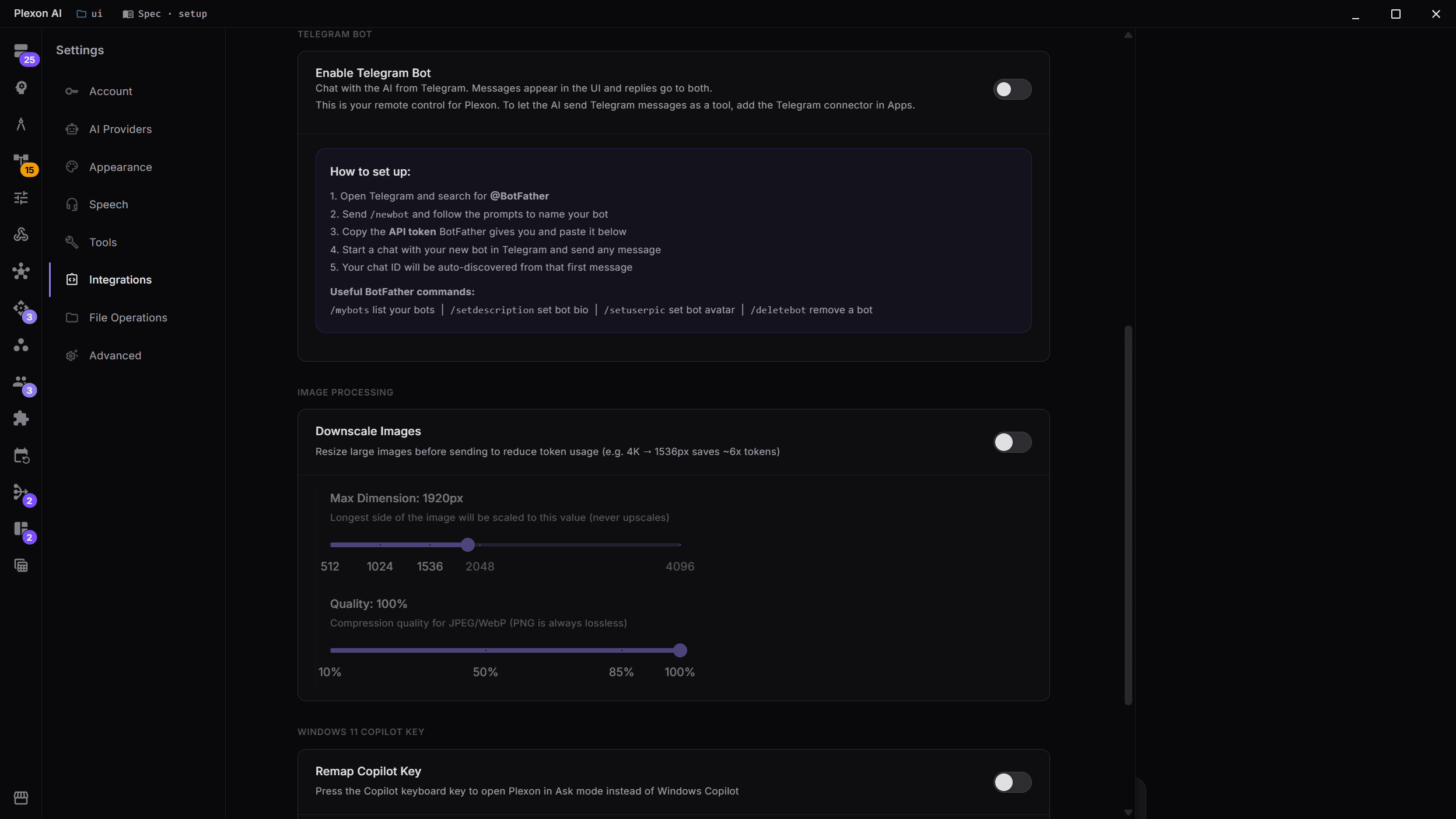
Telegram Bot Settings
Configure the Telegram bot directly from Settings → Connected apps. Toggle it on, paste your BotFather API token, and optionally restrict access to specific Telegram usernames. The chat ID is auto-discovered the first time you message the bot.
- One toggle to enable/disable the bot
- API token from BotFather: paste and go
- Optional username allowlist for security
- Chat ID auto-discovery on first message
- Bot status visible in the Settings panel
Ngrok Tunnel: Preview from Any Device
Plexon AI has a built-in ngrok tunnel tool that exposes your local development server to the internet with a single AI command. Ask the AI to build a website, then tell it to "start a tunnel on port 3000" and you'll get a public URL you can open on your phone, tablet, or share with a colleague. Combined with the Telegram bot, you can direct the AI from your phone, ask it to build and serve a page, then preview the result in your mobile browser, all without touching your desktop.
- Built-in plexon_ngrok_tunnel MCP tool. No setup required
- Auto-installs ngrok if not present on your system
- Start, stop, and list active tunnels via AI commands
- Supports multiple simultaneous tunnels with named sessions
- Regional selection (US, EU, AP, AU, SA, JP, IN)
- Static subdomains for paid ngrok accounts
- Telegram + Ngrok workflow: direct AI from phone, preview on mobile
Quick Setup
Get your Telegram bot running in under a minute. The entire setup happens through Telegram's BotFather. No server configuration needed.
- 1Open Telegram and search for @BotFatherSend /newbot and follow the prompts to name your bot
- 2Copy the API token BotFather gives youPaste it below in Settings → Connected apps → Telegram Bot
- 3Start a chat with your new botSend any message and your chat ID will be auto-discovered
- 4Start chatting!Messages appear in both Telegram and the desktop UI simultaneously
Telegram Bot Capabilities
Image Analysis
Send photos for the AI to analyze: debug UI issues, extract text from screenshots, or get feedback on designs.
Live progress
One message updates as the AI works: each tool with a short preview, plan steps, waits, sub-agents. It collapses to a one-line summary when the reply arrives, and a failed step stays visible.
Locked to you
The first person to message the bot is pinned by numeric user ID, and everyone else is turned away. Set allowed and owner IDs explicitly when you want to.
Documents and files
Send a PDF, CSV, or spreadsheet and the AI reads it. What it makes comes back the same way: pictures as photos, a generated clip as a video, a song as audio you can scrub, everything else as a document.
Rich replies
Answers render with bold, inline code, code blocks, and clickable links. The slash menu and quick-action keyboard are one tap away.
Workflow alerts
Your automations can message you on Telegram: a workflow step, a completion notice, or a reply to a Telegram-triggered run.
Ngrok tunnels
Expose local servers to the internet via AI commands. Preview your dev site on mobile while directing the AI from Telegram.
Session management
Create, switch, and manage AI sessions from Telegram. Full /new, /switch, /mode, /status, /usage commands.
Voice in and out
Send a voice note and the bot transcribes it with Plexon Voice, or on your own machine, which is what happens for languages the cloud engine does not cover, then answers. Turn on /voice to hear spoken replies. No API key needed.
Connects to
Nothing here works alone. See the whole map for how the pieces fit together.
What feeds it
AI Chat & Modes renders into this.
Every session is reachable from your phone.
Dynamic Workflows renders into this.
A workflow can ping you where you already are.