Founder
Have Monday’s numbers before you open the laptop
“Monday starts with an hour of pulling numbers out of five different tools.”
A scheduled workflow with no AI in it computes the numbers once. The board reads what it produced, and the summary arrives on your phone.
Turn on the Founder persona
It brings its own board, its workflows, and the connectors the role needs. You sign into each one with your own account during install.
Install the Stock Trader persona from the marketplace, switch to it, and open the live Trader Cockpit board it brings along. What happens in this clip
- Find the Stock Trader persona in the marketplace and install it.
- Switch to it from the persona picker.
- The welcome screen and the starter prompts change with it.
- It brings its own dashboard, the Trader Cockpit, already live.
- Switching back leaves the persona installed for next time.
Connect the tools the numbers live in
Your CRM, your billing, your analytics. The assistant works inside them with your permissions, not a platform’s.
Search the marketplace for an app you already use, see what the connector will be able to do before you install anything, then link it to your own account. What happens in this clip
- Open the marketplace with Ctrl+K.
- Search for an app you already use.
- The card says what the connector will be able to do before you install anything.
- Install it and the setup starts.
- Link it to your own account, in this case by scanning a code once. Then just ask.
Build the pulse with no AI in it
Tool steps call each connector directly and transform steps do the arithmetic. The numbers come out the same every time because nothing is being reasoned about.
Try this
Build a workflow that pulls <the numbers you track> from the connectors I signed into and does the arithmetic in transform steps. No AI steps at all. Show me the canvas before you save it.
An empty canvas to a working workflow: put it on a clock, add steps from the rail by name, fill in the fields each tool asks for, branch on what it found, then save it and run it. Then the same thing from one sentence, drafted for you to read before it can run. What happens in this clip
- Start from an empty canvas.
- Put the workflow on a clock.
- Add steps from the rail by name, then fill in the fields each tool asks for.
- Branch on what the previous step found.
- Save it and run it. Then the same workflow again from one sentence, drafted for you to read before it can run.
Put it on a clock
Monday at 07:00. Every run is snapshotted, so a Monday you were away is still there in the run history with the numbers as they were.
Try this
Run that workflow every Monday at 07:00, and disable it on its own if it fails three times in a row.
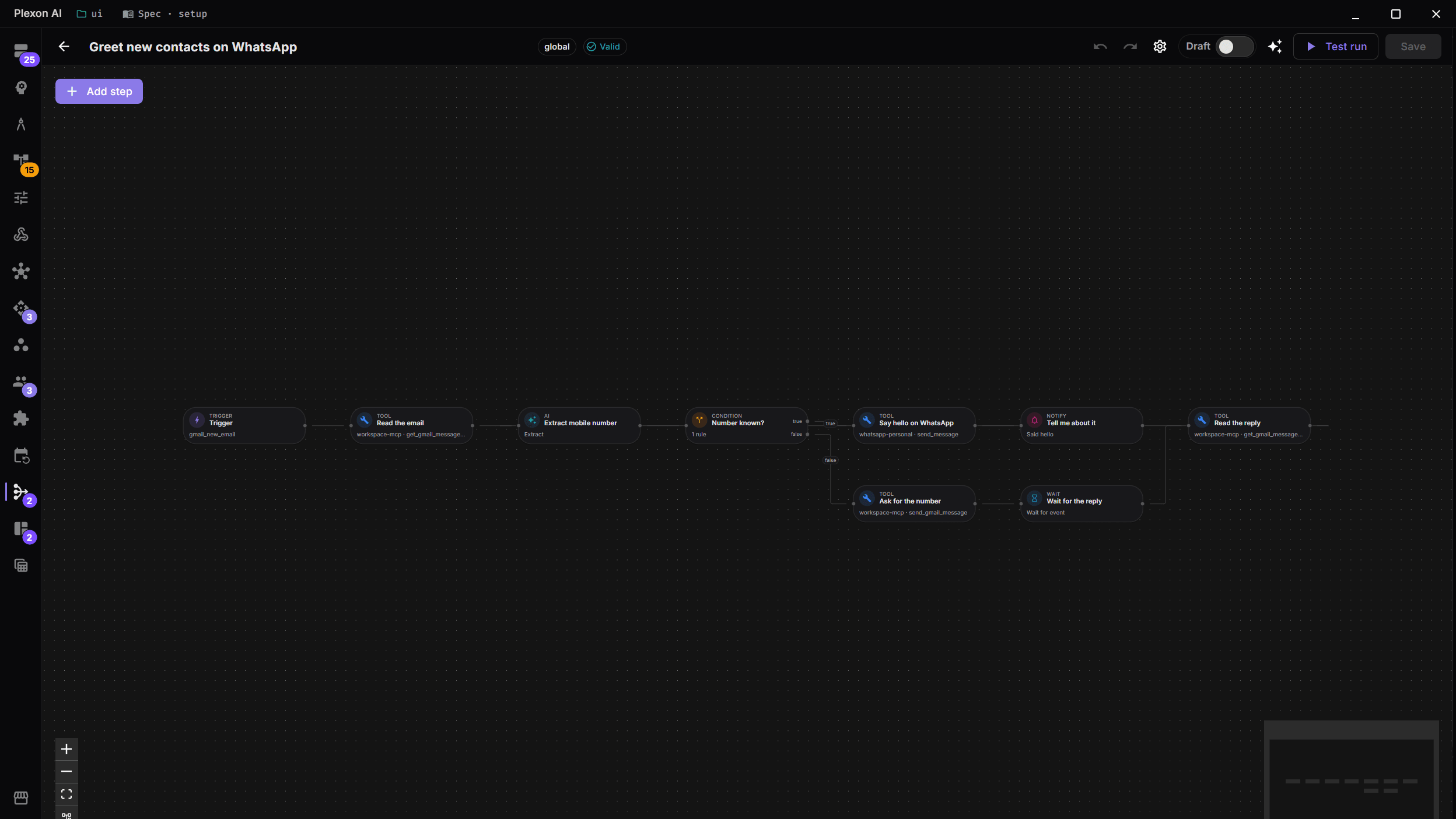
Point the board at what the run produced
A workflow-bound widget shows the most recent run’s output. Opening the board reads that, so it does not go back out to five APIs while you wait.
The Weather board opened in edit mode, widget by widget: the board parameter every card reads, where each one gets its data, and how often it refreshes. What happens in this clip
- The Weather board opens in edit mode.
- A board parameter at the top is read by every card on it.
- Each widget shows where it gets its data.
- Each one carries its own refresh interval, in plain language.
- Change the parameter and every widget re-runs.
Ask for runway as a range
A forecast written from intuition looks exactly like a correct one. This comes back as a range with the odds attached, and reports the seed that reproduces it.
Try this
Work out my runway from the numbers on that board. Give me a range with the odds attached rather than one figure, and report the seed that reproduces it.
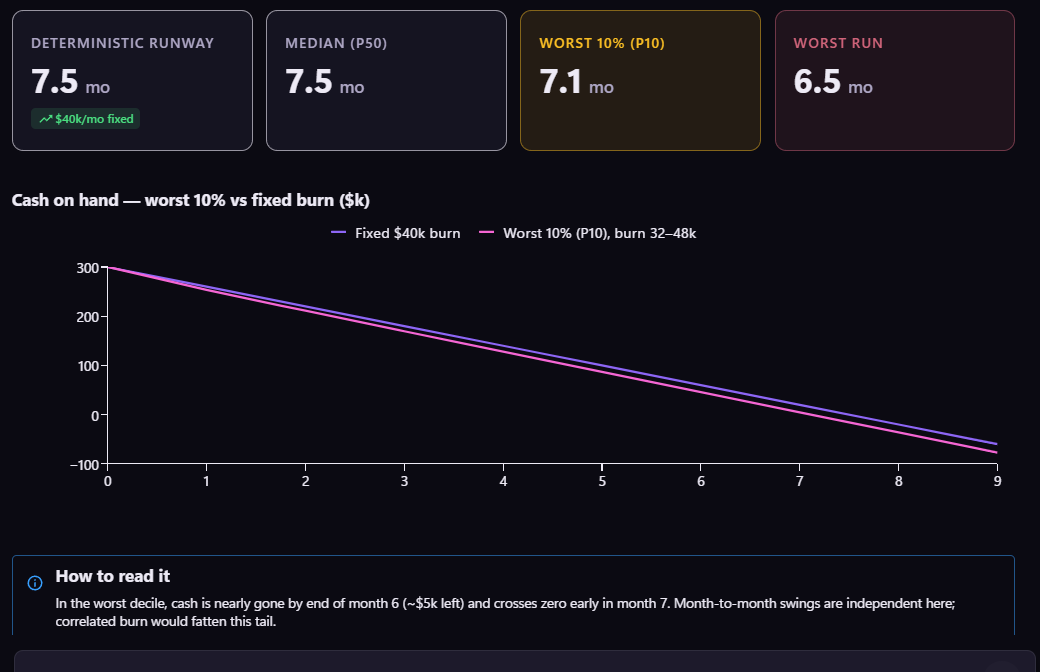
Read it on your phone
The workflow’s last step is a message. Reply to it and you are in the same session the board is built from.
What you end up with
A Monday message, a board that is already current when you open it, and a runway figure with the odds attached.
Download PlexonAlso for founder
Grow an Instagram audience and answer the leads without living in the inbox
A workflow that ships with Plexon follows a few people a weekday from a rotating audience, likes a post or two, messages the ones who follow back and answers the replies that look like leads from facts you wrote. A board shows who is waiting for you.
Follow the right people on X and answer the leads without living in the inbox
A workflow that ships with Plexon follows a few people a weekday from searches you choose, likes their newest post, messages only the ones who follow back and answers the replies that look like leads from facts you wrote. A board shows who is waiting for you.
Get the numbers from your signed-in dashboards in one morning message
A scheduled workflow opens the pages you name in a hidden browser window, on your own signed-in accounts, reads the figures and sends you one message. It opens only the sites its step lists.