Starter Personas
A saved rolefor the work you do
A persona is a saved role with its own instructions and tools. Choose Writer to edit a report or Designer to review a page. Open Settings, choose Browse Personas, and pick one of the 12 included roles. Pro and Premium let you create your own.
What happens in this clip
- Find the Stock Trader persona in the marketplace and install it.
- Switch to it from the persona picker.
- The welcome screen and the starter prompts change with it.
- It brings its own dashboard, the Trader Cockpit, already live.
- Switching back leaves the persona installed for next time.
Related features
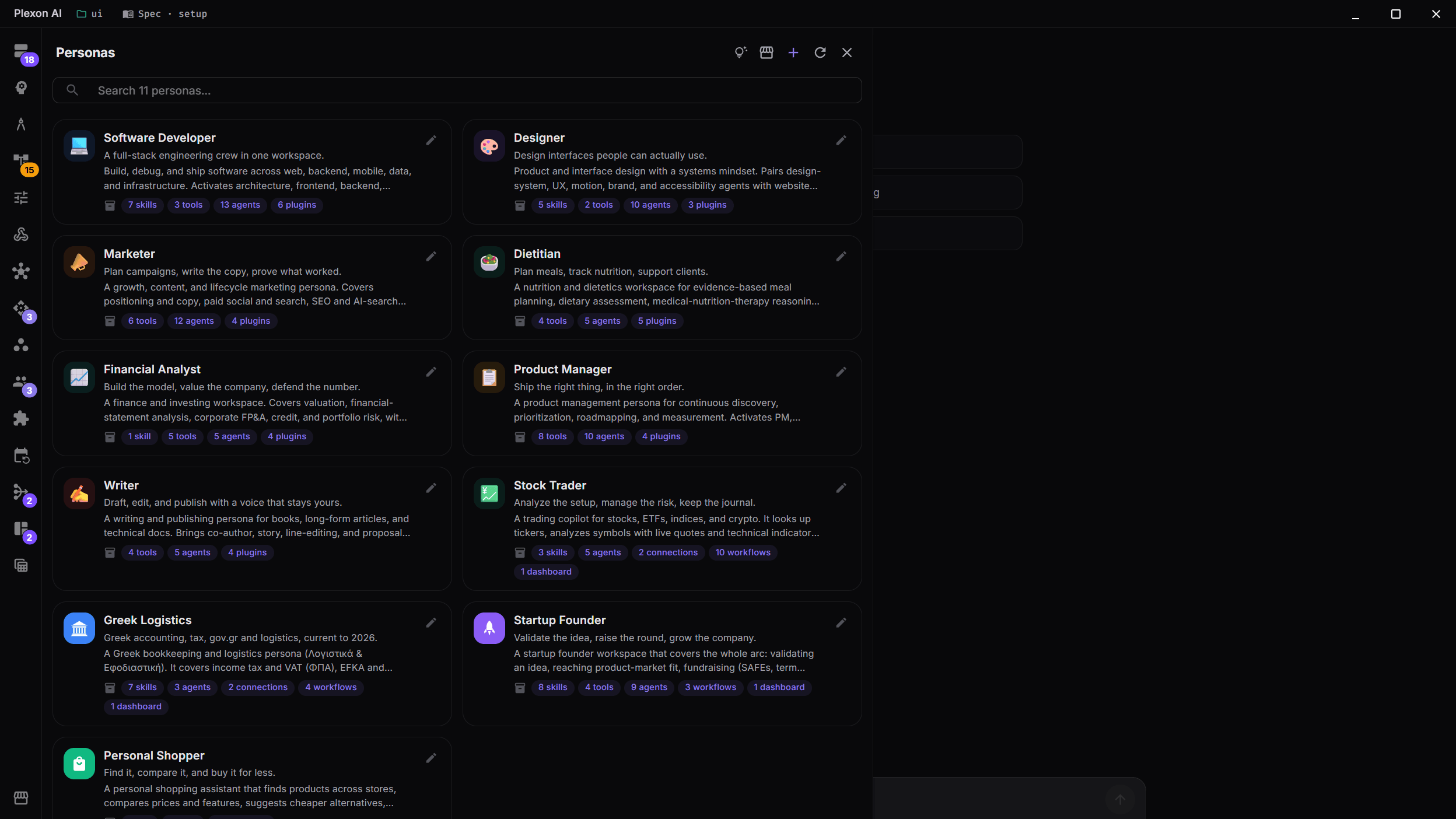
Choose the role that fits today’s task
Open Settings, choose Browse Personas, and pick a role. Writer starts with guidance for editing and tone. Designer includes accessibility guidance. The welcome screen offers examples you can use as your first message.
- 12 personas are included on every plan
- Each role brings its own instructions, specialist agents, skills, and connected tools
- A skill is a set of instructions for a task, such as formatting a document
- Choose a starter suggestion or write your own request
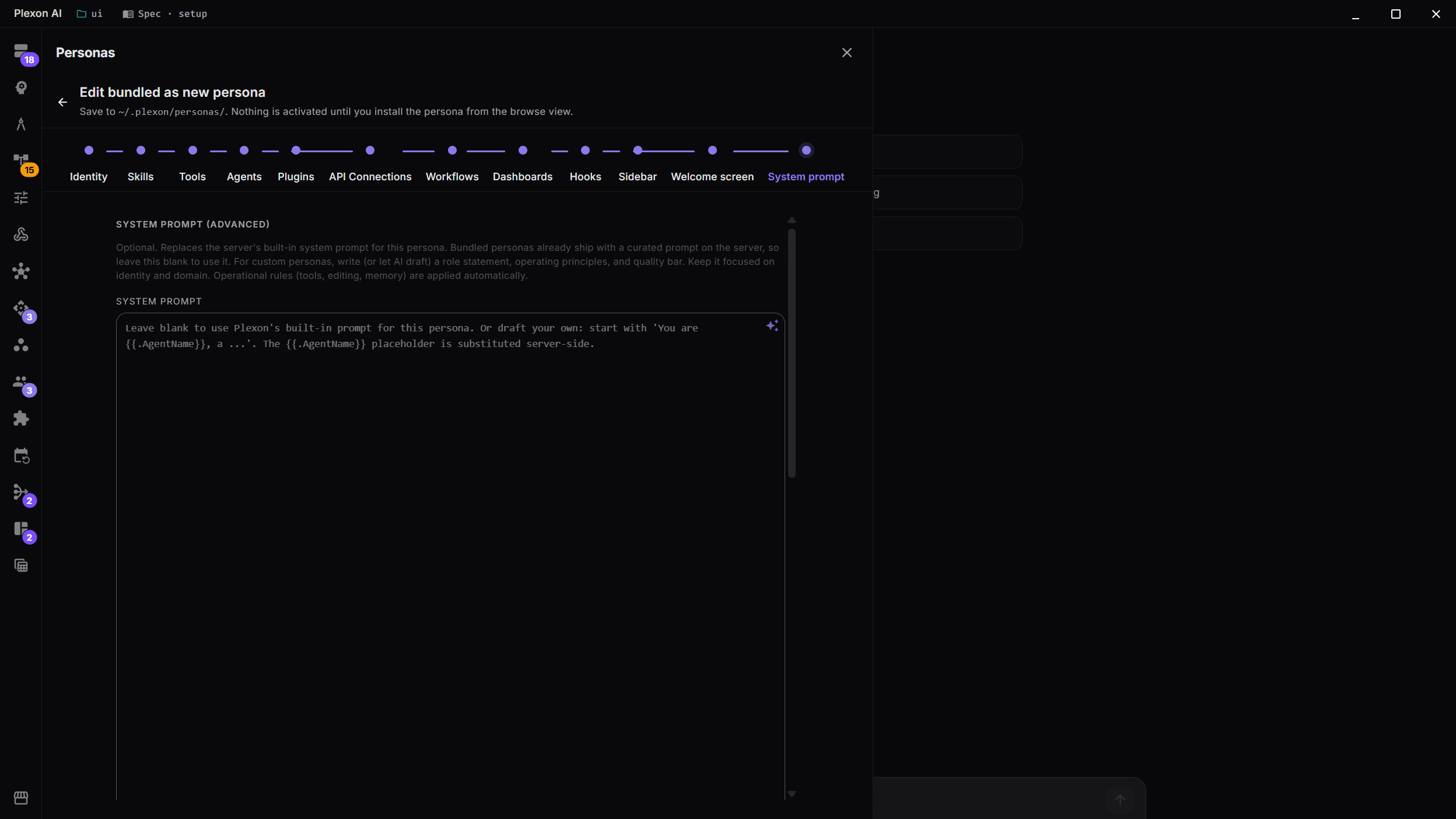
Give each role its own instructions
A persona changes the guidance Plexon follows as well as the tools it uses. A Writer follows editorial rules; a Financial Analyst works with conservative assumptions. Custom roles can include your house style or the steps your team follows.
- Each of the 12 included roles has its own instructions
- Set the tone, standards, and working habits you want Plexon to follow
- On Pro or Premium, edit an included role to save a custom copy
- The same rules for using tools, editing files, and remembering work apply across roles
See what a role adds to every message
A persona’s instructions ride along with every request, so a long prompt costs something on every turn. The persona editor shows how many KB of always-on text the role adds: its own prompt, any always-on layers under it, and your custom prompts. Persona cards show the same total. Past 8 KB you get a note, and past 24 KB a warning. When you ask Plexon to draft the instructions, it aims for 250 to 500 words and moves step-by-step procedures into a skill, a script or a hook that loads only when needed.
- A size caption under the prompt, split into its parts
- A note past 8 KB and a warning past 24 KB
- Persona cards show the always-on total
- Drafted prompts stay short and point to skills for the details
Tune a role from its recent sessions
In the persona editor, Review recent sessions reads the last few chats run under that persona, starting with the ones where something went wrong: a correction, a failed tool, a step repeated for no reason. It proposes the smallest changes to the prompt or the skills, and each proposal names the session and the message it came from. Nothing changes until you approve it in the Proposals list in the Skills panel. Roles managed by your organization and protected ones cannot be tuned, and a role on the built-in prompt needs a saved copy first.
- Up to three proposals per review, each citing the moment behind it
- Proposals are labelled Persona prompt, Skill or New skill
- A review with nothing to fix says so and proposes nothing
- Past chats are read as data, never as instructions
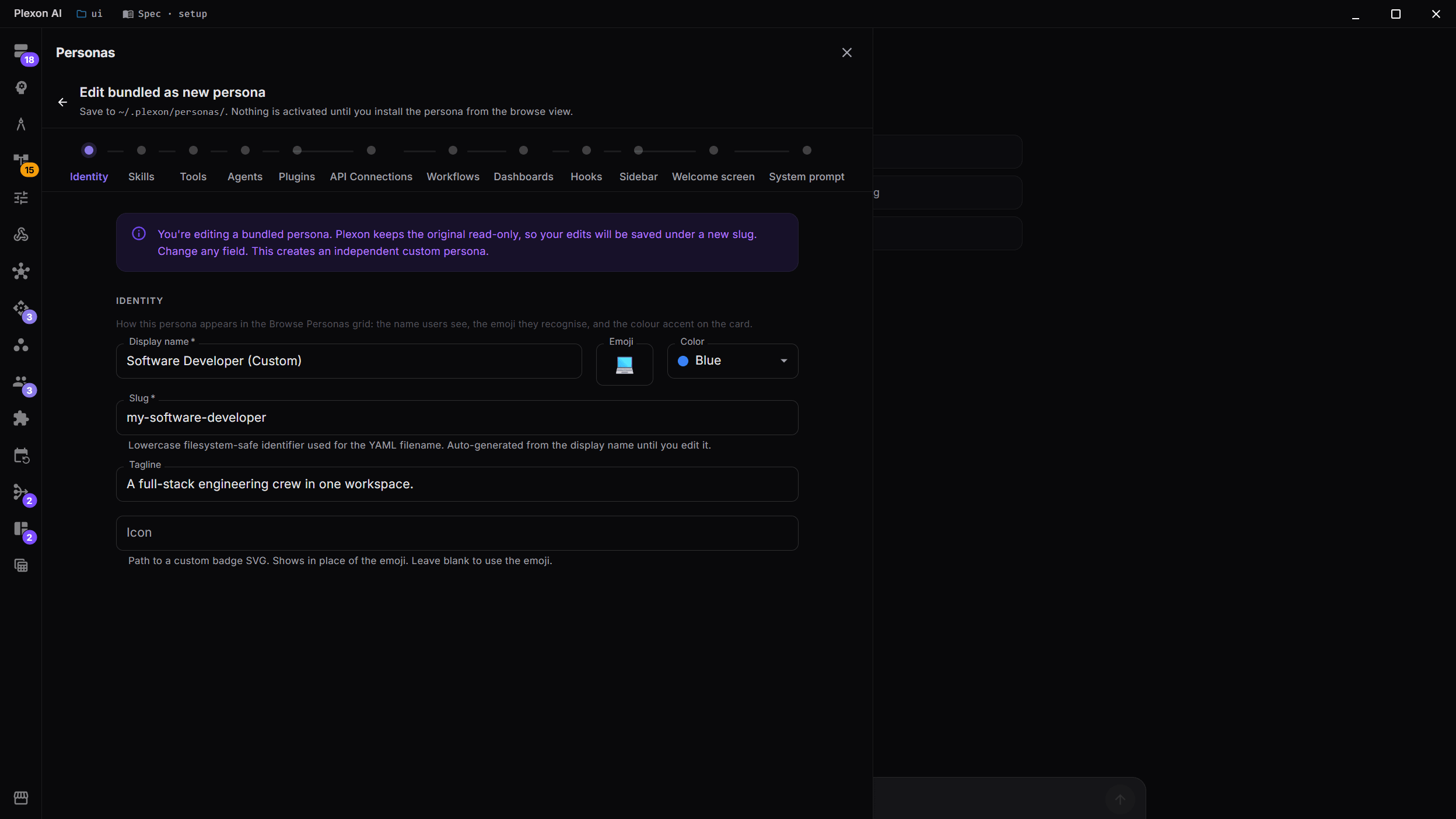
Make a role for your own work
On Pro or Premium, the creation guide walks you through a custom persona. Describe the role, select the tools and skills it needs, and write its instructions. Ask AI to help with the description, starter messages, or instructions.
- Fourteen guided steps, with searchable lists of things to include
- Add workflows, the routines Plexon follows, and dashboards for the results you want to check
- Choose the welcome screen, sidebar, and other display settings
- Import a persona from a shared source or a file on your computer
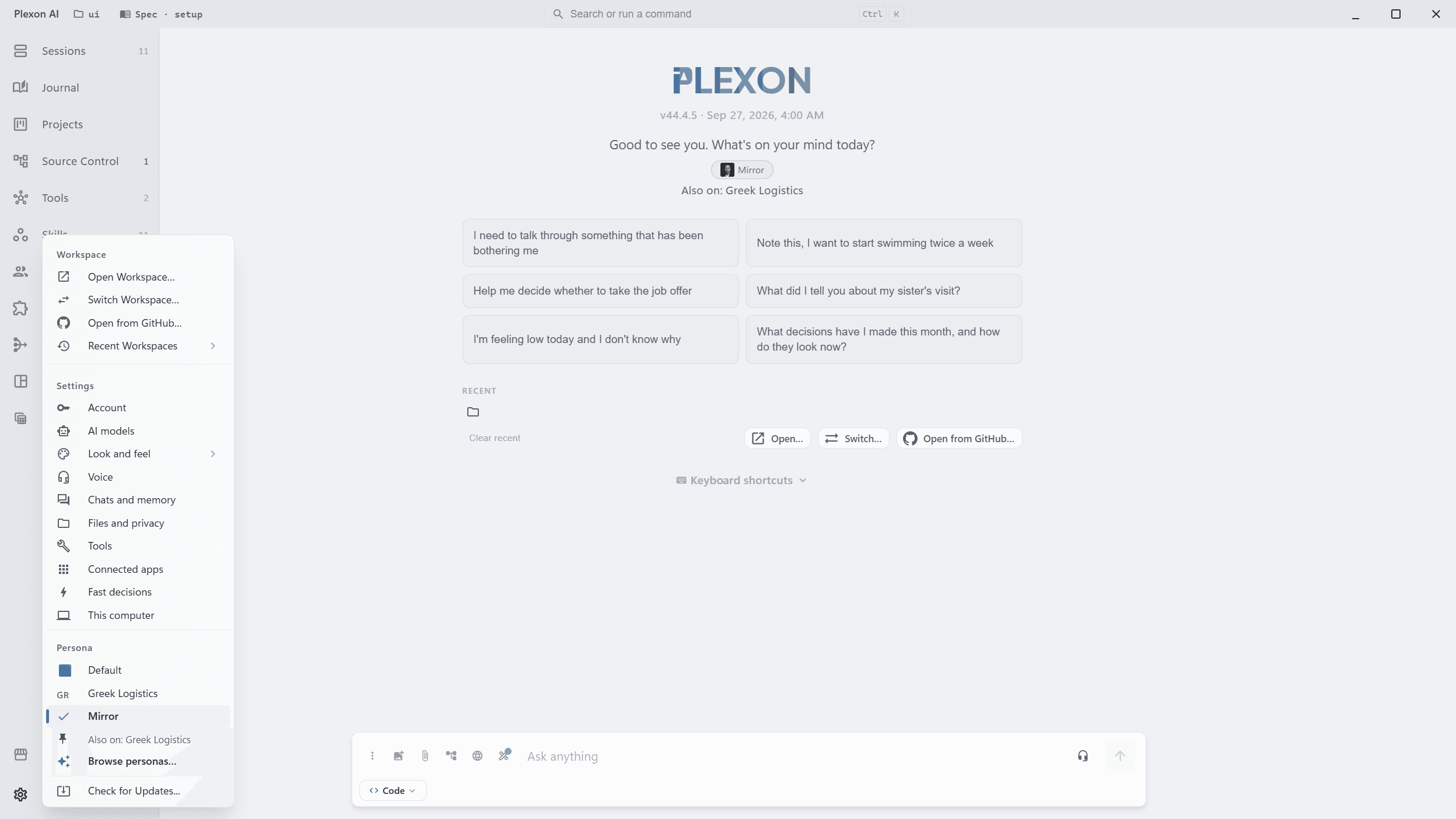
Switch roles as the work changes
Use Designer for a page layout and Writer for its copy. Switch between them in Settings. Each persona keeps its own configuration, so switching back to Designer brings back the tools and settings you had there. Pin a persona to keep it on under every other one.
- The welcome screen changes to match the selected role
- Pinned personas stay on as you switch, with their instructions, skills, and tools
- Switching back loads what you set up under that persona. Reinstall to go back to the persona's defaults; a managed update merges new items into the active persona
- Want no role at all? Switch to Default, which is Plexon on its own
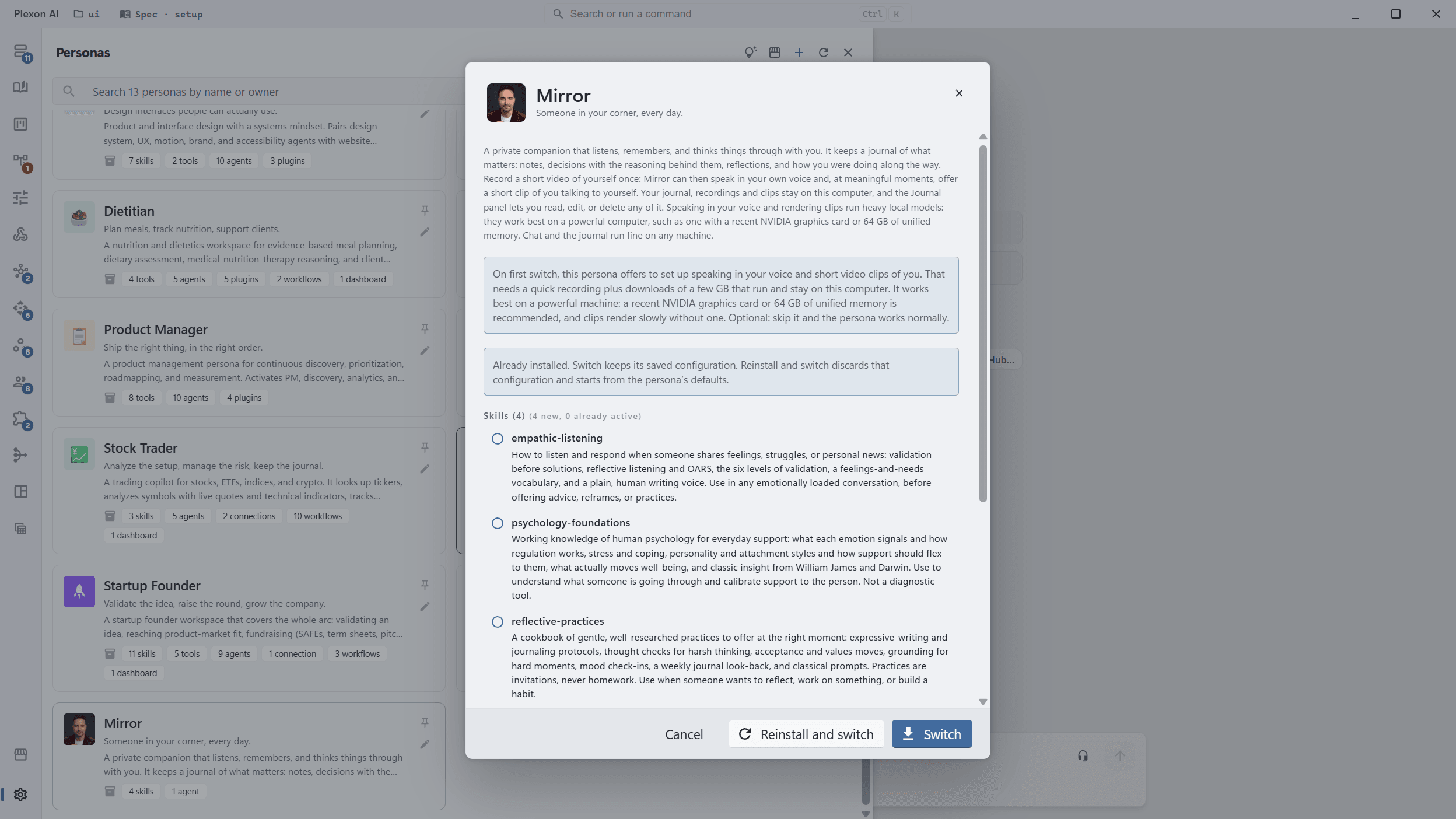
Keep what you set up under each persona
A persona you have used keeps its own configuration: the skills and tools you turned on or off, the connections you signed into, the sidebar you arranged. Open its preview to choose between coming back to that setup and starting again from the persona defaults.
- Switch loads the configuration the persona already has
- Reinstall and switch goes back to the persona defaults
- The first switch to a persona builds its configuration from what it ships with
- A company update merges new items into the active persona without undoing your changes
Share a setup your team can use
Create a role with your team’s writing guidelines and usual tools, then share it as one file. In Marketplace, the collection of things you can install, open Installed and select the persona and its required agents or skills. Export the selection and send the file to a teammate.
- Teammates open the file to install the same instructions, skills, and defaults
- Include specialist agents and connected tools with the persona
- Use a shared marketplace when you want the team to receive future updates
Keep a department’s setup consistent
Publish your team’s persona to a shared marketplace and give colleagues its address. They install the role for their work. Updates appear when they refresh the marketplace, while their local customizations stay in place.
- Use a private source for company instructions and internal tools
- Give designers, marketers, and analysts their own roles from the same source
- Update a writing rule or add a tool once for the team
- New colleagues can install the department’s existing setup
Meet the personas
Open a role to read its instructions, see example tasks, and check which tools and skills it includes.
Software Developer
A full-stack engineering crew in one workspace.
The Software Developer persona turns Plexon into a senior engineering collaborator, fluent in programming languages, frameworks, design patterns, and git hygiene. It defaults to correctness first, clarity second, performance third, and reads your code before it writes any. This is the original Plexon voice, now just one persona among twelve.
PersonaDesigner
Design interfaces people can actually use.
Review a page layout, compare design options, or prepare a handoff for your team. Plexon points to specific problems, such as a Save button that is hard to find, and checks how the design works for people using a keyboard or screen reader.
PersonaMarketer
Plan campaigns, write the copy, prove what worked.
Turn a product brief into an audience plan, campaign copy, and a way to measure results. Plexon helps explain why someone would choose your product, then checks the draft against that audience and the outcome you want.
PersonaDietitian
Plan meals, track nutrition, support clients.
Draft meal plans, review food diaries, and prepare guidance for clients. Plexon helps qualified nutrition practitioners account for food preferences, budgets, and clinical context. It supports professional judgement and does not diagnose or claim to treat, cure, or prevent disease.
PersonaFinancial Analyst
Build the model, value the company, defend the number.
Build financial forecasts, value a company, or review the assumptions in a spreadsheet. Plexon links figures to sources, shows its formulas, and compares scenarios to reveal which assumptions change the result.
PersonaProduct Manager
Ship the right thing, in the right order.
Turn customer feedback into a product brief, compare priorities, and record a launch decision. Plexon helps connect each proposed feature to a customer problem and a result your team can measure.
PersonaWriter
Draft, edit, and publish with a voice that stays yours.
Outline a chapter, edit an article, or prepare a query letter. Plexon works with your existing voice, cuts repetition, and flags facts or quotations that need a source.
PersonaStock Trader
Analyze the setup, manage the risk, keep the journal.
Research a stock, compare risk scenarios, or review your trading journal. Plexon brings quotes, upcoming earnings, and market sentiment into the conversation. It provides education, not financial advice, and never places, changes, or cancels orders.
PersonaGreek Logistics
Work through Greek tax, bookkeeping, and logistics.
Calculate income tax or VAT, prepare for a filing, and find your way through gov.gr and myDATA. Plexon works in Greek and English for freelancers, business owners, accountants, and individuals. It labels the tax year and points to official sources for confirmation.
PersonaStartup Founder
Validate the idea, raise the round, grow the company.
Test an idea, calculate how long your cash will last, or draft an investor update. Plexon helps compare growth and fundraising choices with built-in calculators. Legal and equity examples start with US conventions; guidance is general, not legal, tax, or financial advice.
PersonaPersonal Shopper
Find it, compare it, and buy it for less.
Compare the same product across stores, find a cheaper alternative, or keep a grocery list within budget. Plexon shows purchase links and keeps your lists between sessions. You complete checkout on the store website.
PersonaMirror
Talk things through and keep a journal of what matters.
Weigh a job offer, reflect on a difficult week, or return to a decision you made months ago. Mirror keeps notes and the reasons behind your choices. You can read, edit, or delete journal entries in the Journal panel.
What You Get
12 roles included
Start with Software Developer, Designer, Marketer, Dietitian, Financial Analyst, Product Manager, Stock Trader, Writer, Greek Logistics, Startup Founder, Personal Shopper, or Mirror.
Instructions for the job
Each role brings its own guidance, from a writer’s editing standards to a designer’s accessibility checks.
Start from Settings
Choose Browse Personas and select a card. The role becomes active and its starter suggestions appear.
Keep your existing setup
Installing a persona adds what it needs without duplicating tools or replacing your saved sign-ins and theme.
Examples to start from
Each role shows up to six suggested requests on the welcome screen. Select one to place it in the message box.
Help writing instructions
Ask AI to draft or edit your custom persona’s description, instructions, and starter messages.
Tools chosen for the role
Personas can turn on the connected tools they use. Plexon points out anything missing without stopping the installation.
Connects to
Nothing here works alone. See the whole map for how the pieces fit together.
This one is taught in step 7 of 8: package it as a role.
What feeds it
App Connectors is packaged by this.
A persona seeds the connectors its role needs and asks you to sign in during install.
API Connections is packaged by this.
Bundle a connection into a persona so it arrives pre-configured.
Data Sources is packaged by this.
A persona can bundle a dataset that seeds into your Data Sources on install.
AI Chat & Modes authors this.
The persona wizard drafts the description and welcome prompts for you.
192 AI Agents is packaged by this.
A persona pre-activates the agents its role needs.
Skills & Tools is packaged by this.
A persona seeds its own skills on install.
Richer Hook Events is packaged by this.
Personas bundle their own hooks, which activate with the persona.
Dynamic Workflows is packaged by this.
Attach a workflow to a persona and it arrives ready to review and enable.
Dashboards is packaged by this.
A persona ships its board: the Trader Cockpit, the Founder Cockpit, Greek Tax & Compliance.
Design Extract is packaged by this.
Bundled into the Designer persona.
Persona Agreements extends this.
A role that reaches sensitive data can be sealed behind an agreement the person accepts first.
Where it goes
This runs inside Dynamic Workflows.
A Persona step runs a whole persona, with its skills and connected tools.
This is distributed by Unified Marketplace.
Personas install from any marketplace source, including a company's own.
This is packaged by Move to Another Machine.
One encrypted file carries your personas to a new computer.
This is distributed by Company Marketplaces.
A company ships its own roles to its people through its own catalog.