Authoring
MarketplaceDeveloper Mode
Build your own marketplace through a 16-step wizard, then collaborate on it without git. One-click Sync publishes your edits and pulls your teammates' changes, conflicts resolve per file, workflows and dashboards travel with the folder, and every install of your marketplace updates itself on launch.
What happens in this clip
- Open the Marketplace and switch to the Sources tab, which lists every registered marketplace.
- Create marketplace opens a wizard, or point it at a folder or a private repository only your team can clone.
- The wizard steps through identity, metadata, skills, agents, personas, plugins, workflows, dashboards, tools and the rest.
- It scaffolds the manifest, the folder layout and a first item to copy from.
- Nothing is written until you click Create, and what comes out is a git repository like any other.
Related features
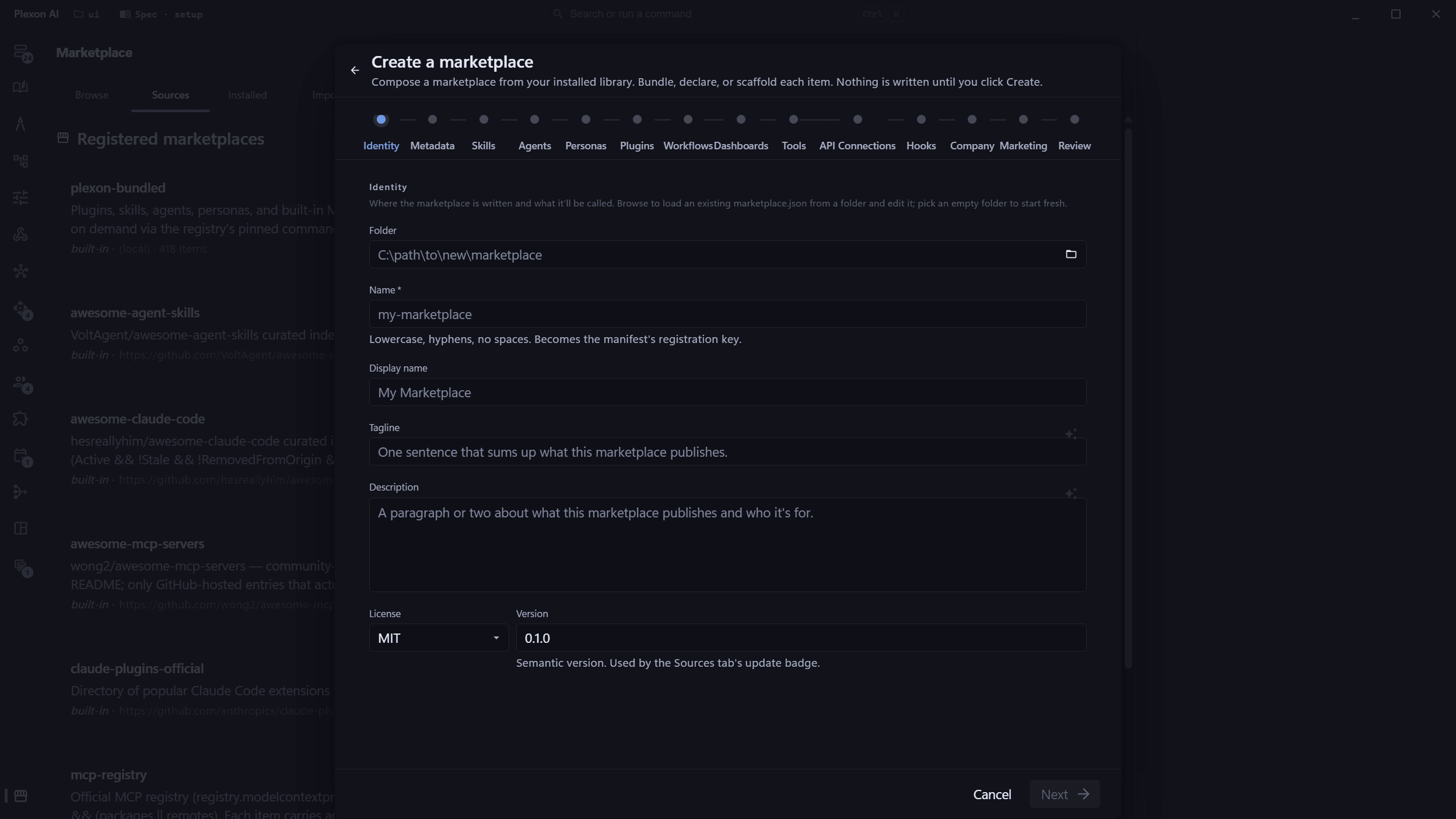
Compose a marketplace through a 16-step wizard
Sources to Create marketplace opens a stepped wizard, not a one-screen form. Step 1 collects identity (folder, name, display name, tagline, description, license, version). Step 2 covers metadata (homepage, icon picker, keywords, owner and author, marketplaces[] auto-subscribe entries). Steps 3 through 7 are asset pickers (Skills, Agents, Personas, Plugins, Tools) over your installed library. Step 8 is the review where every picked item exposes its full overlay (display, media, lifecycle, compatibility, permissions, encrypt). Plexon writes the manifest, materializes the items you picked, scaffolds the placeholders you added, runs git init when you ask, and chains into Link local folder so the new marketplace is wired up the moment you finish.
- Pick any installed skill, agent, persona, plugin, or tool and the wizard auto-fills its display name, description, tagline, emoji, color, version, and author from the source artifact
- Three-tier sort in every picker: your custom artifacts first, then anything you installed from a marketplace, then Plexon-bundled defaults at the bottom
- Add a placeholder beside the existing artifacts when you want a fresh skill / agent / persona / plugin / tool scaffolded into the marketplace folder
- Encrypt toggle on every item in the review step. Plugin items get the flag dropped with a clear warning (the OS interpreter must read those scripts plain at install time)
- AI-rewrite buttons (sparkle icon) on the description and tagline fields, gated on subscription, with cancel-mid-flight protection
One knowledge base every persona reads
A marketplace that ships several personas usually wants them to agree on the same facts: who the company is, what it sells, how it talks. The Knowledge step is where that material lives. Write the documents in the wizard, name the result once, and every persona in the marketplace carries it. On disk it is a plain folder of markdown beside marketplace.json, and it installs as an ordinary skill, so the assistant finds it the same way it finds any other. Correct a document once and everyone on the plan is correct.
- Documents are ordinary markdown in a knowledge-base folder next to marketplace.json. Add, rename, edit and remove them in the Knowledge step
- Plexon writes the SKILL.md front door itself: an index of the documents, not a copy of them, so a long knowledge base costs one line per file in the prompt
- Every persona in the marketplace picks it up automatically. Narrow it to a few of them with the persona chips when a department wants its own
- Clone the repository, link the folder, edit a document and publish. The next sync carries it to everyone on the plan
Bundle existing, scaffold fresh, or just declare
Each picked item lands in the marketplace with one of three personalities. Bundle an artifact you installed (the wizard copies its files into the marketplace folder and strips the install-only stamps that would otherwise lock the marketplace to your local version). Scaffold a fresh placeholder (Plexon writes a working template the consumer can read). Or declare a Plexon-bundled artifact (the manifest names it, no files copied, the consumer's binary already ships the bytes). Declared items are how Plexon's own templates ship without bloating every author's marketplace.
- Bundling: copies SKILL.md / AGENT.md / persona YAML / plugin tree into the marketplace, strips .bundled-hash, .linksrc, and frontmatter version: lines so the marketplace re-stamps cleanly on install
- Placeholders: a sample-skill, sample-agent, sample-persona, sample-plugin (the bundled document-toolkit), or stub .mcp.json gets written to the right kind directory
- Declared: the manifest item points at no files. The install resolver short-circuits to the consumer's bundled extraction, so Plexon-shipped artifacts never get re-shipped
- Inline mcpConfig for Tools entries: the manifest carries the transport spec inline, no per-server folder needed on disk
Edit an existing marketplace in place
Browse picks up a folder that already has a marketplace.json and the wizard loads it into the form: manifest fields populated, every item from items[] surfaced as a declared plan pointing at the same folder. Rename in the Name field and click Create to fork it, or pick a different output folder to clone-and-edit. There is no second 'load existing' button. Browse is the single entry point.
- Manifest fields, owner, author, marketplaces[], items[] all round-trip cleanly
- A clear banner tells you which folder you loaded from and what the create button will do
- Refuses to overwrite an existing marketplace.json at the same path. Pick a different folder or rename first
- Live-reload watcher attaches after create. Editing the marketplace.json in your editor refreshes Plexon instantly
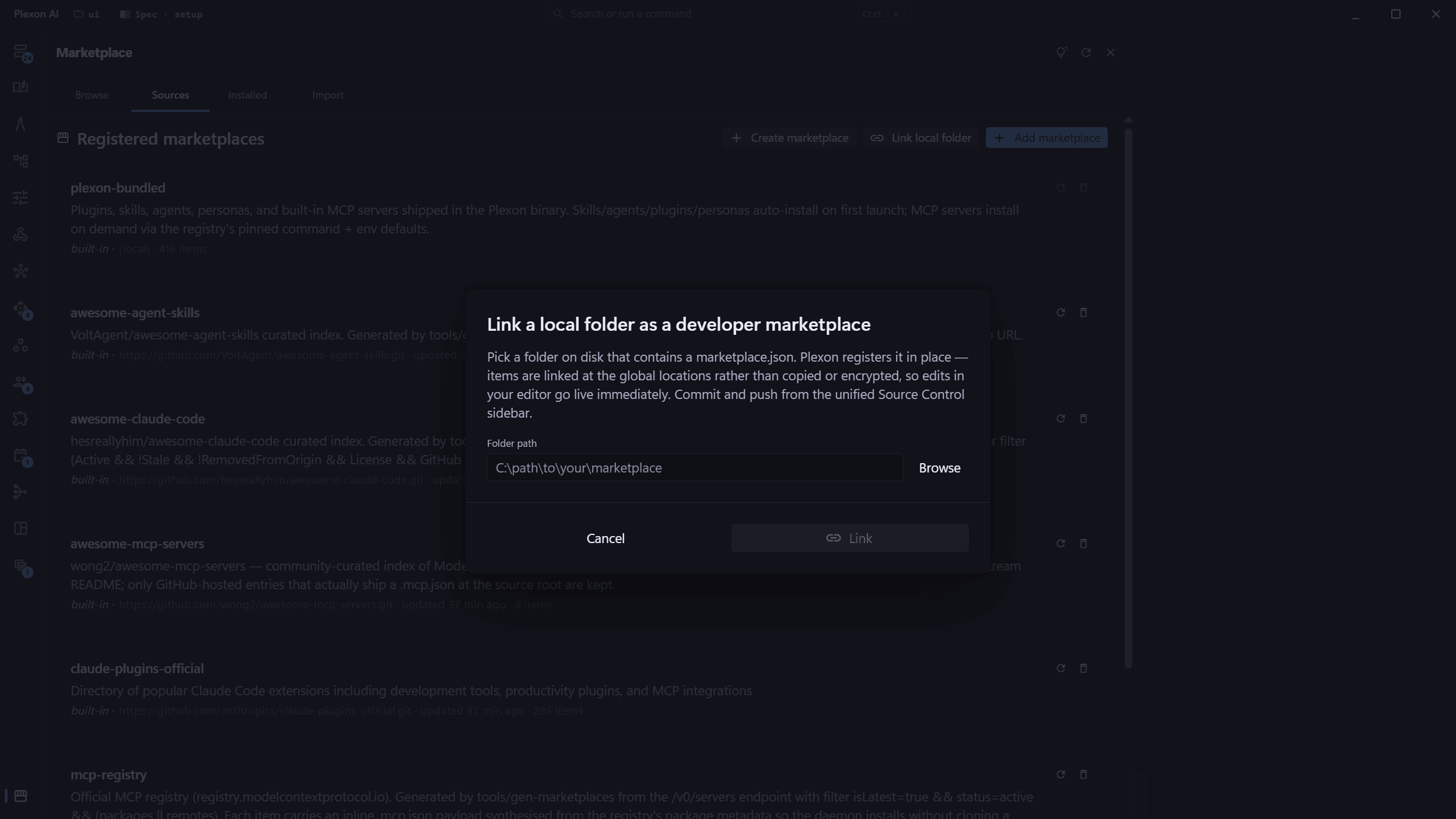
Link a local folder, edit in place
Already have a marketplace cloned somewhere on disk? Sources to Link local folder registers it without copying. Per-kind installers symlink items at the global install locations, encryption is skipped, and your origin URL is saved for a later switch back to consumer mode without re-typing it. The row shows a Developer mode chip and the linked path.
- Plexon never touches your folder on its own. Sync pulls and publishes only when you click it or turn on auto-sync
- Edits to SKILL.md, AGENT.md, and persona YAML are live the moment you save. Workflow, dashboard, and hook saves write back into the folder
- Switch back to consumer mode any time. Your source folder is never deleted
- Works with private repos using the same encrypted per-host credentials as consumer mode
Sync with your team in one click
Sync on the Sources row runs the whole collaboration loop: your store-backed edits land in the folder, everything commits with a generated summary line, your teammates' changes come in, and yours publish. Staging is scoped to the marketplace's own directories, so a stray note or .env in the folder never rides along. A validation gate refuses to publish while marketplace.json fails validation, protecting everyone who installed your marketplace. The same pipeline answers to chat: tell the AI 'push my marketplace changes' and it drives the plexon_marketplace_sync tool.
- Commit summaries are written for you from the diff, with a plain fallback like "Update 2 workflows, 1 skill" when offline
- Auto-sync chip: opt in per marketplace and Plexon syncs a few minutes after your edits settle
- History on the row lists every change by the items it touched, who made it, and when. No hashes anywhere
- Offline? Your changes commit locally and publish on the next sync
- First publish included: a marketplace with no repo yet routes into the Publish to GitHub flow
Publish a company marketplace without holding a GitHub token
A marketplace your company manages arrives read-only for everyone who receives it. When somebody has to maintain it, an admin names them a developer of it on the Marketplaces page, and their Sources row grows a Develop button. Plexon clones the repository into a folder they choose, links it in developer mode, and from then on Sync and the revision card's Publish push with a token the server mints at that moment. Nobody pastes a GitHub credential, and none is stored on the developer's machine.
- The grant lives on the marketplace row. A Plexon admin, or the company's own admin, adds a member of a group or company that marketplace is linked to
- The push token is minted per publish, lives about an hour, carries write access to repository contents and read access to metadata, and cannot write GitHub Actions workflow files
- It only ever opens a repository inside the owner company's own connected GitHub organization. A repository outside it is refused by name, before anything is cloned or pushed
- Take the grant away and the next publish is refused with the reason. The developer keeps the folder and its history
- Each push reports its commit and version back, so the marketplace row on plexon.ai shows what is live
Fold new documents into a bundle you linked
A new price list lands, a policy gets rewritten, three trip reports come back from the field. Update from documents points Plexon at the folder and lets it work out what in your marketplace has to change. Three steps: pick the bundle and, if you want, narrow it to a single persona; choose the documents and read the scan of what is in them; tick which kinds of file this run may touch and start. Or skip the steps: drop the files on the persona card and the dialog opens with them already named. The request Plexon writes for the assistant sits under Show the request on the last step, if you want to read or edit it. Documents the bundle has folded before are recognised by their content, even after a browser renamed the download, and stay unticked; a new version of a known file is ticked and read. A document the bundle already cites says so on its row, with the number of files citing it and the date they were last reviewed, so the run checks those for what changed instead of reading the bundle again. With Fast decisions on, the documents are checked while the list loads: one that looks unrelated to the bundle is flagged, and unticked when it came in with a folder (a file you dropped yourself is only flagged), a new version that changed only cosmetically is unticked, and a kind of file the documents do not seem to touch is turned off, all of it yours to put back. Documents the bundle folded from that folder before and that are no longer in it are listed as gone, with the passages that still cite them; tick Retire on one and the run rewrites or removes what rested only on it. Start opens the revision first and the chat second, so a refusal (nothing linked, a revision already open) lands in the wizard rather than in a chat with nowhere to put the work.
- Opens from the Sources row of a linked marketplace, or from a persona card that marketplace owns. A bundle you received from your company is never offered, because you are not its author
- The documents step scans the folder before a single file is read, and counts the ones that need a visual read separately, since each of those costs a model request
- The check before a fold never holds up Start and never overrides a tick you made yourself. Turn it off under Settings, Fast decisions
- A document you removed from the folder can be retired from the bundle in the same run, or on its own, with no new document at all
- The kinds you can tick are read out of your own bundle, so every group on offer is a group the assistant can actually change
- Drop the folder on the dialog, browse for it, or type the path
- The request is shown section by section with a caption on each, and it is yours to edit before it is sent
- The chat opens on the marketplace it is revising, and Source Control moves there with it
Read every change before it lands
Nothing reaches your folder while the assistant is working. Each edit is staged into a revision instead, one file at a time, and when it submits, a card appears in the chat with every file it wants to change: the differences, a one-line note saying what changed, and the document the change came from. Every file starts ticked. Untick the ones you are not ready for, approve the rest, and only the ticked files are written. Ask for changes sends the whole thing back with your feedback and the assistant carries on in the same revision.
- With Fast decisions on, the files come riskiest first and the ones worth a careful look carry a Read this one tag; the version bump and the changelog entry always sit last
- If a file moved on disk after it was staged, the approve is refused, nothing at all is written, and the card names the file
- The version bump and the CHANGELOG entry are staged in the same card as the content, so the release half is something you read rather than something you remember
- Undo an applied revision from the Revisions list on the Sources row. It works file by file, and anything you have edited since is refused by name instead of being overwritten
- Keep a copy of the documents in the bundle is on by default: the sources land under knowledge-base/sources/ in a dated folder, so a citation in a reference file still resolves next year
- Sync when you are happy with it and the team gets the result the usual way
Resolve conflicts without touching git
When you and a teammate change the same file, Sync stops and shows each conflicted file with the two versions side by side and three choices: keep yours, take the team's, or let AI merge both. Your versions are copied to a snapshot folder before anything is applied, so nothing is lost whichever way you decide. AI merges are validated with the same parsers the installer uses (a merged workflow.json must still be a valid workflow) before they reach the repo.
- Conflicts are named by item ("workflow Invoice Reminder"), not by file path
- One Apply resolves every file together; the sync finishes and publishes on its own
- The AI merge favors your version when both sides changed the same lines, and the result says so
- A conflicts chip on the Sources row and a toast reopen the resolution screen any time
See exactly what Plexon parses
The Inspector pane is a read-only view of what Plexon understands about your marketplace right now. Manifest validation errors, per-item frontmatter, the global symlink target, and encryption mode for every item, all in one pass. Subscribes to the live-reload watcher so editing marketplace.json in your editor refreshes the inspector instantly.
- Surfaces manifest validation and per-item parse errors before you publish
- Open in editor, Reveal in folder, and Copy path for every resolved file
- VS Code, Cursor, and Sublime auto-detected from PATH
- Same parser ladder the install flow uses, so fixes here are fixes consumers never have to see
Live reload while you write
Edits to marketplace.json, SKILL.md, AGENT.md, or any persona YAML reload Plexon's catalogs the moment you save. No refresh click, no re-install round-trip. The watcher debounces editor burst-saves into a single reload and ignores the noise (git, lockfiles, images, editor folders) so your workflow stays quiet.
- 350ms debounce collapses rename-write-rename editor saves into one event
- Allowlist filters out images, lockfiles, and CSS so a screenshot save is silent
- Ignores .git, node_modules, .vscode, and .idea so a rebase is invisible
- Red badge on the Sources row warns you the moment manifest validation fails
Bump versions, stage the change
Pick Bump version on a linked-marketplace row and choose Patch, Minor, or Major. Plexon parses your current version, increments the segment, writes the file atomically, and runs git add marketplace.json so the change is staged for your next commit through the Source Control sidebar.
- Tolerates empty, v-prefixed, and pre-release versions
- Strips -beta and +sha1 suffixes on output so the bumped version is clean numeric semver
- Refuses to bump consumer-mode entries (those clones are Plexon-managed and would be clobbered on Refresh)
- Never auto-commits. You drive the commit message, identity, and signing
Authoring Capabilities
One-click Sync
Commit with a generated summary, pull the team's changes, publish yours. One button on the Sources row, one in Source Control, and the same pipeline from chat via the plexon_marketplace_sync tool.
Conflicts without git
When you and a teammate change the same file, pick per file: keep yours, take the team's, or let AI merge both. Your versions are snapshotted first, and AI merges are parser-validated before they land.
History by item
Every change listed by the items it touched, who made it, and when. Written for marketplace authors, not git users: no hashes, no diffs to decode.
Auto-sync after edits settle
Opt in per marketplace and Plexon syncs a few minutes after you stop editing. Conflicts pause it until you resolve them; a rate gate keeps background syncs polite.
Workflows travel too
Saving a workflow, dashboard, or hook the marketplace ships writes it into the folder, scrubbed of webhook secrets, run history, and machine-local paths. Pulled edits install back into the app.
Updates reach users on launch
Everyone who added your marketplace by URL receives your push the next time Plexon starts, limited to items they already installed. A per-source Auto-update chip opts out; Refresh applies on demand.
Developers your admin names
A marketplace the company manages can have named developers who maintain it from inside Plexon. Each publish pushes with a short-lived token the server mints for that one repository inside the company's own GitHub organization, so the developer holds no GitHub credential at all.
Source control built in
Sync sits on top of a full per-marketplace git surface: status, stage, commit, push, pull, and diff. Each linked marketplace is its own group in the unified Source Control sidebar, alongside your workspace.
Plaintext on GitHub
Your repo never holds encrypted blobs. The encrypt flag in marketplace.json is a consumer-side install instruction. Contributors read and review your diffs normally.
Validate on save
Save marketplace.json and Plexon re-runs the structural validator on the spot. A red N validation errors chip appears on the Sources row. Click it to jump to the Inspector focused on the manifest.
Private repos, securely
Same per-host encrypted credential store as consumer mode. GitHub, GitLab, and self-hosted Git each get their own slot. Tokens stay on your machine, never reused across hosts.
Cross-platform symlinks
Real symlinks on Linux and macOS. Windows uses directory junctions for folders and NTFS hardlinks for single files. No admin prompt required.
Mixed kinds in one tree
All five kinds are first-class in the Create wizard. Skills, agents, and personas link side-by-side in linked-folder mode; plugin and tool items install through the regular consumer path alongside the linked items without conflict. The wizard's Tools step writes inline mcpConfig payloads so a server entry is self-contained and never needs its own per-server folder.
Wizard auto-fills from your library
Pick an installed skill, agent, persona, plugin, or tool and the wizard pre-populates its display name, description, tagline, emoji, color, version, and author from the artifact's own frontmatter or YAML. Edit any field on the review step to override. Auto-fill speeds the common case (bundling your own work) without locking out the unusual one.
Per-item Open in editor
Inspector resolves every item to a path and gives you Open in editor, Reveal in folder, and Copy path. VS Code, Cursor, and Sublime are auto-detected from PATH.
Create then link, in one flow
Finish the Create wizard and Plexon chains straight into Link local folder. The new marketplace lands wired up in Developer mode, the watcher attached, every bundled and declared item already installed.
Switch modes without losing files
Flip a developer entry back to consumer mode and Plexon drops the symlinks. Your source folder is untouched. Re-clone happens on the next Install click.
Stages, never commits for you
Bump version writes the new value and runs git add. The actual commit, message, identity, and signing stay under your control through the Source Control sidebar.
Folder-moved detection
Move or delete your linked folder and Plexon flags the row with a clear error on the next list. Re-link to the new path through the Link local folder dialog.
Connects to
Nothing here works alone. See the whole map for how the pieces fit together.
This one is taught in step 8 of 8: share it, or publish it.
Where it goes
This authors Unified Marketplace.
Build your own marketplace inside Plexon and publish it with one-click Sync.
This authors Company Marketplaces.
The same wizard that builds a personal marketplace builds a company one.