Knowledge System
Reusable AISkills
Give your AI specialized knowledge with reusable instruction files. Create custom skills, install from the community repository, or encrypt proprietary knowledge.
What happens in this clip
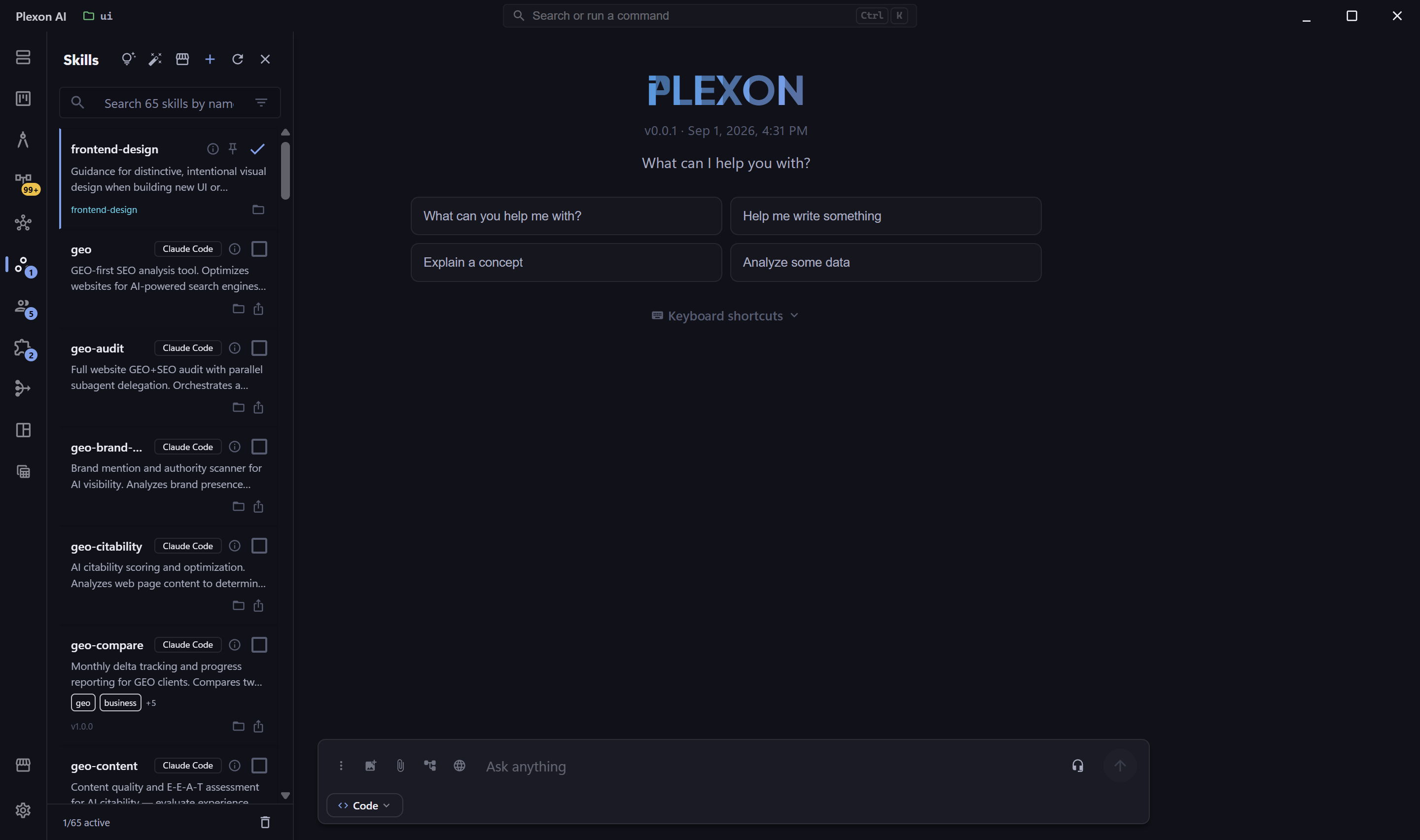
- The Skills panel lists what is installed, with a search across it.
- Skills adopted from other tools show where they came from.
- Open one to see its description, its usage so far, and whether it has support files.
- Pin a skill and it stays on through persona switches, protected from AI changes and inactivity archiving.
- The Import tab takes a package, a zip, or an install line pasted from another tool, and previews the items before installing.
Related features
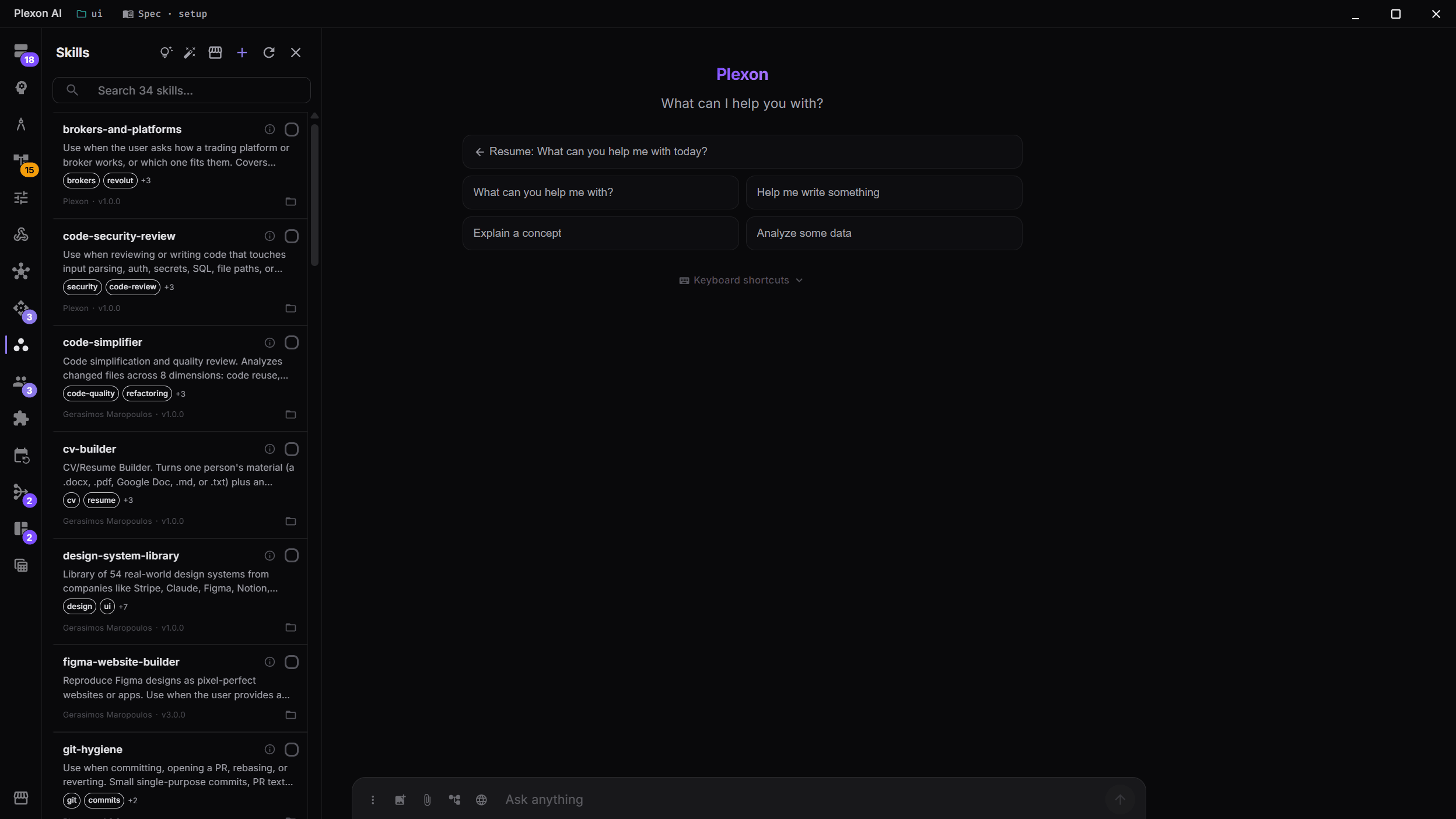
Manage Your Skill Library
The Skills panel shows the skills you have installed, with descriptions, tags, author info and version numbers. It starts with a handful; the rest of the bundled skills wait in the Marketplace until you install one. Activate the skills your current project needs from the same list.
- Per-workspace skill activation
- Type @skill: in the chat to run one on the spot, activated or not
- Author and version tracking
- Tag-based organization
- Encrypted skill support for proprietary knowledge
Skills That Ship Their Own Scripts
A skill whose instructions run a script it does not include fails the first time someone uses it. Plexon checks for that in three places. When the assistant writes a skill, the result warns about the missing file. When a marketplace or plugin installs one, the install stops and names the file. In the Skills panel, the skill carries a "missing file" chip, and its tooltip lists each reference with its line in SKILL.md.
- Checked when a skill is written, installed or listed
- A missing script stops the install and keeps the version you had
- A missing reference or template only warns
- References to other skills are not flagged
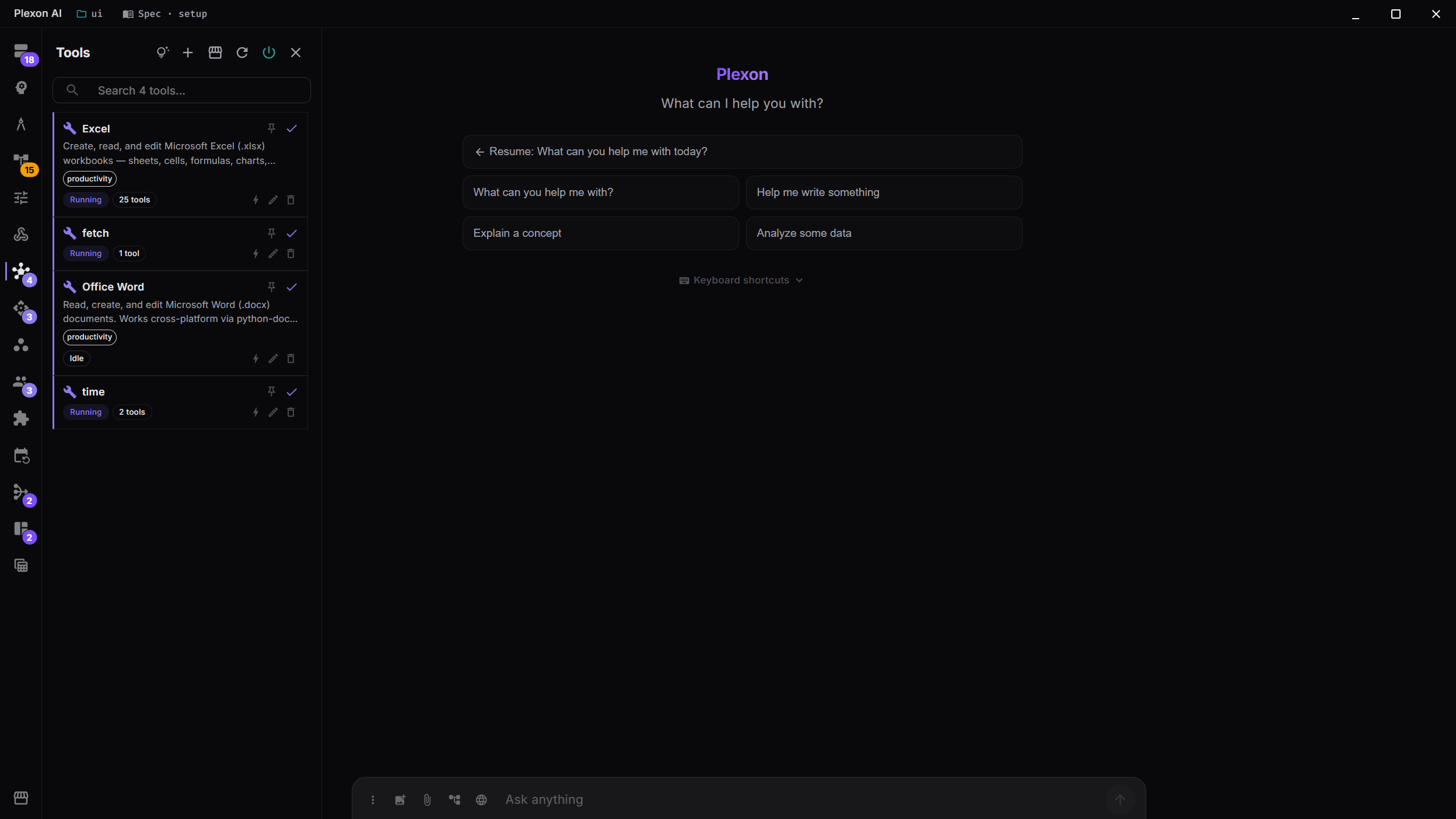
MCP Tool Servers
Extend your AI's capabilities with Model Context Protocol (MCP) tool servers. Connect to databases, APIs, web search, file systems, and more through a standardized protocol.
- Connect any MCP-compatible tool server
- Browse and read server resources (files, databases, APIs)
- Live status monitoring with Running indicators
- Per-server configuration and management
- 22+ tools from Playwright alone for browser automation
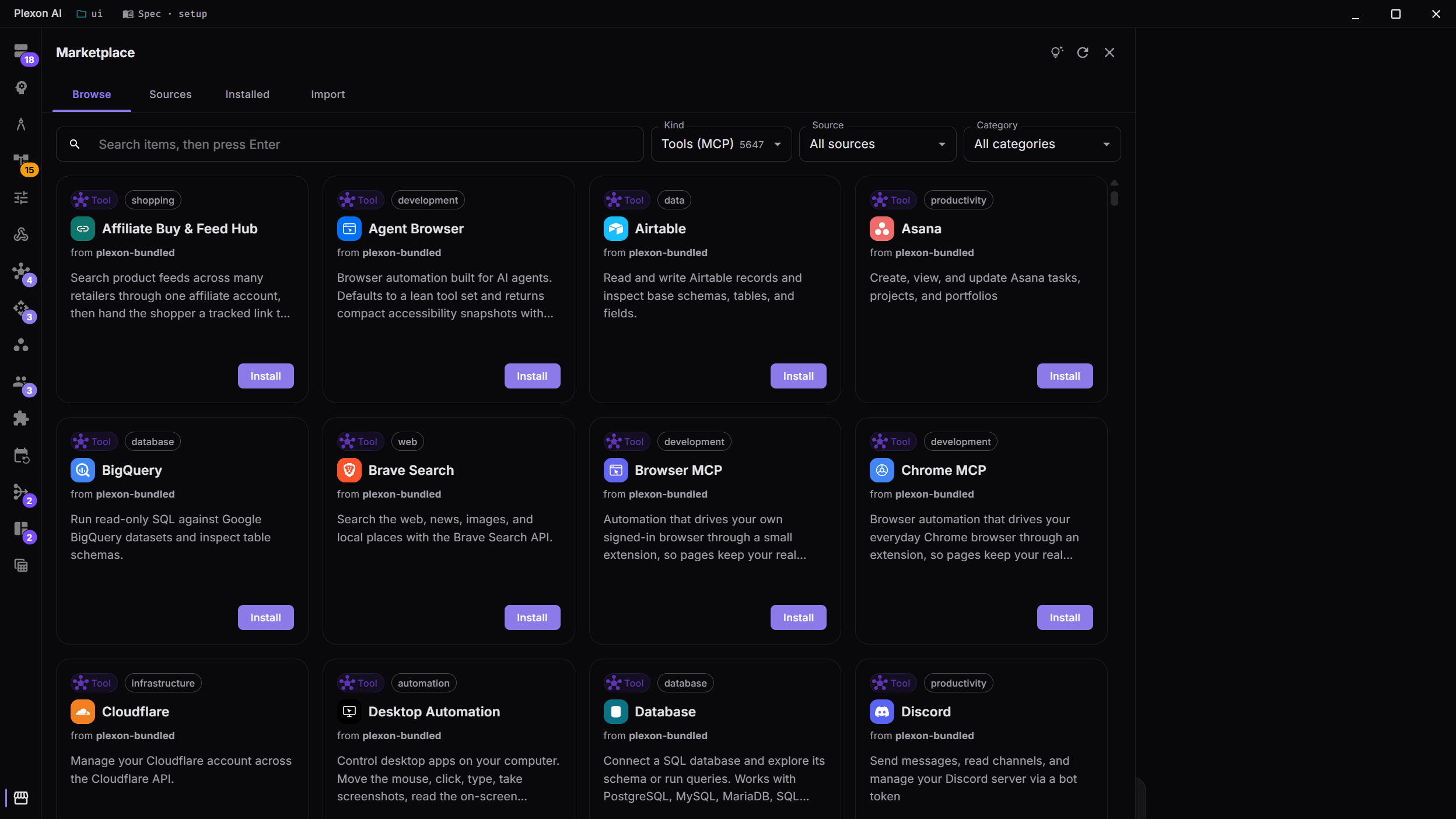
Browse & Install Tool Servers
Discover tool servers from a curated registry organized by category: Web, Database, DevOps, AI, and more. See star counts, configuration requirements, and personalized recommendations based on your active provider.
- Curated registry with 16+ categories
- Personalized recommendations based on your provider
- Star counts and configuration badges
- One-click installation with auto-configuration
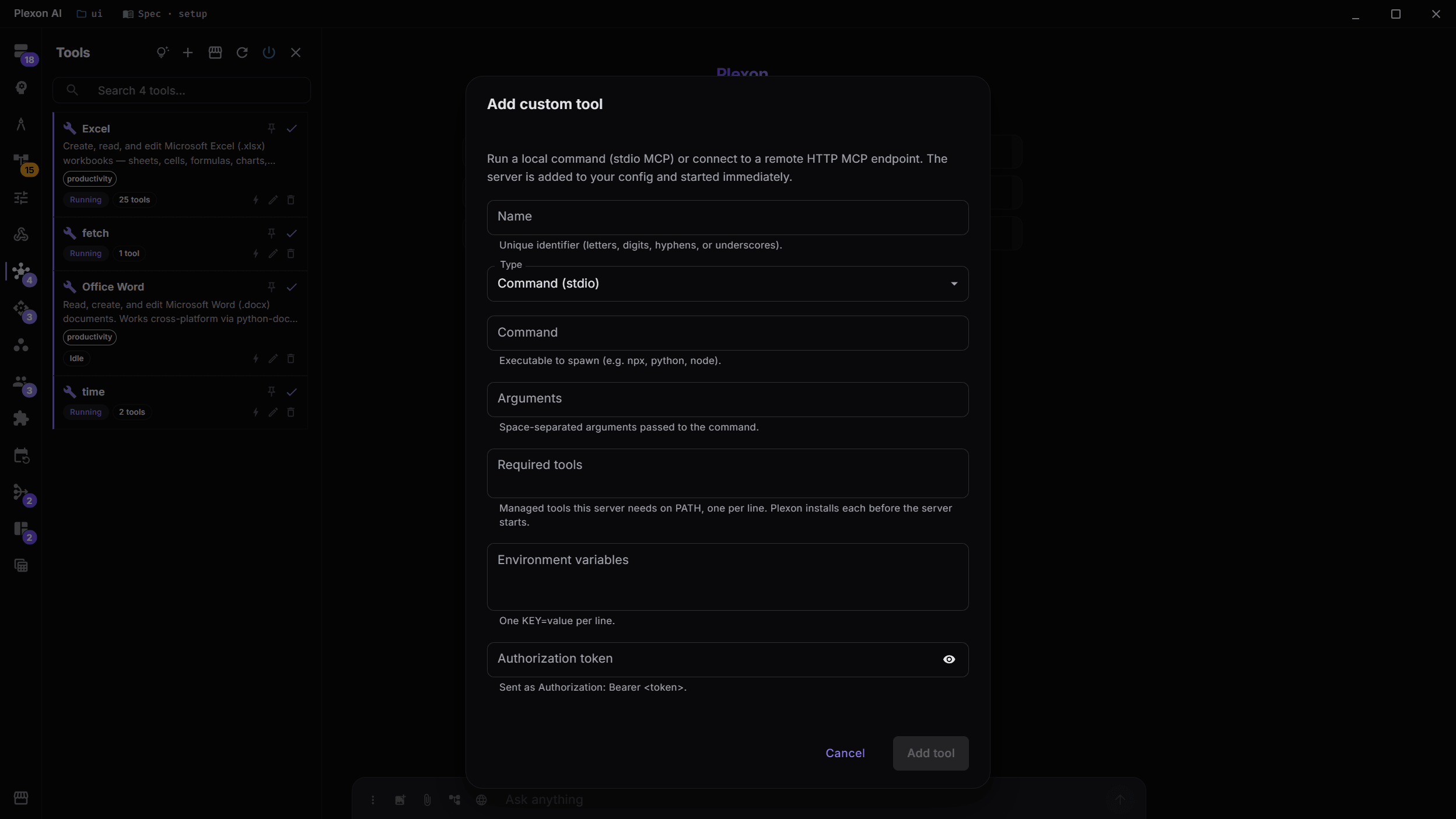
Add Custom Tool Servers
Connect your own MCP-compatible tool servers with full control over the command, arguments, and environment variables. Supports both command-based (stdio) and HTTP server types.
- Command-based or HTTP server types
- Custom environment variables
- Tool parameter defaults to override AI values
- Instant save and connect
Skills From Other Agent Tools
Skills you install with npx skills add, or that already live in ~/.agents/skills, ~/.claude/skills, or another agent tool’s folder, appear in Plexon on their own. Each carries a chip naming its source tool, stays managed by that tool, and deleting it in Plexon removes only the link.
- Claude Code, Codex, Cursor, Gemini CLI, Copilot, Windsurf and more
- Continuous: a new install shows up within seconds, no restart
- Read-only adoption. The original folder is never touched
- A workspace’s .agents/skills and .claude/skills are read in place once you link it
One Switch Per Source
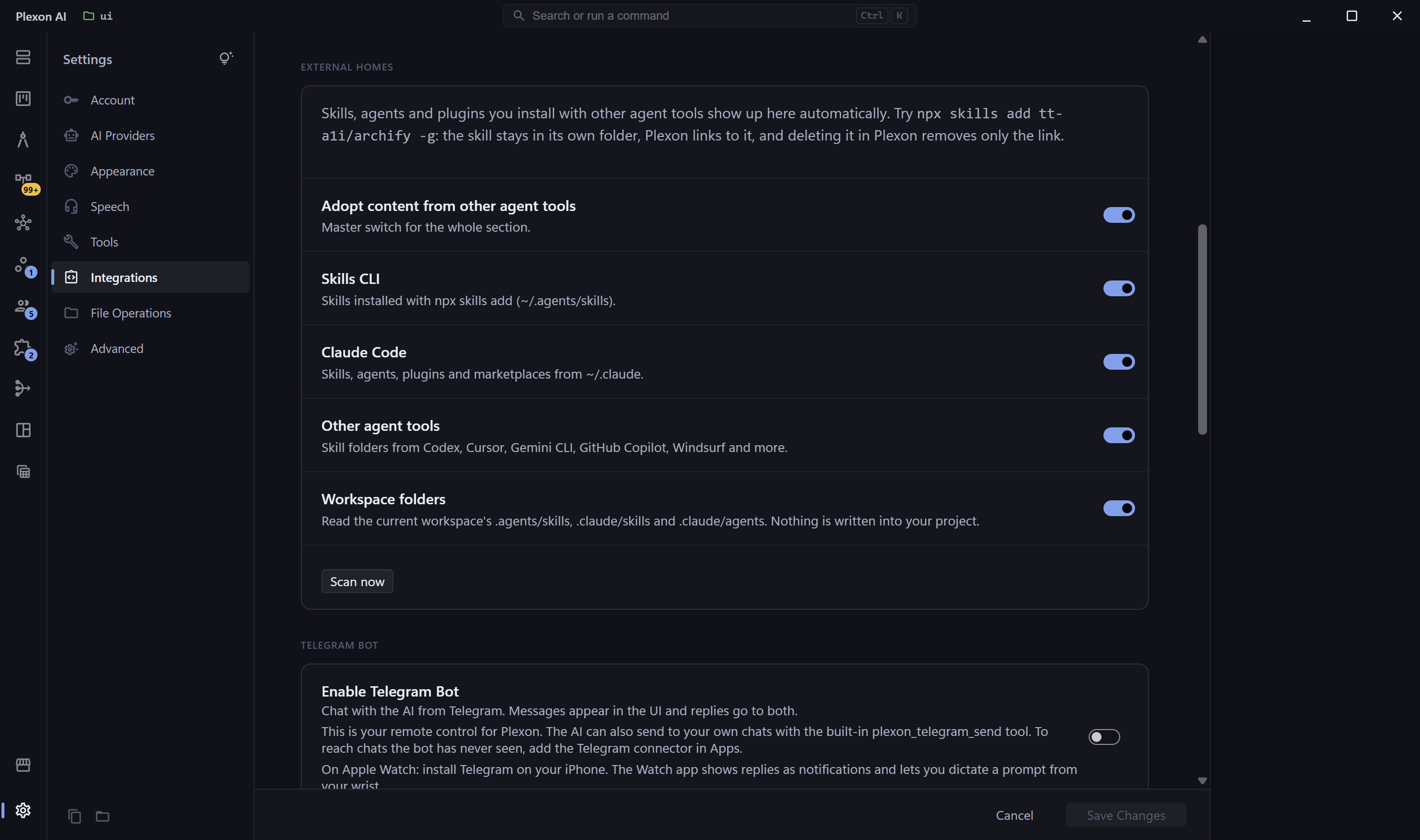
Settings > Connected apps > More options > External homes controls the whole thing: a master switch, one toggle per source tool, and a Scan now button. Turn a source off and its adopted content unlinks; nothing is ever written into your project folders.
- Master switch plus per-tool toggles
- Scan now for an immediate pass
- Project scope is read-only by design
Share Your Skills
Built a skill that's useful to others? Share it in one click. Open the Marketplace's Installed tab, filter to your skills, and click Export as `.plxm`. Teammates or community users double-click the file and have your skill installed and ready to use. Or publish to a Git repo so anyone can subscribe and pull updates over time.
- One-click export bundles your skills into a single shareable file
- Recipients install with a double-click. No command line, no setup
- Or publish to a Git repo for ongoing updates the community can subscribe to
- Want to publish a public skill pack? Marketplace Developer Mode builds the repo for you
Figma Integration
Design-to-code, built in
Plexon AI includes a native plexon_figma MCP tool that extracts complete design specifications from any Figma file: colors, typography, spacing, shadows, border radii, layout specs, and a hierarchical component tree. Combined with the bundled figma-website-builder skill (v3.0), Plexon can turn a Figma link into a pixel-perfect React or React Native implementation with automated visual verification via Playwright.
plexon_figma Tool
- Extract full files or specific nodes by ID
- Export images as PNG, SVG, JPG, or PDF at multiple scales (@1x, @2x, @3x)
- Hierarchical component tree output
- Design tokens: colors, typography, spacing, shadows, radii
- Complete design screenshots for visual reference
- Token from config, env var, or secure prompt. Set once, use everywhere
figma-website-builder Skill
- Pixel-perfect React 19+ or React Native implementation
- AI visually compares output vs design screenshot. Iterates until exact match
- Parallel sub-task decomposition for complex multi-section designs
- Auto-selects optimal libraries and styling approach per design
- Supports user-uploaded screenshots alongside Figma data
- Bundled reference: Figma-to-Tailwind mapping guide
Design System Library
54 real-world design systems, ready to use
Say "build me a landing page like Stripe" and Plexon knows exactly what that means: the purple gradients, the weight-300 typography, the blue-tinted shadows, the precise spacing. The bundled design-system-library skill contains complete design specifications extracted from 54 of the world's most recognized tech companies, following Google Stitch's DESIGN.md format.
Purple gradients, elegant
Premium white space, SF Pro
Warm minimalism, serif
Black & white precision
Ultra-minimal, purple
Warm coral, rounded UI
Vibrant green on dark
Playful multi-color
Dark emerald, code-first
Warm terracotta, editorial
Dark premium surfaces
Stark monochrome, futuristic
Plus 42 more: Coinbase, Revolut, Uber, IBM, NVIDIA, Cursor, Raycast, PostHog, Sentry, Zapier, Framer, Pinterest, Miro, and many others.
What Each System Contains
- Complete color palette with hex values and semantic roles
- Typography rules: font families, size scales, weights, letter-spacing
- Component styles: buttons, cards, inputs, navigation with states
- Layout principles: spacing system, grid, whitespace philosophy
- Shadow & elevation system for visual depth
- Responsive breakpoints and touch targets
- Do's and don'ts: design guardrails and anti-patterns
- Ready-to-use agent prompt guides for implementation
How It Works
Just describe what you want
"Build like Stripe", "Notion-style dashboard", or "dark minimal like Vercel". Natural language is all you need.
AI loads the right design system
Plexon matches your intent to the right reference and loads only the relevant specification. No manual setup.
Tokens are extracted automatically
Colors, typography, spacing, and shadows are mapped to your project's format: CSS variables, Tailwind config, or shadcn HSL.
Build with pixel-perfect fidelity
The AI follows the design system's rules, including the do's and don'ts, producing UI that genuinely looks like the reference.
Integrated with the website-builder, figma-website-builder skills, and the UI Designer, Frontend Developer, and UX Architect agents. A dedicated Design System Architect agent helps you explore and compare systems.
Author Skills From Chat
No dialog. Just describe what you want.
Just describe the skill in chat and Plexon writes it for you. List, create, read, update, or delete any of your skills from a normal conversation. The AI uses the same checks as the Skills panel and the new skill is ready to use right away.
Every change shows you a preview before anything is saved, with one-click approval. Bundled and plugin-installed skills stay read-only by design. If you want to change one, the AI offers to copy it to a new name first. A built-in helper teaches the AI Plexon's preferred style as it writes.
Try in chat
"Create a skill called pr-summary that helps me write good PR descriptions."
"Update pr-summary to also cover commit-message style."
"List my skills."
"Delete the pr-summary skill."
What you get
- Full CRUD via plexon_skill: list, get, create, update, delete
- Same validation pipeline as the Skills panel dialog
- One permission prompt per write, with full params preview
- Bundled and plugin-installed skills stay read-only
- plexon-author companion skill loads automatically with the schema and worked examples
- Multi-provider: works with Anthropic, OpenAI, Gemini, and any other configured provider
- Available from any mode: Make, Plan, Ask, Auto
- Sub-agents cannot mutate global skills (tool excluded from sub-agent contexts)
Pairs with the existing AI-assisted authoring wizard in the Skills panel. The chat path is for one-shot creation; the wizard is for guided form-based editing. Both call the same daemon helpers.
Report Templates That Describe Themselves
Skill-rendered pages that come out right every time
A skill can ship a page template that carries its own contract in one file, right at the top: the variables it needs, their types and allowed values, and a complete sample. The AI can ask any template what it expects, and it can preview the page with sample values so you see how a report looks before you have real data. When data is missing, it sees every problem at once and fixes the call in one step instead of guessing one field at a time.
For pages built from an API result, the template can pull its own numbers straight from the payload: drop header rows, join tables, split ranges like 121-131, and read percentages, so the AI never re-types dozens of values by hand. Mark a template strict to check its data hard, or leave it free so the AI fills in what you did not spell out. Every skill install checks its templates and names exactly what is broken, and a rendered page can no longer come up blank while reporting success.
For skill authors
- Keep the whole contract in one file, right at the top of the template
- Preview a template with sample values before you have real data
- Templates pull their own values from a source report, no hand-copying
- Install-time lint refuses a broken template and names the exact problem
What you get
- Report pages that render right far more often
- A live preview with realistic sample data, in one step
- One clear error listing everything missing, fixed in a single retry
- A syntax check that catches a blank page before you see it
Skills are included across the library and bundled plugins. Some work in the background. Availability depends on your computer, AI service and enabled plugins.
Skills & Tools Capabilities
Dual Skills Architecture
Two kinds of skills, side by side: write your own (unlimited, share via Git), or use Anthropic-native skills that handle xlsx, docx, and pdf. Open format compatible with other AI assistants.
Encrypted Skills
Protect proprietary knowledge with skill encryption. Encrypted skills are usable by the AI but unreadable by anyone inspecting the files.
168 Built-in Tools
Built-in tools read and write files, search folders, manage tasks and carry out actions in Plexon. File searches stay within the folders you allow. Your role and settings determine which tools are available.
Community Repository
Browse and install skills from a curated registry organized by provider: Anthropic, Vercel, Cloudflare, Supabase, and many more, plus the skills.sh catalog of nearly 300 popular community skills.
Bring Your Own Skills
Plexon reads the standard skill layout: one SKILL.md folder per skill, globally at ~/.plexon/skills and per project at .plexon/skills. Skills installed with npx skills add, or already in your ~/.agents/skills, ~/.claude/skills or other agent folders, are picked up automatically.
Connects to
Nothing here works alone. See the whole map for how the pieces fit together.
This one is taught in step 7 of 8: package it as a role.
What feeds it
AI Chat & Modes authors this.
Author a skill from the conversation, through the plexon_skill tool.
Self-Improving Skills extends this.
A curator agent saves new entries, refines existing ones and retires the stale, in that same library.
Where it goes
This feeds 192 AI Agents.
An agent loads the skills carrying the standing knowledge for its domain.
This is packaged by Personas.
A persona seeds its own skills on install.
This is distributed by Unified Marketplace.
Skills install from any marketplace source, or from a dropped zip.
This feeds New Workspace Guide.
The Tools step turns skills, agents and connectors on for this folder alone; what is already on everywhere is marked, not offered twice.