Session Branching
Try It Another Way,Keep the Way That Worked
Rewinding a chat deletes everything after the point you rewind to, so a long piece of work is the price of one experiment. Branching takes the conversation up to a message you pick into a second chat and leaves the first one alone, with a line marking where the inherited part ends and a way back to it.
What happens in this clip
- Type @ in the message box and the picker offers your agents and the files in the project.
- Point the message at one of them and send it.
- Ask mode answers read-only, drawing a table instead of touching anything.
- The usage chip under the reply shows the tokens and the time that answer cost.
- Branch the conversation from any earlier message. The original stays exactly as it was.
Related features
Branch at Any Message
Hover a message and press the branch icon. A new chat opens carrying everything up to and including that message, and the one you were in stays exactly as it was. Pick a reply to keep it and take the next step differently. Pick your own question to have it answered another way.
- The original keeps every message after the branch point
- The branch opens straight away, ready to type into
- Works on your messages and on the assistant’s
- Branch a branch, as many times as the work needs
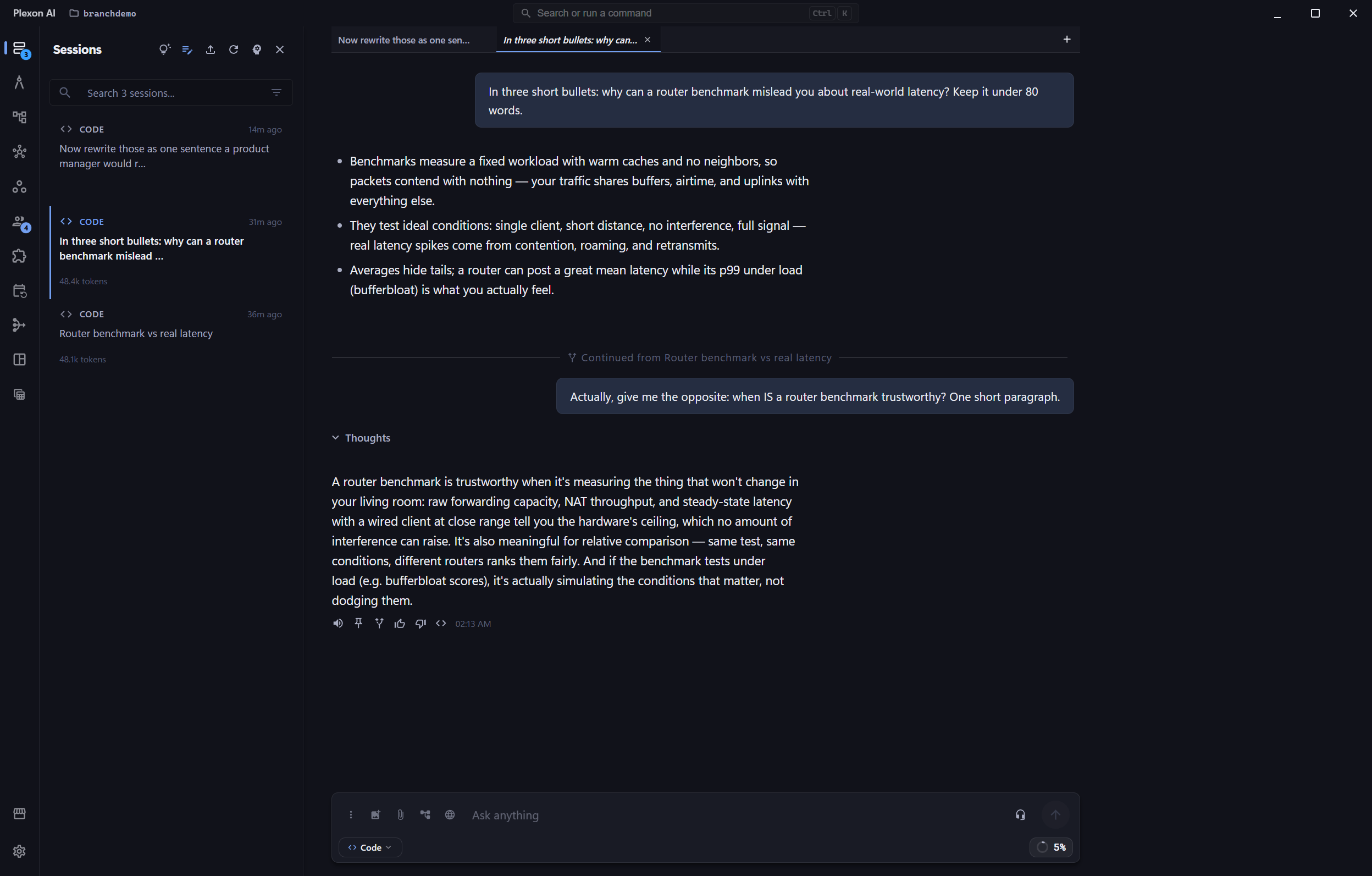
A Line Where the Inherited Part Ends
Messages carried over from another chat look exactly like ones you had there, which is how a branch would read as a conversation that already covered all this. A line across the transcript marks where the inherited part stops and the new work starts, and clicking it takes you back to the chat it came from.
- The line names the chat the history came from
- One click returns to the original
- The same mark appears on side questions and approval chats
- Nothing above the line was typed in this chat
Named After the Question, Not the Answer
Branches from one conversation would otherwise arrive in the sidebar as four rows of the same name with numbers after them. The branch is named after the prompt at the point you branched, which is the thing that tells them apart. Branching at a question and at the reply to it give you the same name, because both mean the same thing.
- The sidebar reads as different questions, not copies
- Rename it yourself whenever you like
- The original’s name never changes
- Long prompts are shortened to one line
It Refuses Rather Than Clipping Quietly
Some points are not usable as a branch, and Plexon says which instead of moving the line for you and handing you a conversation that behaves oddly later. A message inside a step still running, a chat mid-reply, and a locked chat each come back with what to do about it.
- Never splits a step from its result
- Waits for a reply in flight to finish
- An unlocked chat first, for a locked one
- A message no longer in the chat is refused, not guessed at
Files Are Shared, Not Duplicated
A conversation that generated a video, ran an agent, or captured a page left real files on disk, and the messages carrying them point at where they are. A branch points at the same files rather than copying them, so branching a chat with three generated videos costs nothing and neither copy can drift from the other.
- No gigabytes copied to make a branch
- Both chats open the same file, and neither rewrites it
- A new take is always saved under a new name
- The original’s files are never moved
What It Guarantees
Nothing Is Deleted
The chat you branch from is not modified at all. Every message after the branch point is still there when you go back to it.
Retry Still Exists
Retry rewinds in place and is the right move when the tail was a mistake. Branching is for when it was not.
A Way Back
The divider is a link to the chat the history came from, so you are never hunting the sidebar for the original.
Tells Branches Apart
Each one is named after the question at its branch point, so a sidebar of four attempts reads as four questions.
Never Half a Step
A branch cannot end between a tool call and its result. That conversation would be rejected by the model, so it is refused up front.
No Duplicate Files
Generated media, agent reports and captures are shared between the two chats rather than copied to make a second set.
No Phantom Resume
A freshly branched chat is not mistaken for one that was interrupted, so Plexon never reopens it and sends on its own.
Independent From Then On
The two chats keep their own mode, their own tasks and their own history. Typing in one does nothing to the other.
Connects to
Nothing here works alone. See the whole map for how the pieces fit together.
Where it goes
This extends AI Chat & Modes.
Branch a chat at any message and the conversation up to that point opens as a second chat, with the first one untouched.
This extends Side Questions.
A side question you fork into its own chat carries the same mark showing where the inherited part ends.