FireworksAI
Run open-weight models on Fireworks from Plexon: twelve of them, up to a million tokens of context. Routed over the Anthropic Messages protocol so cached prompts and tool calls arrive intact, with built-in tools for your deployments, fine-tuning runs, and datasets. Bring your own key.
Related features
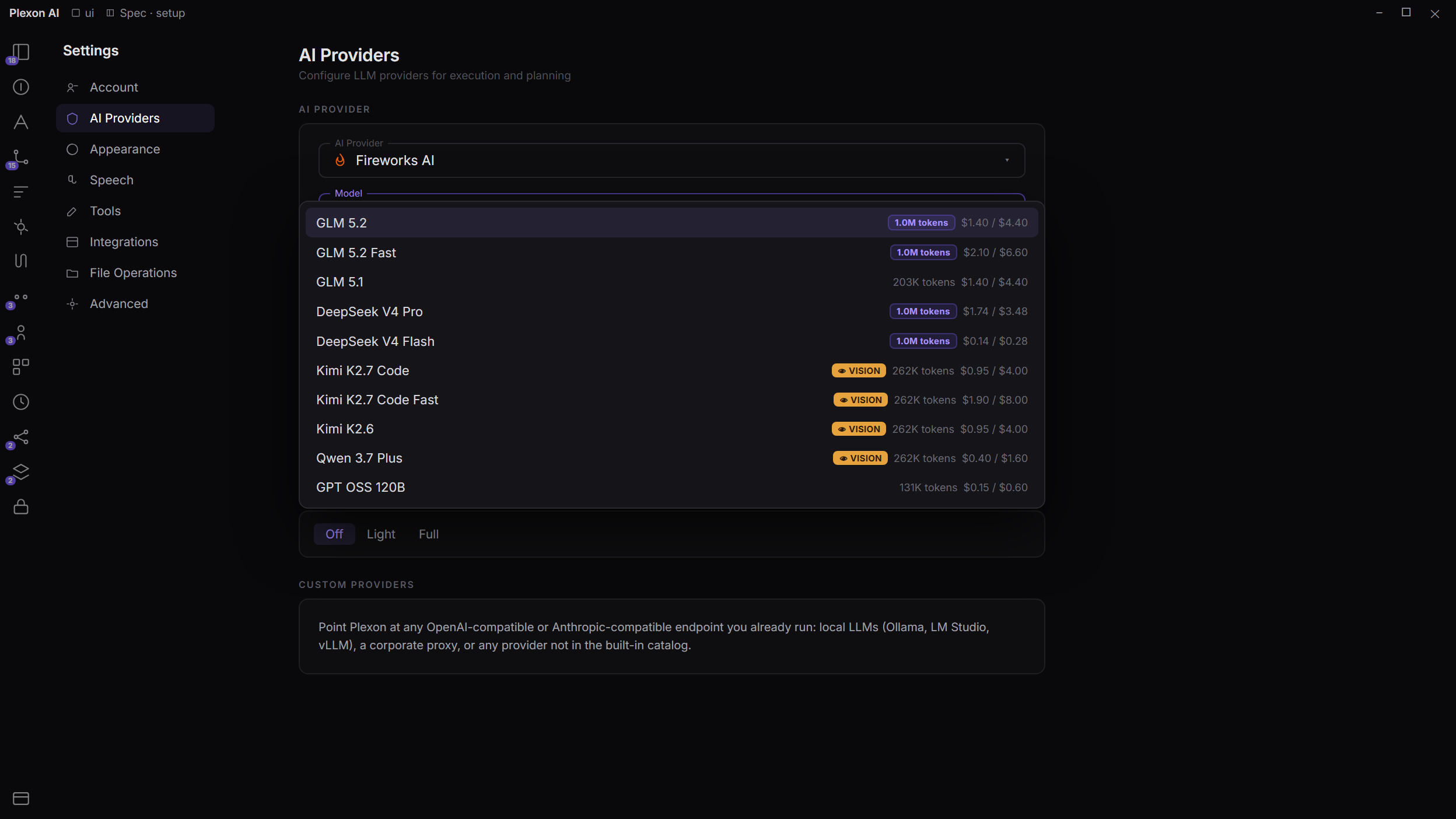
Twelve Open Models, One Key
Pick Fireworks AI in Settings, paste your key, and the whole curated list is there. A coding and tool-use model is already selected. One of the others carries a million tokens and reads images, and a frontier open-weight entry sits beside it.
- Two coding and tool-use entries, one of them the default
- Three entries that read images
- A frontier open-weight entry, plus GPT OSS 120B
Cached Prompts That Actually Land
Fireworks speaks the Anthropic Messages protocol, so Plexon sends its real prompt: four blocks with three cache breakpoints, in a deterministic order. Fireworks honours those breakpoints with a 5 minute or 1 hour TTL, which means a long session bills most of its input at the cached rate instead of full price.
- Three cache breakpoints per request, not a flattened prompt
- No cache-write surcharge: caching is automatic prefix matching
- Same client path Plexon uses for Anthropic, so tool calls keep their shape
Long Context Without the Premium
Five of the twelve carry a million tokens of context. Plexon caps output per model so a large one-shot write cannot eat the window, and the status bar shows what is left as the session grows.
- Up to 1M tokens of context on five of the twelve models
- Per-model output caps sized for large file writes plus reasoning headroom
- 262K context on the mid-tier entries
- Live remaining-context accounting in the model picker
Fast Serving Paths
Fireworks runs a separate high-throughput path for interactive work, above 100 generated tokens per second. Plexon exposes it as its own model entry, so switching from the standard path to the fast one is a single pick in the model list.
- Fast variants of the coding entries as first-class picks
- Same weights, same context window, higher throughput
- Pricing shown per model so the tradeoff is visible before you switch
- Standard paths stay available for batch and background work
Reasoning and Vision
Every Fireworks model in the catalog is a reasoning model, and Plexon surfaces the thinking stream as it arrives. Three of them read images, so screenshots and diagrams attach the same way they do on any other vision provider.
- Extended thinking with a configurable budget
- Reasoning streamed live, not buffered until the turn ends
- Vision on three of the twelve entries
- Capability flags per model, so controls only appear where they work
Manage Your Fireworks Account From Chat
Five built-in tools talk to the Fireworks control-plane API with the key you already configured, so there is no second credential to paste and nothing to install. Ask what is deployed or how a fine-tuning run is going and get an answer without opening the dashboard.
- List models with context windows and tool support
- Check deployments, replicas, accelerator types, and regions
- Track supervised and reinforcement fine-tuning jobs
- Inspect one job in full, or list your training datasets
Setting it up
Four clicks, or one link
Point Plexon at Fireworks by hand in Settings, keep your key in your operating system keychain instead of a config file, or let a link do the whole thing and confirm it once.
By hand
In Settings
- 1
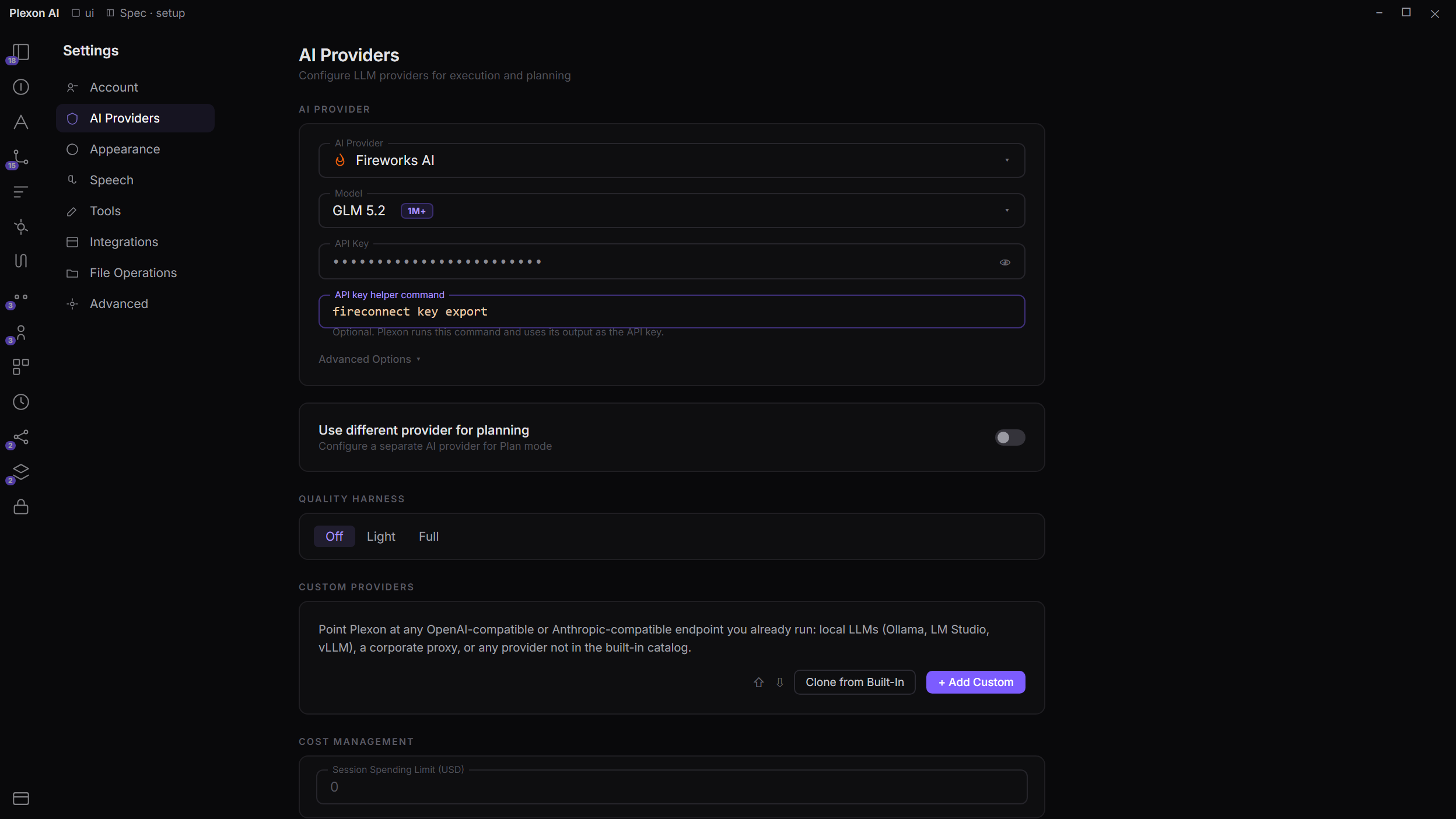
Open Settings, AI models
The gear at the bottom of the sidebar, or the Ctrl+, shortcut.
- 2
Pick Fireworks AI
It sits in the provider dropdown next to the others. Nothing to install and no custom endpoint to fill in.
- 3
Paste your key
The fw_ key from your Fireworks dashboard. It stays on your machine and travels only to Fireworks.
- 4
Choose a model
One is already selected. Switch any time from the model picker in the chat window.
Prompt caching, tool calling, streaming, reasoning, and vision all work from here. There is no extra step to turn any of them on.
Keys
Keep the key in your keychain
Under each API key field there is an API key helper command. Name a local command that prints your key and Plexon runs it when a request needs one, so the key never lands in a config file at all.
Settings, AI models, API key helper command
fireconnect key export
- The command runs on your machine, and its output is used as the key.
- Rotate the key in your keychain and Plexon picks it up on its own.
- The stored key, if you have one, is the fallback when the command fails.
- Setting it from chat always stops and asks you first.
Any command works: your keychain CLI, a password-manager command, a script that reads a vault.
From a link
One link, one confirmation
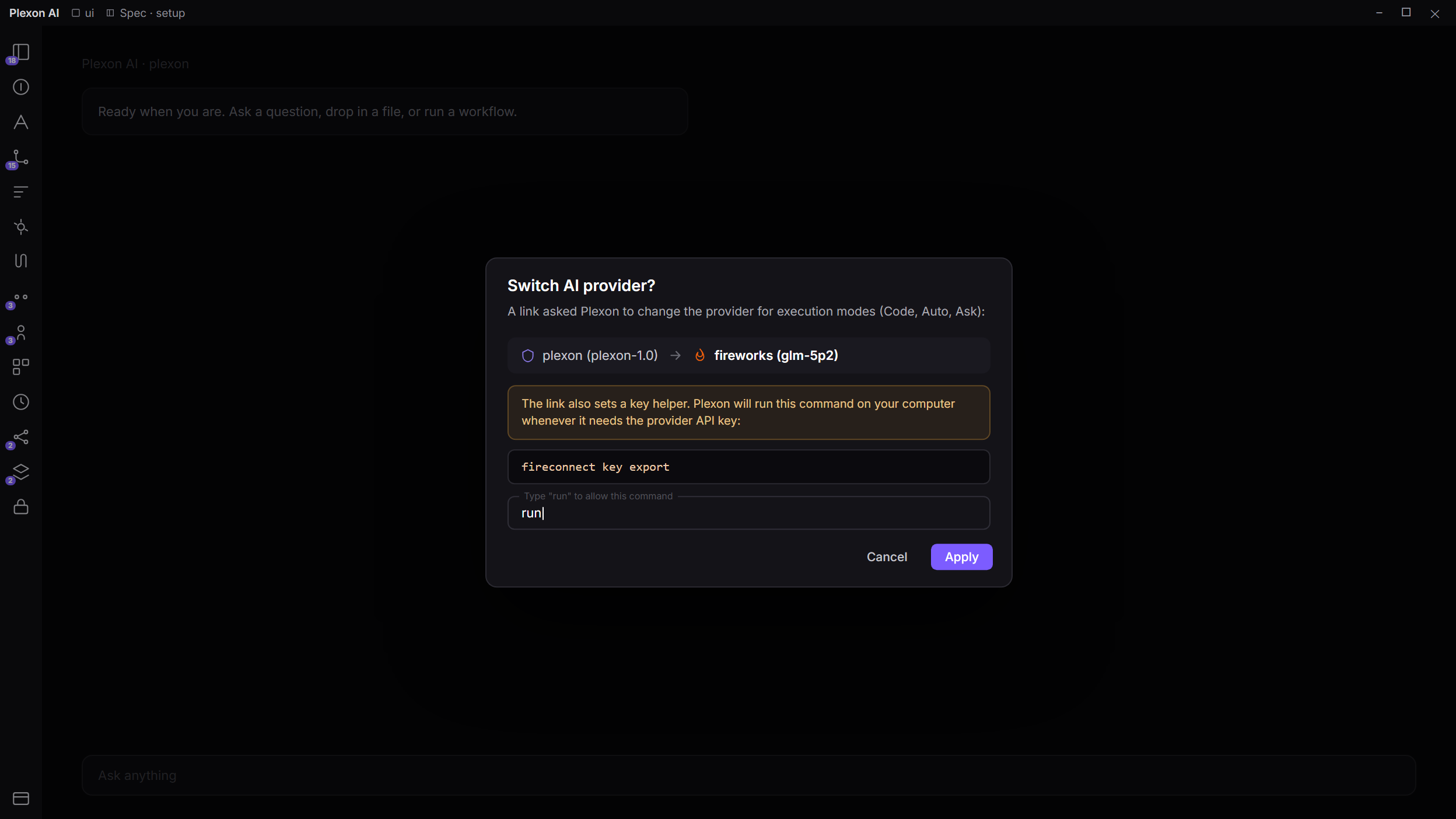
Plexon registers a plexon:// handler on Windows, macOS, and Linux. A provider link switches one slot and asks you to confirm before it writes anything. The rest of your setup is left alone, and the provider reloads without a restart.
plexon://provider?name=fireworks&model=gpt-oss-120b&mode=execution
A key in the URL is refused: links end up in shell and browser history. To hand over a key, the link carries an api_key_helper command instead, shown to you in full before anything is armed.
With FireConnect
FireConnect is the Fireworks CLI that points coding clients at Fireworks models. It can open the provider link for you, with the model and a key helper already filled in, so your key stays in the keychain and rotation needs nothing from Plexon.
Plexon's side of this is built and ready for a FireConnect target. Until one ships, the setup above takes about a minute.
Under the Hood
Built In, Not Bolted On
Fireworks is one of the twelve providers in the Settings dropdown. No custom endpoint to configure, no Premium plan required, and the model list refreshes from the hosted catalog every 24 hours.
Anthropic Protocol
Plexon routes to the Fireworks Messages endpoint rather than the chat-completions one. That is what lets cache breakpoints, thinking blocks, and Anthropic-shaped tool definitions travel unchanged.
Fast Paths Exposed
The high-throughput serving path is a separate model entry, so you choose it deliberately and see its rate before you do. Standard paths stay in the list.
Reasoning Everywhere
All twelve entries support extended thinking with a configurable budget, streamed as it is generated. Adaptive thinking is off because Fireworks does not implement it, so requests never fail on an unsupported field.
Vision on Three
Three of the twelve entries accept images. Attach a screenshot and the vision path is identical to any other provider that reads pictures.
Control-Plane Tools
Deployments, fine-tuning jobs, and datasets, queried from chat with the provider key you already set. Read-only, so nothing here can spend money or delete a deployment.
Your Key, Your Bill
Bring your own Fireworks key. Requests go straight to Fireworks with your credential, and Plexon never pools or proxies it.
Connects to
Nothing here works alone. See the whole map for how the pieces fit together.
Where it goes
This feeds AI Chat & Modes.
Open-weight models over the Anthropic Messages protocol, so cached prompts and tool calls arrive intact.