Parallel Work
Split a TaskAcross Chats
Some jobs are really three jobs. Ask for the task to be split into separate chats and the assistant opens up to four, each a tab in the same folder with its own part of the work. They run at the same time and report back to the chat you started in.
What happens in this clip
- Ask for the work to be split into three separate chats, and say what each one owns.
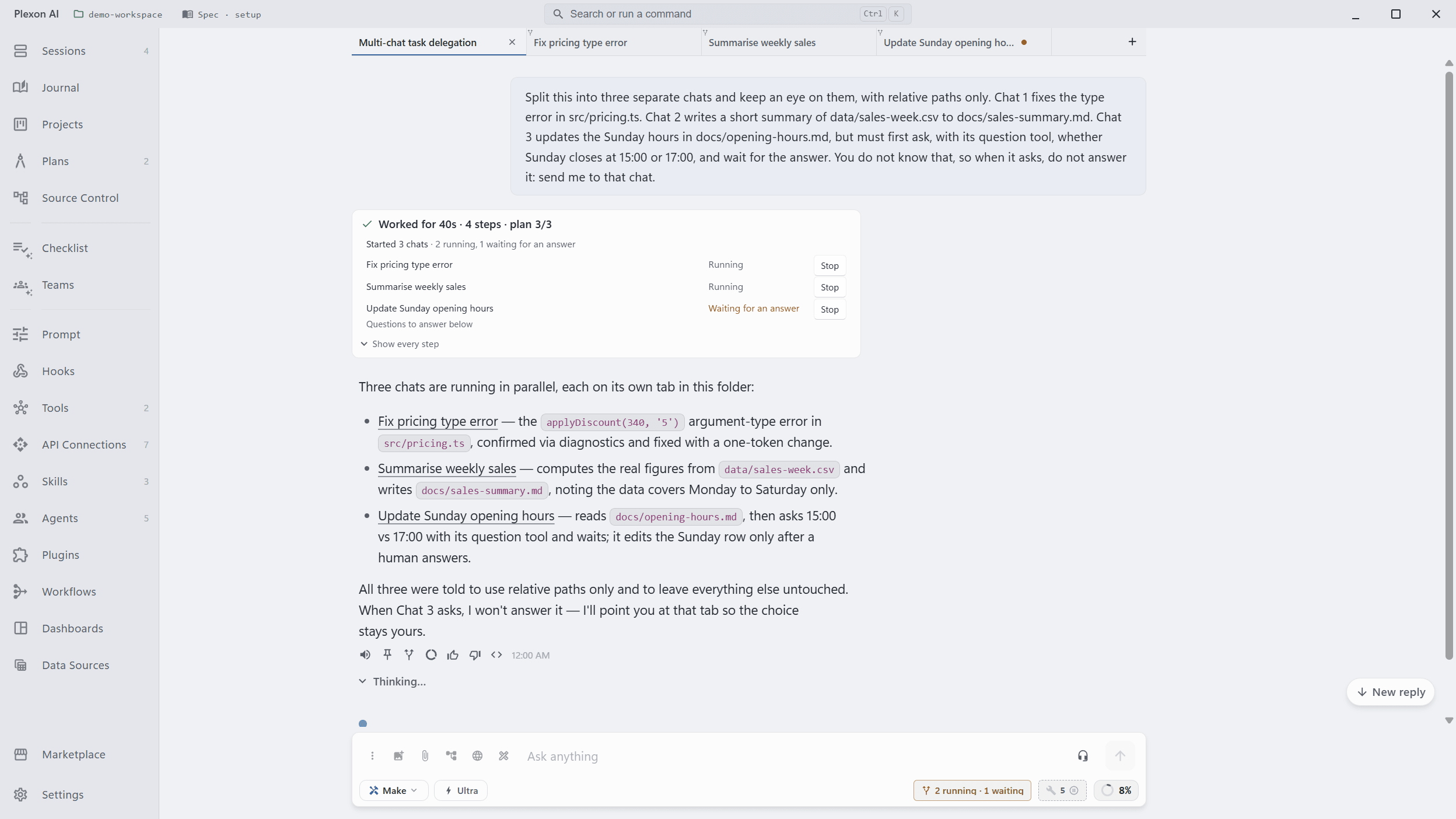
- Three tabs open beside the chat you asked, and the step that started them lists each one as Running.
- One chat has a question. Its row reads Waiting for an answer and the count in the message box turns amber.
- The main chat says which chat is waiting. Open it from the list and answer where it was asked.
- Back in the main chat the reports arrive by themselves, and it checks that the three parts fit together.
Related features
One Request, Up to Four Chats
Ask for a task to be split into separate chats and the assistant opens them for you. Each one is an ordinary tab in the same folder, with its own part of the work and its own first prompt. They run at the same time. The chat you asked in ends its reply and stays usable while the others work.
- Up to four new chats from one request
- Each is a normal tab you can open and read
- Every chat gets its own part and its own first prompt
- The main chat is free again as soon as they start
Every Chat Can Run Its Own Team
Each of these chats is a full chat. It can hand parts of its work to its own agents, run several of them at once, and build a team that passes work between its members. One request can put several teams to work at the same time, each in its own tab.
- Each chat can fan its part out to its own agents
- A chat can build a team and hand work between its members
- Agents and team members use your allowance too
The Main Chat Hears Back
You don't have to watch four tabs. The main chat is told when one of them finishes a reply, fails or asks a question, and it takes a turn on its own. Chats that finish close together arrive as one report.
- Told when a chat finishes, fails or asks a question
- The main chat takes its turn without you prompting it
- Chats that finish close together arrive as one report
Questions Go to the Main Chat First
A question from one of the chats goes to the main chat before it reaches you. If the main conversation already holds the answer, the assistant answers, and the question card says the main chat answered. If it doesn't, you get a link to the chat that is waiting.
- The question card says when the main chat answered
- No answer in the main conversation means a link to the waiting chat
- A secret, a permission request and a plan to approve always wait for you
One List, and a Count That Stays in View
The step in the main chat that started the chats lists them, each with a status word: Running, Waiting for an answer, Done, Failed, Stopped or You took over. Click a name to open that chat. While any chat is running or waiting, a small pill in the message box shows the count and opens the same list, with Stop on each chat and Stop all.
- Status is a word, one per chat
- Click a name to open that chat
- Stop on each chat, and Stop all
Type in One and It's Yours
Each of these is a real conversation, in a tab like any other. If you type in one, it is yours from then on, and the list shows it as You took over.
The Limits
Four at once is the ceiling, and a chat started this way can't start its own. They share one folder and nothing merges their edits, which is why each gets a part that touches different files. Each is a full conversation on your allowance. Closing the app ends the running turns, and they show as Stopped.
- At most four chats at once
- A chat started this way cannot start more
- One shared folder, and nothing merges their edits
- Each chat is a full conversation on your allowance
- Closing the app ends running turns, shown as Stopped
- A question nobody answers within the hour is never answered for you
What It Gives You
At the Same Time
Up to four chats work on their own parts at once, and the chat you asked in stays usable.
Reports Come Back
The main chat is told when a chat finishes, fails or asks a question, and takes a turn on its own.
Stop One or All
The list has Stop on every chat, and the pill in the message box has Stop all.
Yours When You Type
Type in one of the chats and it is yours from then on. The card says You took over.
How it differs
The agents an assistant hands work to run inside one reply and have no tab of their own. Parallel Agents gives the same prompt to several agents, each in its own copy of the project, with tiles to merge from. Splitting a task gives each chat a different part, in one shared folder, as a tab you can open and type in. Chats you opened yourself can keep each other informed too: see Cross-Chat Messaging.
Connects to
Nothing here works alone. See the whole map for how the pieces fit together.
What feeds it
Cross-Chat Messaging feeds this.
The report that a split chat finished, failed or asked a question arrives in the main chat on the same path open chats use to message each other.
Where it goes
This extends AI Chat & Modes.
Ask for a task to be split and the assistant opens up to four new chats, each an ordinary tab with its own part of the work.