Creative AI
Film Studio:a story, filmed shot by shot
Ask for a series, a short film, a cartoon, a trailer or a music video and Plexon films it. It writes the story, draws the cast, generates every shot in the look you pick, and cuts each episode into one mp4 on your computer with titles, captions, voices, music and sound effects. It stops once, before the filming, to show you the cast and one test shot.
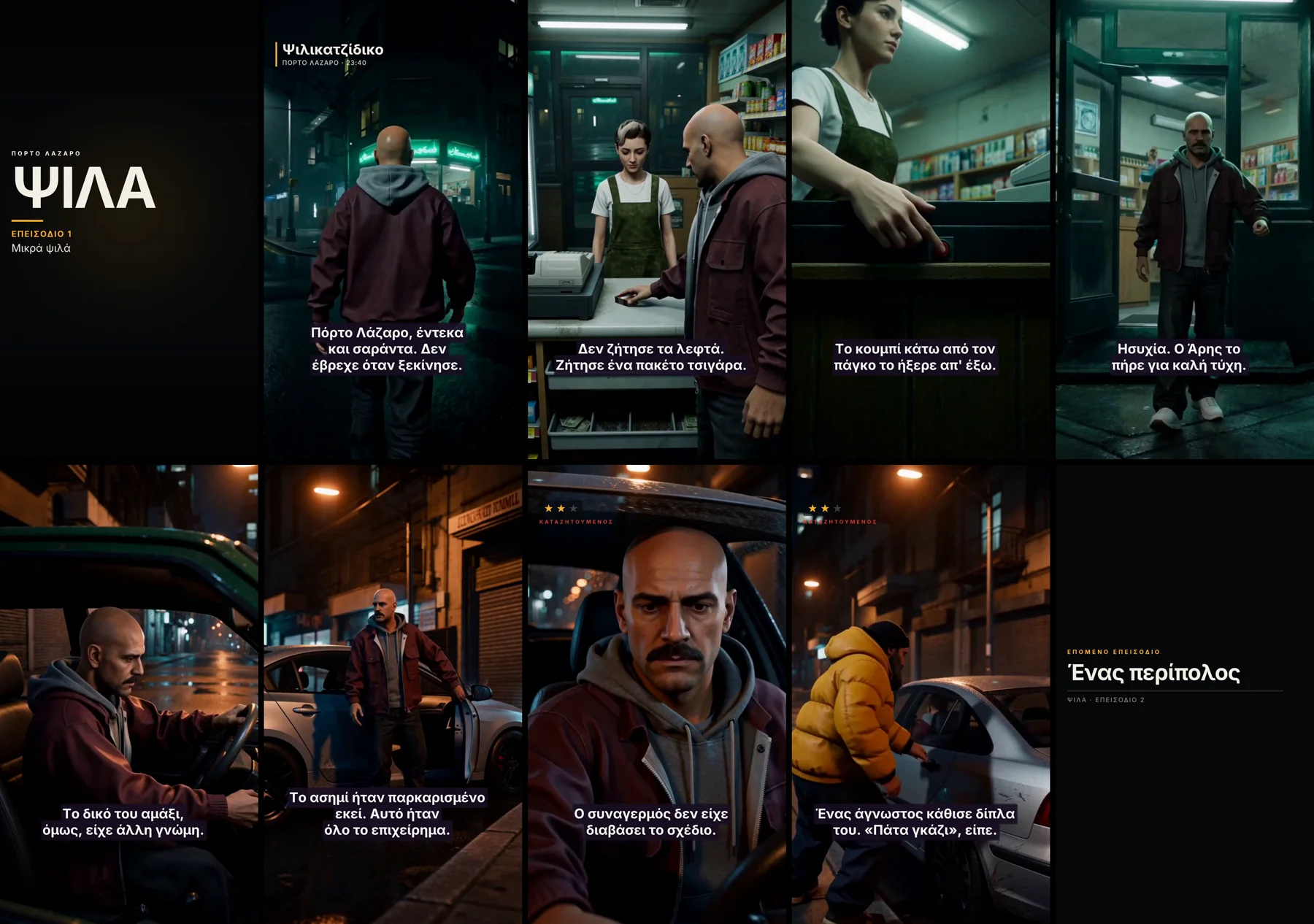
What happens in this clip
- A title card names the series and the episode, in Greek.
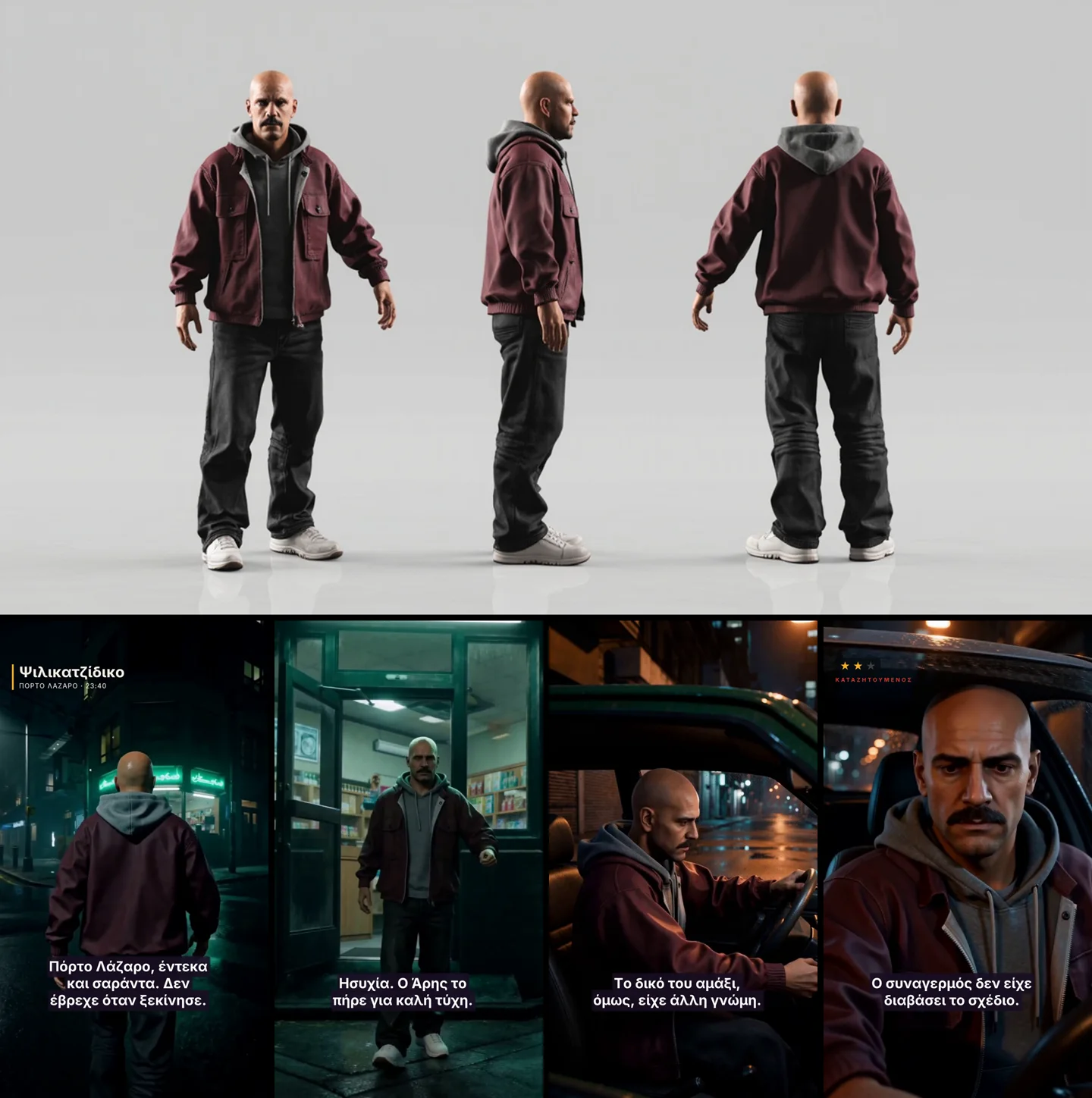
- A bald man in a dark red jacket walks up to a corner shop at night, with the place and the time laid over the shot.
- At the till he pushes a pack of cigarettes across the counter, and the assistant presses a button under it.
- He walks out, and his own car will not start.
- He gets into a silver car parked at the kerb, and a wanted marker with two stars appears in the corner.
- A stranger in a yellow jacket gets into the passenger seat, and a card names the next episode.
Related features
Animated, anime or 3D is a look, not a different tool
Say "an animated series" and Plexon still films it. Every shot is a generated clip, and words like 3D animated, anime, game cinematic, 2D cartoon or live action describe how that footage looks. They go into every shot. Code draws only what has to be spelled right: the title, the episode number, captions, credits, and graphics over a shot.
- Characters, places, cars, weather and action are filmed
- Titles, chapter cards, captions and credits are drawn in code
- An animation of your own product or workflow is a different page: Animated and 3D Videos
One cast from the first shot to the last
Before anything is filmed, Plexon writes a short series bible and draws each main character as a reference sheet: three views on a plain background, plus a fixed description pasted into every shot. The sheets and a still of each place ride along with every clip, so a face in shot nine matches the face in shot one.
- A series bible: the premise, the look, the cast and the places in fixed words
- A reference sheet per main character, drawn with image generation
- Three to five references on each shot
One stop, then every episode
Plexon films one test shot, usually the hardest one in episode 1. Then it shows you the cast sheets, the place stills, that shot, and how many clips the episodes need. Say yes, or say what to change. That is the only question between the brief and the finished episodes: after the yes it films and cuts every episode you asked for. Changing the look here costs one picture and one clip. Changing it after episode 1 costs the episode.
Four shots at a time, while it keeps working
Shots film in the background, up to four at once. Plexon collects each clip as it lands, checks it, and asks for a retake when a shot comes back wrong. A one-minute episode is about eight clips and takes ten to fifteen minutes to film. A clip that has started keeps filming even if you stop the reply, and the chat tells you when it is saved.
Cut on your computer, with sound
Each episode is cut on your computer into one mp4: a title card, the shots, captions, and an end card. A narrator can tell the story, or each character speaks in their own voice. Music runs under it, sound effects land on the moment they belong to, and scenes can fade in, dissolve or dip to black without changing the episode's length.
- A narrator, or a voice per character, picked from the list your voice engine offers
- A theme generated once and shared by every episode
- Sound effects from a free library that ships with Plexon, or your own files
- Graphics drawn in code over the moving footage: a title, a lower third, a HUD
A character can say a line on screen
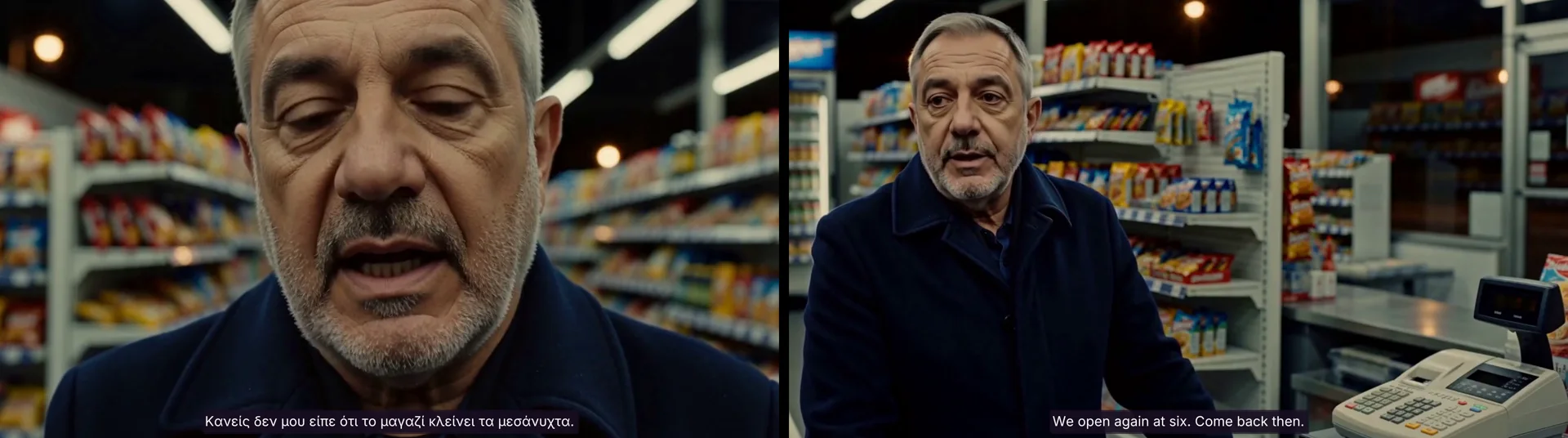
When one character is alone in a shot, Plexon can record the line in that character's voice and film the shot from it, so the mouth moves with the words. It works on the newer video model only, one speaker per shot, and it was tried on live-action looks. The test shot shows whether it holds in your look. Where it does not, the line is heard over the shot instead.
One episode, from one request
The first clip at the top of the page is a whole episode: 58 seconds, upright, in Greek, in a game cinematic look. Plexon made it in a test run in November 2026 from one request, for an animated series with one-minute episodes: a man robs a shop, takes a car when an alarm goes off, and runs from the police with someone he met on the street. This is episode 1 of that series: one episode, about a minute long.
It has eight shots, a narrator, captions, music, and four graphics drawn in code. One shot was filmed twice, because the first take showed the wrong car. Nobody speaks on screen in it, so the last still and the third clip come from a separate test of that.
Or just ask
Say it, get episodes back
Four requests and what comes back. Each one starts with a single question, and stops once before the filming.
Say this
Make an animated series about two thieves and a stolen car, three episodes of one minute, vertical.
You get back
One question about the look, the frame, the voices and the tone. Then the cast sheets, a test shot and the clip count, and after your yes, three 9:16 episodes with a title card, captions, music and an end card.
Say this
Film a two-minute short film about a lighthouse keeper who finds a message in a bottle, anime look, with a narrator.
You get back
A bible and a reference sheet for the keeper, a test shot, then about sixteen clips cut into one mp4, narrated, with the captions burned in.
Say this
Make a 30 second movie trailer for a heist film, game cinematic look, 16:9, with a title over the last shot.
You get back
A short run of filmed shots with dissolves between them, a theme under the cut, and the film's title drawn in code over the closing shot.
Say this
Film a one-minute animated pilot about two thieves and a stolen car.
You get back
The same path as a series with one episode: one stop with the cast and a test shot, then the pilot cut with its voices and music.
Every draft opens for you to read before it does anything. Nothing runs, sends, or refreshes until you have looked at film and said so.
What it costs, and the limits
Film Studio is part of the Premium plan, which makes 10 generated clips a day. A cast that stays the same from shot to shot needs reference images, and only the newer video model takes them. That model uses your credits, by clip length and resolution. The standard model uses none, but it films 16:9 only and takes no references. Past the day's 10 clips, a clip is still made when "Use credits for video" is on under Settings, Account and your credits cover it, and that clip does not count toward the day. Otherwise the filming stops and Plexon tells you when the day resets. Plexon tells you how many credits each clip used once it is made.
- A line spoken on screen: one character at a time, on the newer video model, tried on live-action looks only.
- Graphics over a shot are recorded frame by frame, in about the time they are on screen, and one overlay holds at most 120 seconds of video.
- A clip filmed in the wrong shape can be cropped to fill the frame, but it loses its sides and looks softer. Plexon films in your frame's shape first.
- Several voices need Plexon Voice. A voice engine on your computer has one.
- You see the cast and a test shot before anything is filmed in bulk.
Pairs with
- Video Generation: the clip model that films every shot.
- Video Composition: the cut, with voices, captions, music and dissolves.
- Image Generation: the cast sheets and the stills of each place.
- Animated and 3D Videos: an animation of your own product or workflow, built from code instead.
Film Studio Capabilities
Filmed in your look
Every shot is generated footage: 3D animated, anime, game cinematic, 2D cartoon or live action.
A cast that stays put
Reference sheets and fixed words keep each character the same from shot to shot.
One stop
The cast, one test shot and the clip count, before anything is filmed in bulk.
Four at once
Up to four shots film in the background while Plexon checks the ones that landed.
Several voices
A narrator or a voice per character. Several voices need Plexon Voice; a voice engine on your computer has one.
Music and effects
A theme under every episode, and sound effects placed on the moment they belong to.
Captions burned in
Each line is captioned in the cut, timed to when it is spoken.
Graphics over the shot
A title, a lower third or a HUD drawn in code, laid over the moving footage.
Past the day's clips
After the day's 10 clips, a clip is still made when your credits cover it, and it does not count toward the day.
Connects to
Nothing here works alone. See the whole map for how the pieces fit together.
What feeds it
Visual & Voice feeds this.
A film is narrated, or each character speaks in a voice picked from the list your voice engine offers.
Image Generation feeds this.
Each main character is drawn as a reference sheet, and each place as a still, before a shot is filmed.
Video Generation feeds this.
Every shot of a series or a short film is a generated clip, up to four filming at once.
Video Composition feeds this.
Each episode is cut on your computer with titles, captions, voices, sound effects and dissolves.
Music Generation feeds this.
One theme is generated per series and runs under every episode.
Where it goes
This is packaged by Personas.
The Designer persona ships with the film-studio skill and the video agent.