Workflow + Board + Background Browser
X outreach,on a schedule
X sector outreach is a workflow that ships with Plexon, switched off. Give it a list of X people searches, and it works through a different one each weekday, a few people at a time: it follows them, likes their newest post, and later messages the ones who followed back and reads what they write. A reply that looks like a lead gets an answer written from facts you gave it, or waits for you on a board. It does this in a hidden browser window on your own signed-in account, and it stays under limits Plexon set conservatively.
Related features
Set the searches and the texts once
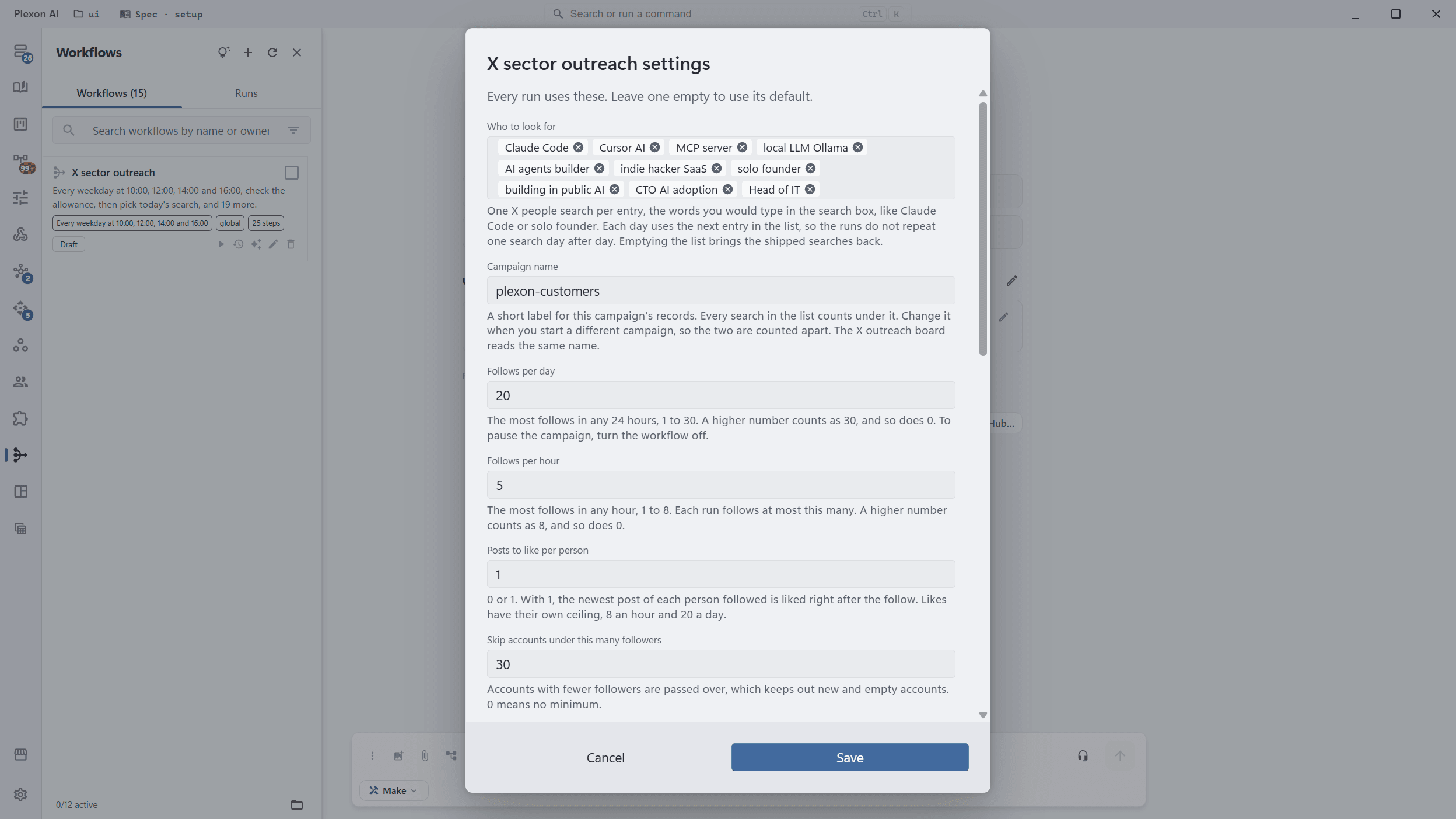
The workflow arrives switched off. Right-click it in Workflows and choose Settings. Every run reads these values, and a field you leave empty uses its default.
- Who to look for: one X people search per entry, the words you would type in the search box. Each day uses the next one. Ten ship, aimed at developers who pay for several AI tools, founders and indie hackers, and IT leads at mid-sized companies
- A campaign name, so two campaigns are counted apart
- Follows per day, 20 by default, and per hour, 5 by default
- Posts to like per person: 0 or 1, the newest one, right after the follow
- Skip accounts under 30 followers by default, which keeps out new and empty accounts
- A message for people who follow back, written for each person from their profile, or one text with their first name filled in. 10 first messages a day by default
- Answer leads in the thread, on by default, 10 answers a day, from the facts you wrote and nothing else
- When to hand a lead to you: prices, discounts, calls, demos, partnerships and anything personal ship as the default
What one run does
It runs at 10:00, 12:00, 14:00 and 16:00 on weekdays, in your own time zone. Each run checks the allowance before anything else. When nothing is left and nothing is due, it posts a note saying why and ends there, without using AI.
- Starts at a random minute within the next half hour, so runs never land on the hour
- At most every 20 hours, and only while someone it followed has not followed back or a conversation is open, it opens your followers and matches them against the people it followed. Each match is a follow-back, and it messages up to 5 of them
- In the same pass, reads up to 20 conversations in your messages and sorts the replies into leads, peers, asks and spam
- A lead gets one short answer in the thread from your facts. Or, with answering off, the answer is drafted onto the board for you
- Then it opens the People tab of the search of the day and, for each new person, reads the profile once, passes over protected accounts, follows, checks that the button now reads Following and likes their newest post, not a pinned one, a repost or an ad, and no older than 30 days
- Waits 20 to 60 seconds between people
- Never replies to anyone in public, never posts and never unfollows
- Ends with one line: followed, liked, skipped, followed back, messaged, replied, answered, drafted, and why it stopped
A board for the leads that are yours
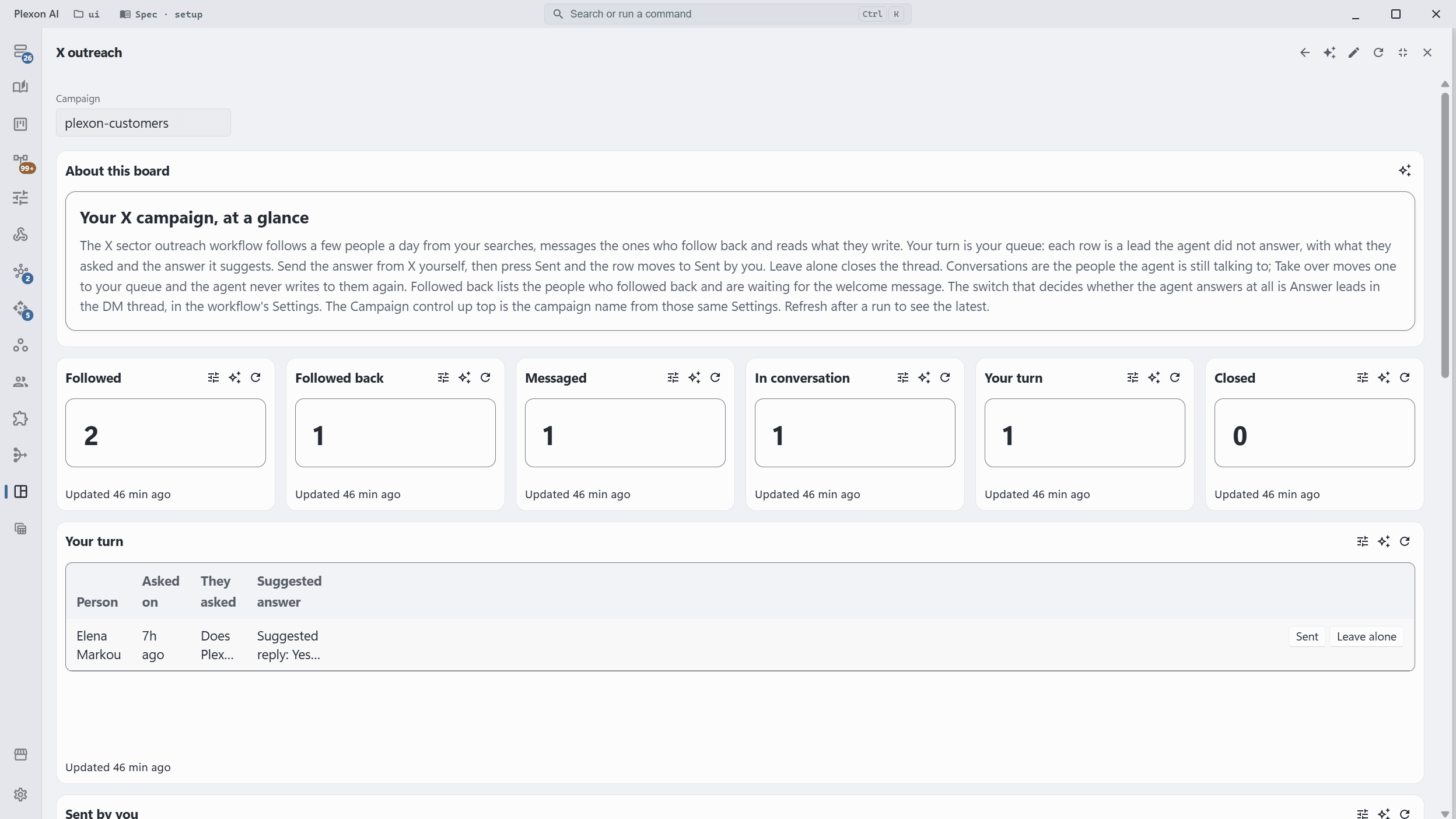
The X outreach board reads the same campaign record. It is where a lead the workflow must not answer waits for you, with the reply it would have sent.
- Your turn: every lead handed to you, what they asked, and the suggested answer. Press Sent once you have sent it from X, or Leave alone to close the thread
- Conversations: every open thread, with a Take over button that stops the agent answering that person for good
- Followed back, and the whole campaign below
- One parameter, the campaign name. Keep it equal to the workflow's
A browser window nobody has to watch
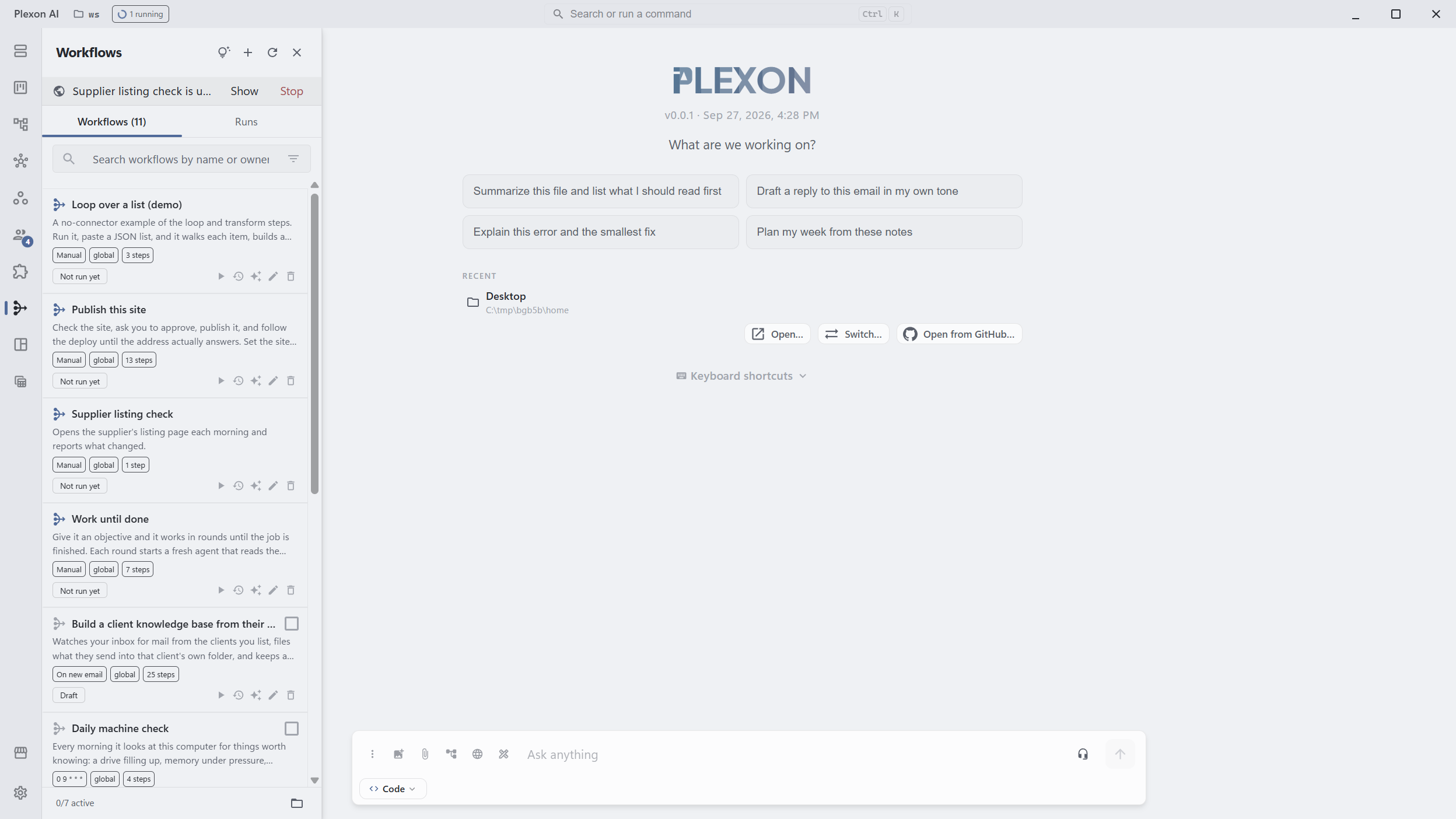
The run opens its own browser window, hidden and kept out of the taskbar. It uses the same sign-in as the browser panel, so sign in to X there once. While it works, a strip in the Workflows panel names the workflow, with Show and Stop.
- Show brings the window to the front, with the page it is on
- Stop cancels the run and closes the window at once
- The tray menu has the same two items while a run is using the window
- Closing the window hides it; the run carries on
- The window closes by itself when the step ends
Where it runs
On this computer the app has to be running, open or in the tray. A Plexon Nous box on your home network is the better home: the workflow runs on the box's own browser from your home address, and this computer can be closed. X challenges sign-ins from addresses it has not seen, so that matters here.
- On a Nous box, sign in while the app is connected to the box; the sign-in stays there
- On Nous Cloud the runner's address is a data-center address in another country, which X treats with suspicion. Set a Browser address first, the way the LinkedIn workflow needs one
- The record of who was followed and what was said stays in a file on the machine that runs it
The limits it keeps
X publishes no exact limits and forbids automation. These ceilings are Plexon's own, set conservatively. Settings can lower any of them, and nothing raises one past its ceiling.
- At most 8 follows in any hour, 30 in any 24 hours and 150 in any 7 days, whatever the setting says
- It stops following once 300 follows are still waiting for a follow-back, and carries on as people follow back
- At most 8 likes an hour and 20 a day
- At most 20 first messages in any 24 hours, and 30 answers in existing conversations
- A message goes only to someone who followed back, and never to someone who wrote first
- Every follow, like and message is recorded before the click, so two runs cannot touch the same person
It stops at the first sign of trouble
Nobody is at that window to answer a question, so the run never tries to get past a check. It stops and tells you what it saw.
- X saying you cannot follow more people right now pauses the campaign for a day. A rate limit notice pauses it for two hours
- A sign-in page, a locked account or a challenge pauses the run on a Sign in to X step and shows you the page the browser stopped on. Sign in and approve, and the same run carries on
- A protected account is passed over and never sent a follow request
- Pages outside x.com are refused, and so is any address that is not https
The risk, plainly
X's rules do not allow automating follows and messages. Staying under the limits lowers the chance of a restriction. It does not remove it, and the account at risk is yours. Start with lower numbers than the defaults if you are unsure.
- Its instructions for X's pages were written from the current layout; when X moves a button, runs may skip people until they are updated
- An answer the agent sends is one it wrote from your facts. Read the facts you give it the way you would read a script for a new hire
- The record of who was followed and every message sent stays in a file on the machine that ran it
How It Stays Careful
Four Runs a Weekday
At 10:00, 12:00, 14:00 and 16:00 in your own time zone, each starting at a random minute within half an hour.
Counted Before Every Click
Each follow, like and message is checked against the hour, the day and the week before it goes. A refused one never reaches X.
Messages Only After a Follow Back
A stranger never gets a message. Someone who follows back gets one, and a lead who asks gets an answer built from what you wrote. Prices, calls and demos come to you.
Hidden, One Click Away
The window stays out of sight and out of the taskbar. Show and Stop sit in the Workflows panel and the tray.
No Public Replies
It follows, likes one post and sends private messages. It never replies under anyone's post, never posts and never unfollows.
Your Account, Your Machine
It drives the X you signed in to, from your own computer or your own Nous box. The outreach record is a local file.
Connects to
Nothing here works alone. See the whole map for how the pieces fit together.
What feeds it
Embedded Browser requires this.
You sign in to X once in the browser panel, and the hidden window the steps work in shares that sign-in.
Where it goes
This runs inside Dynamic Workflows.
X outreach is a bundled workflow: an allowance check, a random start, a sweep that messages the people who followed back and reads their replies, and a follow step for the search of the day, with the searches, the texts and the facts it may answer from in Settings.
This renders into Dashboards.
The X outreach board lists the leads waiting for your answer with the reply the agent suggests, every open conversation with a Take over button, and the people who followed back.